
Auto Select Selection Sets
Currently, to select a bone selection set, you click the selection set name and press the select button.
Maybe just clicking the selection set name could automatically select the bones?
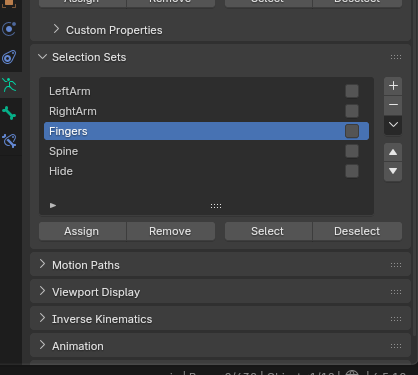
So in the image, I would just click "Fingers" to select the finger bones.
1 Comment
I believe this proposed implemention is not essential... since, there's already a handy solution for 3D Animation Workflow in what regards Selection Sets:
in the Select Menu, on Pose Mode, there is already a Bone Selection Set Sub-Menu (I'm not sure which is the default shortcut, but for me is [ Shift+A ]), leading to a list (or a Context Menu list) of all the already elaborated Selection Sets for the Skeleton. I use the shortcut all the time; can't live without with. That means, any Selection Set can be immediately reached in at least 2 steps, directly from the 3D Viewport Editor (instead of requiring to reach for the Properties Editor, which would be more inclined to manage the elaboration of Selection Sets).