
ICONS TO KNOW WICH NODE WORKS ONLY WITH EEVEE OR CYCLES OR BOTH
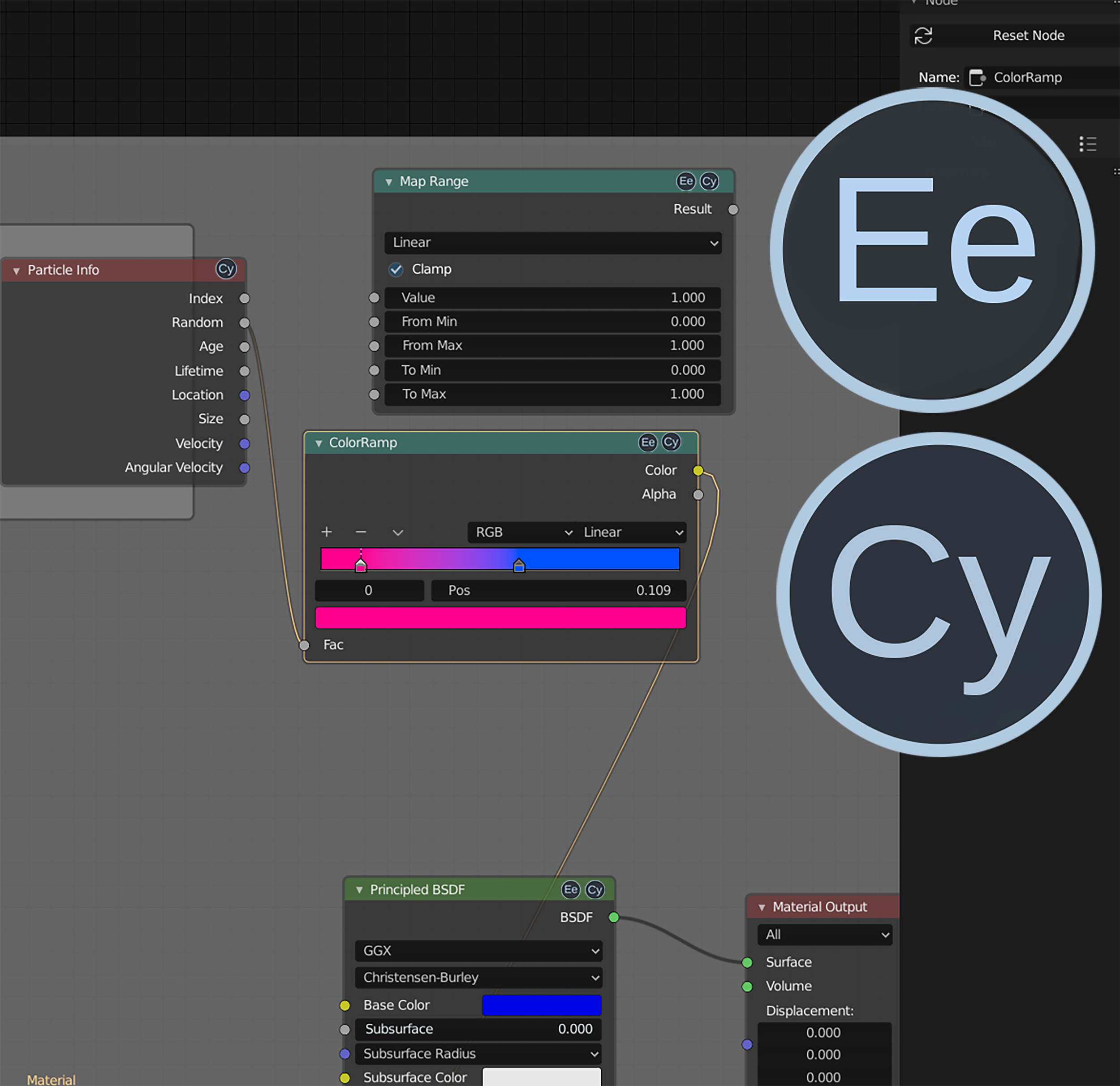
I know it will never get made , but it's just an idea , again for the sake of clarity and interface friendly , i just thought it would be nice to have an icon who tells you wich nodes work only with Eevee or cycles or both ! it could be added on the nodes but also next to the name of the node in the add menu ! if there is already a way to know it , sorry i don't know it yet !
21 Comments
Not that bad of an idea. I'd say: if both are supported, no icon is shown. In case only one engine is supported show its icon.</br> Oh no! now we need icons for eevee and cycles! (better just write the name?)
* @ Lsscpp * yeah sure absolutely , whatever that works ,just something to identify if it works only for one engine ..i'm not an Ui designer xd ,it was just an idea like that !
* @ Lsscpp * I'm torn: yours is cleaner but requires more knowledge to use.
Whereas a "DOES NOT WORK WITH" icon is a lot easier to understand from the get go.
I think DOES NOT WORK WITH is more important and faster to comprehend than a DOES WORK with icon, and acts as an easily understood ** warning** to users.
The OP's included textual-icons work well for me, with a red diagonal bar.
* @jeric_synergy * yeah you're right ,sounds better indeed :)
* @jeric_synergy * it could be a sober "Only Cycles" or "Only Eevee" label
That idea is fine, prolly rename it to something less passive aggressive and cross fingers... Imo it would be the best if instead of an icon there was just a text like "Eevee" or "Cycles" in the head, if it's only for one of the engines
* @ogierm * oh , sorry if it sounds passive agressive ,it was not my intention :) my broken english maybe ^^ yeah a text ,icons , whatever that works
As detailed below, I think the INVERSE of this, ie "Does NOT work with..." would be a better idea.
I'd add an image but y'all are artists: imagine a red diagonal line across the OP's icons.
* @jeric_synergy * yeah that's true the opposite might be a better option , i didn't put a lot of thoughts to it ,if it would get made ,it surely would need more investigation to make the clearer thing possible :)
There is a maniphest in the UI paper cuts that tackle this topic already : developer.blender.org/T63078
Really like the idea, specially for external render engines.
Pex. LuxCore has some nodes that can be translated when using cycles shaders, and I think it could help new users to easily find out the reason the shader isn't working properly because of compatibility issues rather than the users' own fault.
Specially if developers can add their own icon to the already existing nodes
* @saisua * yeah , i've seen myself wasting time ,looking for some issues in the settings and parameters for in the end finding out that " ohhh it doesn't work with this engine " ("sigh intensify " )
* @kaerobattossai * I mean the title of the post is literally in caps, no one is going to take that serious
* @ogierm * i don't see why it matters if the title is written in caps or not ..but i 'll keep that in mind ;)
put in the list all the nodes, being in cycles or in eevee, but visually deactivated from the list those that are not compatible with that render engine.
* @Salvador Garcia * yeah !great idea !
The problem, that some nodes partially supports Eevee. Can you suggest markers in such case ?
But core idea is nice.
* @ Vyacheslav * ha ! :) i didn't think about that ,maybe half of the icon greyed out or something , i don't know xd
* @ Vyacheslav * , icons are fun to design, so have at it.
My suggestion for "Partial Support" is the OP's textual icons PLUS a half-circle outline on the bottom of the icon. "Glass half-full" kinda.
* @jeric_synergy * and it will not help to know what outputs supported by eevee. So my suggestion is to add tip with list and marks (what supports what)
* @ Vyacheslav * good documentation is always desirable. If it pops up when you need it, even better.