← All ideas21 Jun 2018RegnasOpenGeneralUser InterfaceRegnasAndySellersBlenderonDraiseFacuIIIFGIIIJosephbburgLexi4ShimoonTheRedWaxPoliceVupliDertsYury_Ziankoyuskialan.zirpolibillyjonsmithbnzsfabian12graehugrinsegoldlsscppmatagonzalezricardomistajollynavarroblayaromanvolgushev4565salvadorsimonstoschuslykdrakotesturethinkingpolygonsthomasnortonvertexsupawilBrwouterstomp
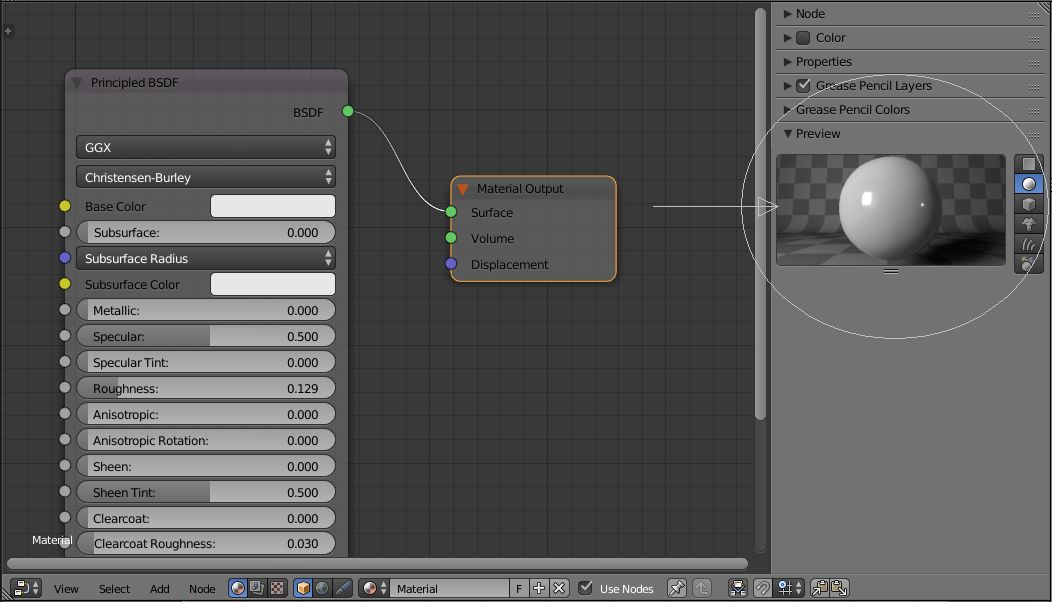
Material preview in the Node (Shader) Editor panel
The image says everything...
Would be handy!
86.1%
Development Status:
Open
Upvote31Downvote5
R
Regnas
21 Jun 2018
4 Comments
f
fabian12
I would like to see them as part of the nodes (of course with toggles to turn only the needed ones on), see 3dsmax or XSI. It would be a big productivity help to be able to quickly see the nodes effects, image thumbnails etc. Especially when you didn't set up the shader network. Also there is a difference between small scenes and working with production scenes that are hundreds of gigabytes of textures and geometry. Launching a full render to bang out a bunch of materials or to tweak some shader settings is a really good way of being very unproductive.
N
Nizar
i think the comments before mine are logic, computer nowadays are fast enough for having a fast preview of our scene. i also never used it because i don't find it that useful, you can"t control the light nor the max samples
r
rob
Shaderballs are from an era where computers were not fast enough for instant feedback.
I've worked with a lot of 3D apps, and never really touched them, or turned them off.
Almost never it shows the final result on the model itself, and makes it hard to work with.
Make use of the instant feedback of Eevee or Cycles, makes much more sense ;)
s
sreenivas
@rob:
Absolutely! You are right on! Apart from that, having these is adding more processing work to blender. But, I don't understand why there are so many up votes. If someone can add what we are missing here!

4 Comments
I would like to see them as part of the nodes (of course with toggles to turn only the needed ones on), see 3dsmax or XSI. It would be a big productivity help to be able to quickly see the nodes effects, image thumbnails etc. Especially when you didn't set up the shader network. Also there is a difference between small scenes and working with production scenes that are hundreds of gigabytes of textures and geometry. Launching a full render to bang out a bunch of materials or to tweak some shader settings is a really good way of being very unproductive.
i think the comments before mine are logic, computer nowadays are fast enough for having a fast preview of our scene. i also never used it because i don't find it that useful, you can"t control the light nor the max samples
Shaderballs are from an era where computers were not fast enough for instant feedback. I've worked with a lot of 3D apps, and never really touched them, or turned them off. Almost never it shows the final result on the model itself, and makes it hard to work with. Make use of the instant feedback of Eevee or Cycles, makes much more sense ;)
@rob: Absolutely! You are right on! Apart from that, having these is adding more processing work to blender. But, I don't understand why there are so many up votes. If someone can add what we are missing here!