
Move Hierarchy to another Collection
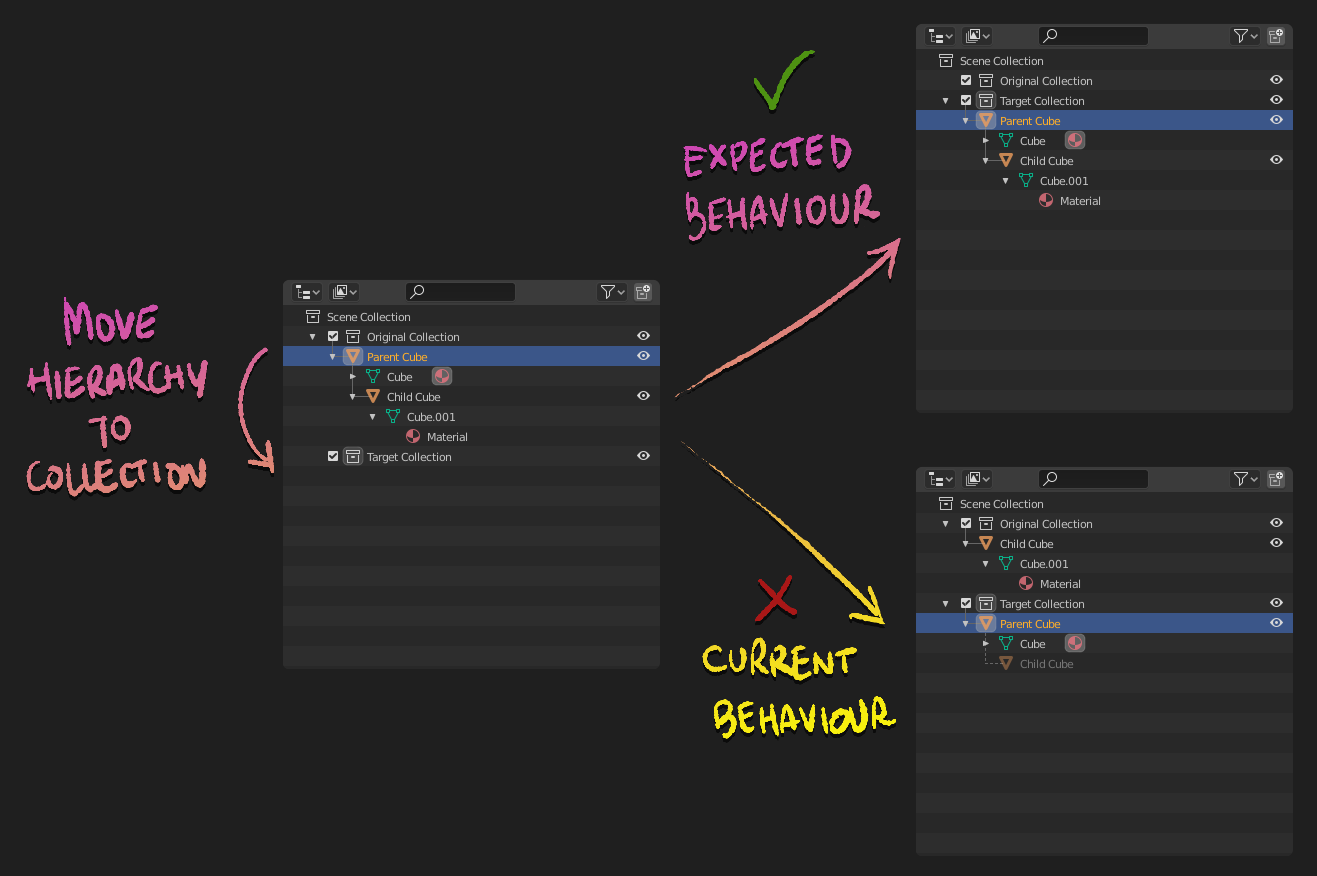
Current behaviour of the outliner, determines that moving a Parent object of a hierarchy of objects to another Collection just moves the parent object and not the childs. Child objects will remain in the previous collection and will exists at the same time as Children of the Parent Object (greyed out).
This is, by all means, counterintuitive, and forces the user to: Select Parent Object > Right Click > Select Hierarchy > Drag & Drop to another collection , in order to achieve the expected results of any other software (at least it would be nice to Alt + Click to select the hierarchy, but no)
I propose, that moving a Parent object to another Collection will move all its childred at the same time even if these are not selected. If you want to achieve the previous behaviour, you will need to drag the child object into the previous collection manually.
These actually rises another question that go against some of the principles of the Collections design:
- Should a Child Object belong to a Collection? Isn't it part of the "Parent Object" hierarchy?
- Should the Collection of Child Object be an inherited property from the Parent Object ?
- What are the benefits of an object being in several Collections at the same time? Is this really being used? Maybe some of your experiences may help in the comments! :)
18 Comments
I'm a new-ish Blender user so I might be missing some obvious points, but this looks to me like a side effect of the real problem, which is the lack of a more obvious and intuitive grouping system, proposed here 3 years ago: blender.community/c/rightclickselect/Rcbbbc/
The problem you describe with the Outliner is also valid for the Viewport: if you wanna copy an object with children, for instance, you first have to select the parent, then do a Shift+G>Children ( and click Extend in the popup), otherwise it just copies the parent alone. If we had one more abstraction layer like Containers, we could leave the current system as is and still accomplish the desired outcome you're talking about (move/copy everything within a hierarchy without going through cumbersome menus and shortcuts every time).
Coming from SketchUp, the current system feels so, so unintuitive and tiresome to me, and honestly, it's one of two primary reasons (the other being lack of precision snapping and drafting tools--which is being worked on!) I just can't switch over completely (which I would love to do).
* @Faruk Ahmet * AMEN
Totally agree from a UX perspective the hierarchy should move together. This is a real issue in complicated scenes. Thanks for pointing this out.
Just saw this post and thought i'd mention it still a giant frustration. I just had to manually reassign 70 objects manually back into their respective collections because ??? I hope they eventually fix this parenting/collection system. This really isn't sustainable.
Outliner proplem for beginner Nr.1
That is the most stupid situation in blender and they can`t fix that. Outliner moving and parenting objects is the worst thing of all 3d apps
Yes, yes, and yes. The disjointed children really can get messy quickly and adds extra steps to organizing. A modal hotkey to only move active instead of hierarchy would work around this, make hierarchy go first.
I'm one of the weirdos who uses the functionality of having objects in multiple collections. Perhaps a special key could be pressed while doing the drag-and-drop that also moves all children to the new collection (as a stopgap solution).
I would love to have this, I just spent an hour trying to figure out what was going on with these duplicated greyed out objects in the outliner, I couldn't figure out why linking them to a new file wasn't working. The current default behavior feels like it should be the exceptional case not the default case.
Hi, this has been implemented now in 5.3: projects.blender.org/blender/blender/pulls/156916
I support a change of this nature. Coming from Maya, I find it incredibly frustrating trying to organize my files into collections as though I were moving folders containing data, then either all or some of the hierarchy have not moved or, as you show here, I have the same data doubled in the Outliner. I don't know what it means, how to change where it is reflected, or consistently what my outcomes are going to be.
i'm using blender more than a year now and i still dont understand what is going on when you move object to a different collection and the object doubles left grey copy in the previous collection. I figured out that i should manually CLEAR PARENT every mesh (you cant select them all and do it once) and i have around 50 meshes. Why cant it be just like layers in photoshop or modo or any other software available in the market
Blender please fix it!
Will close this thread :)
How this is not implemented yet? Also copy and paste in the viewport should have the same behavior, why would I want to copy a parent and not the child objects?
Totally agreed. It's totally unintuitive. And needs users to remember of making unnecesary clicks (right click - select hierarchy).
I'm torn on this... not being able to move individual objects of a hierarchy in Maya to different view layer was really irritating. It's visibility vs hierarchy and the two work in the same panel in Blender - I guess this is the real problem. Those two should have their own display mode.
you can move hierarchy to new collection without any problem.
* @dniitall * That's already addressed in the post and in the comments; you can do anything if you don't mind doing it in multiple steps, the issue is ease of use and intuitiveness. Also, if there are hidden objects inside a collection, for instance, you have to first unhide them for your method to do what is desired here, which further complicates things.