
Bone posing improvement.
In crowded scenes, i find armatures very distracting if you try to animate. One would like to see the whole scene and the effect of the pose adjustments. One would not like to see 60 bones or so and scene behind it. Hiding other figure armatures is not a great work around.
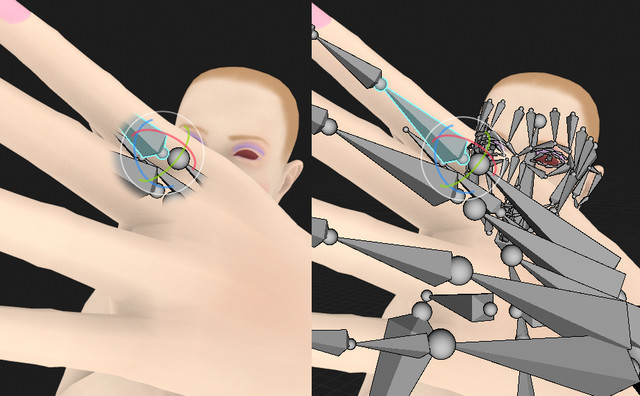
So i propose a new solution, have an Xray Visor around the mouse pointer (scroll wheel size of visor) and only in this area show the bones.
It might also perhaps be possible to do this for the nearest armature (so you dont get distract by figures in the background either.
In more General such a visor view might be helpfull in other areas as well, like sculpting or mesh edit modes. (then see only verticles of the area but show unmeshed figures elsewhere.
The visor could be just a bit larger as the Gizmo size and show only nearby bones. i tried to visualize that below :
8 Comments
I think that Face-Maps will solve this, theyre being worked into 2.8 right now from what I understand. Take a look at youtube.com/watch -- this will be a better solution.
Like akeytsu does, but with decent performance.
youtube.com/watch
* @Josephbburg * Not so sure as bones not always have a direct mesh relation. (ea bones on top of each). I worked with some complex bone systems and drivers where i dont think it would work. (for basic armatures i can see this working though).
Brilliant idea.
That's actually a smart idea ,but what * @Josephbburg * is showing ,IS EVEN BETTER way way better ,it just hides bones that are kinda probably good to use only on Things without a FaceMap binding (for example like a socket or Inverse Kinematic bones)
Scroll wheel is already used though.
* @-L0Lock- * Well it could be some slider too somewhere in the viewport.
Interesting idea