
User-friendly working 2D views
when we are in 2D views (Top, front, left, right, bottom, back), blender should snap to two axis (like when we are in top view it should ignore snapping to Z axis, similarly for front view, it should ignore Y axis).
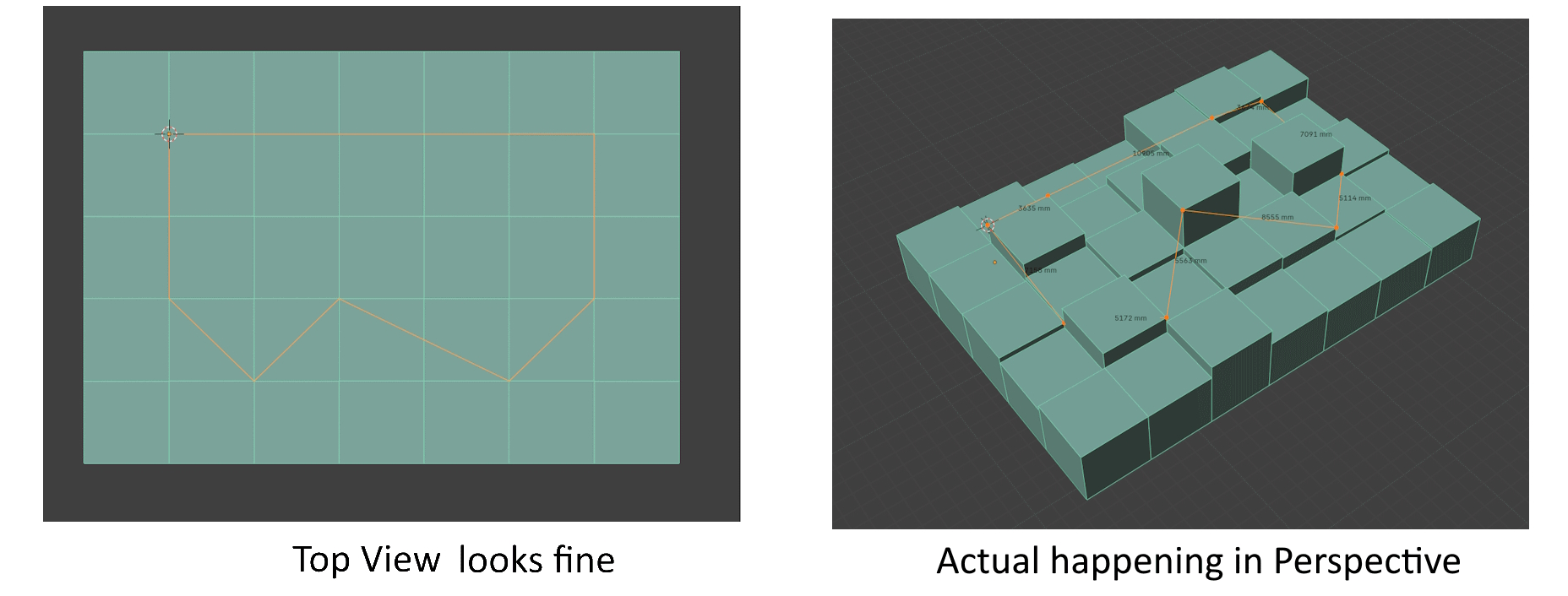 I come from archviz background and in 3ds max it is called as 2.5D snapping and it is very useful to do work using this way otherwise when we do extrusion of edges in top view, they are mis-aligned and sometime snap to bottom and sometime top of any object.
Another thing is to automatically switch to "View" transform orientation because there is no need of third axis in 2D views. we don't have to remember whether it is X axis or Y axis while moving.
it may sound a little but it will faster the workflow a lot because if the object is only hard surface we sometime confuse to remember whether it is X or Y axis.
5 Comments
I dissagreen on that, I often need snapping in all axis and local transform in "2D" views.
When I place objects on a landscape form the top of a terrain, I want them to snap to the ground. I often need some objects local Z axis when I'm in a top or side view.
But some permanent axis locks might be helpfull
I suggested a toggle based setting, not a permanent one.
Yes, I wanted to say that, I just meant toggle based and not by pressing shift + Axis-Key every time. I mean something like the mirror transform buttons
some people can say we can just scale the object in Z by 0 but it is another unnecessary step.
That only applies if the starting Z scale was Zero, and needs to stay Zero.