
A visual indicator that a bone or object is transformed but not keyframed in the 3D viewport
When a property has keyframes on it:
- When the current frame is on the same position as the keyframe, the property background is yellow.
- When the current frame is not on the same position as the keyframe, the property background is green
- When the property is changed but a keyframe hasn't yet been placed, the property background is orange.
It's a very good quality of life feature in the various editors, but unfortunately there is no equivalent with objects and bones in the 3D viewport. So I would like to propose to apply points 1 and 3 (maybe only 3?) from above onto bones and potentially objects in the 3D viewport.
I am not exactly sure how this should be handled but this is what i propose:
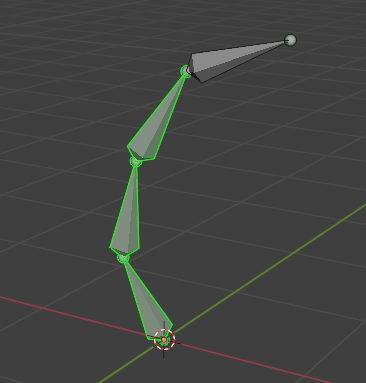
- When a bone is keyframed and the current frame is the same position as the keyframe, the object/bone gets a green outline ., similar to the selection outline.
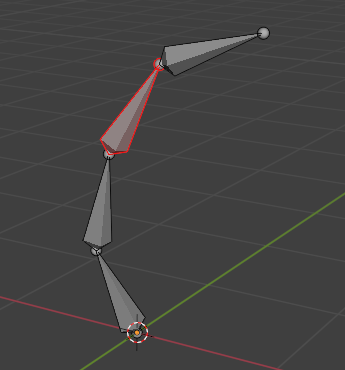
- When an object/boneis transformed and not keyframed, it gets a red outline , this obviously has higher priority than the green outline.
- Object outlines are always visible when in object mode . Bone outlines are always visible when in pose mode, but only for the selected armatures . Selection outline will always override the keyframe outline.
I tried to make sure this does not clash with any existing theming, like bone colors (originally i was gonna suggest coloring entire bones but it clashes heavily with existing situations that color bones).
| Bone transformed, with it not yet keyframed, will be lost if you move the current scene frame! | Bone has a keyframe on the current frame. It does not have to be different from the previous keyframe. |
|---|---|
|
|
1 Comment
👍👍👍