
Rig Layer Improvement
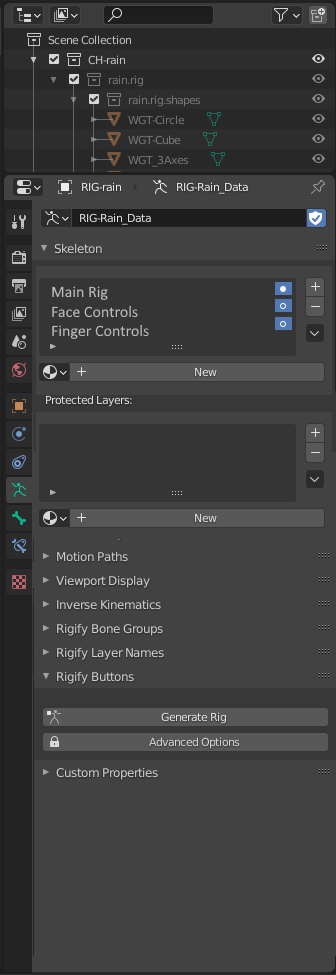
One thing I'm finding to be very discomforting about working in Blender is that the rig Layers section is absolutely horrid when it doesn't need to be. The functionality is fine. I don't have any problem with being able to turn on and off sections of the rig. What I find to be horrible is the way it's laid out when you've gotten it right in so many other ways in the Blender layout. My suggestion involves making the layer sections able to describe the layers , rather than having it where you need to guess or remember which dot controls which layer. I have a mockup of what I'm talking about. You should be able to look at the layer stack without having to guess what is what.
4 Comments
There is an add-on called bone layer manager that can kinda do the job for you but having a built-in way to hide/unhide bones, assigning names to bone layers, allow bones to exist in multiple layers and disable selectability of a layer of bones is a must.
This area really needs a huge re-bump to be more user friendly/open... the addon "bone layer manager" does a great job but I think those features should be in Blender without any addon.
If the Bone Layer Manager or something along those lines could be implemented into the default UI it would be a huge workflow improvement. The clunky DOT layer interface needs to go away.
Yes yes yes yes yes please. Also, the limit of layers is extremely unsatisfactory, nonetheless hard to use without labels and auto colour assignment.