
Real Time Eevee: "1 Sample Renders"
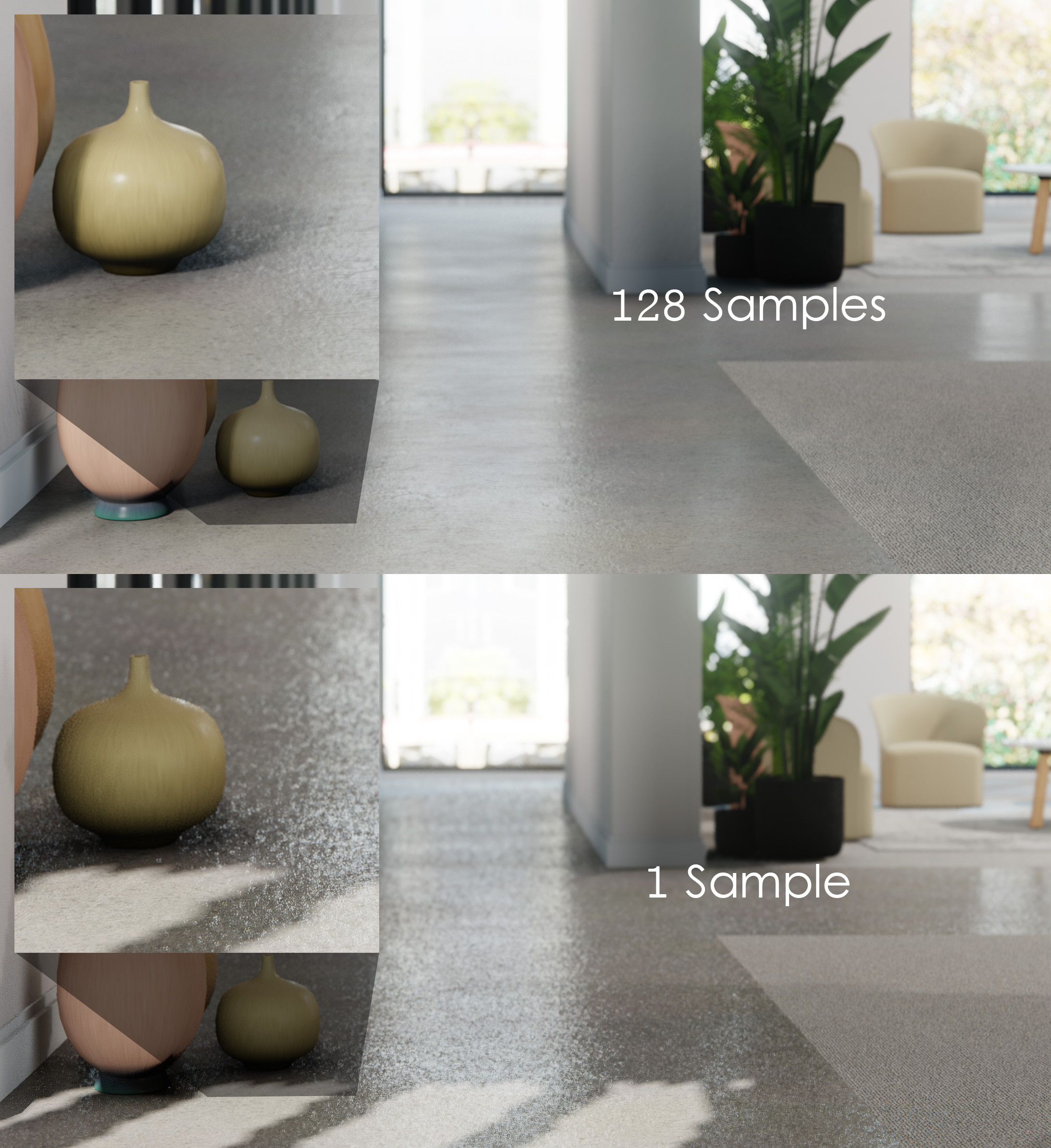
An investigation of techniques to achieve a goal:
Eevee renders that still look great with 1 sample. Not as great as 128 samples, but still great.
Why?
Eevee is often described as a real time engine, using "game engine-like" techniques to create 3D graphics faster than Cycles.
Cycles is for final, high quality, ultra realistic renders, that can take a long time to complete. With perfect quality reflections, subsurface scattering and more.
Eevee is for much faster renders, and interactivity, as Eevee is also what we use for previews in the viewport.
Eevee is fast, and incredible, a joy to work with.
But right now, the description "Real time" is a tad generous, when for example, in the above render, the 128 sample image took 2 minutes to render on my PC.
Why "1 Sample Renders"?
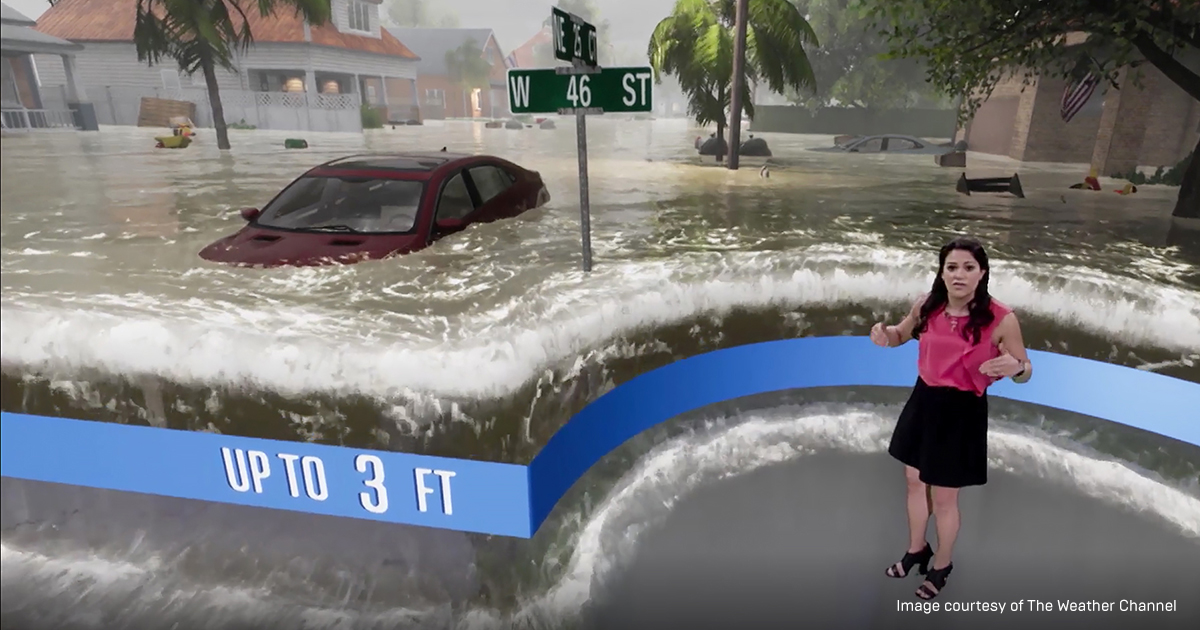
What if a 1 sample render from Eevee could still look great?
Not as great as a 128 sample render, but still great?
A 1 sample render can render much faster than a 128 sample render.
About 128x faster in fact. Leaving open the door to some fantastic possibilities..
What if Eevee could render great results at 30fps? Or even 60fps?
The possibilities would be huge, Eevee could be used for live real time 3D rendering/compositing of scenes combining live footage and 3D graphics. Such as compositing a green screened news presenter onto a 3D illustration for a news segment.
Test renders could be significantly faster and final quality animations could use much fewer samples to achieve results comparable to what we have today.
But first, why did that render take 2 minutes?
Besides the fact that my PC sucks?
Because in order to achieve a nice final quality render, the image required 128 samples. With less than that, the noise was too visible.
Comparison below of 128 samples (above) vs 1 sample (below).
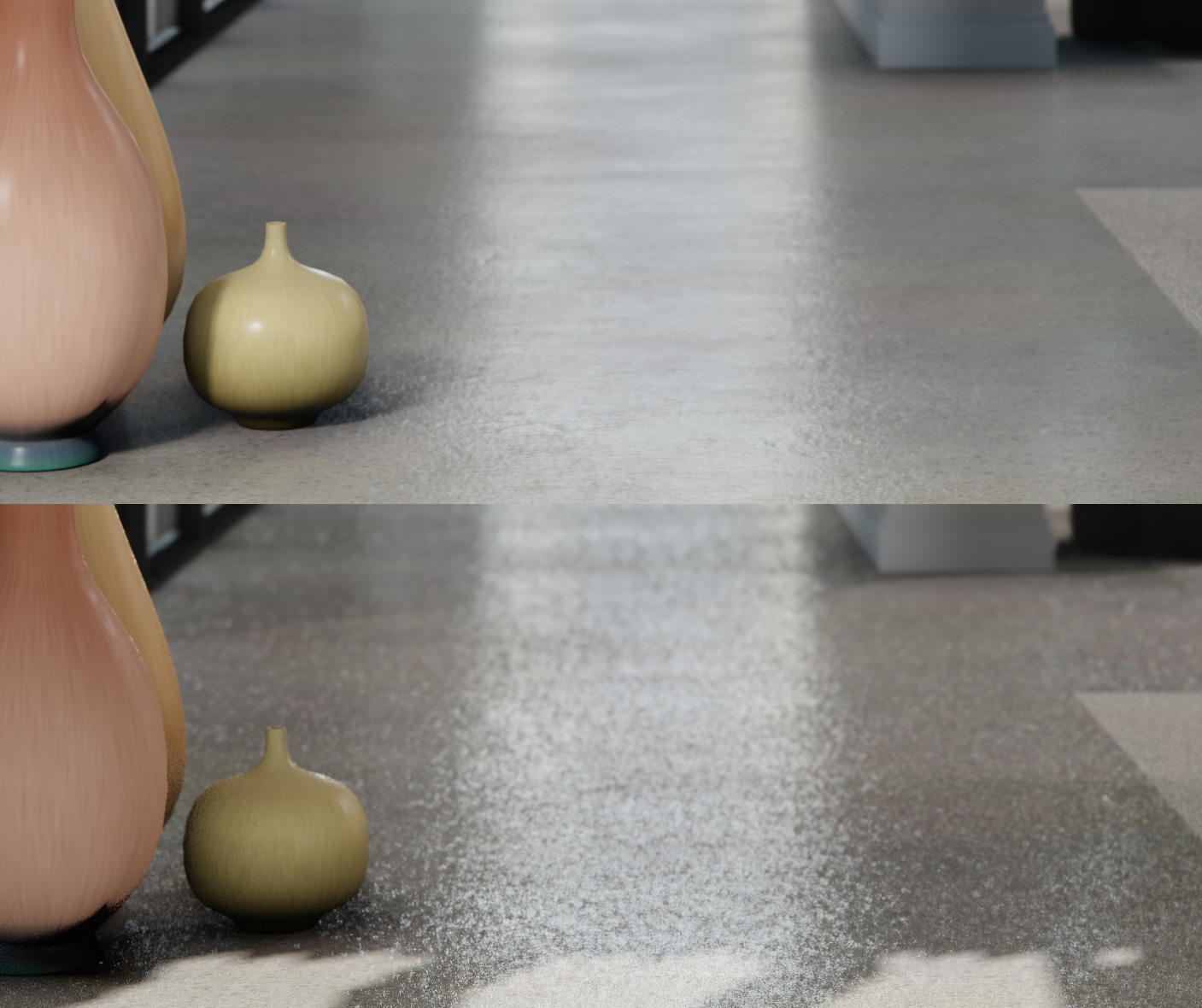
Eevee relies on samples to achieve a nice result.
Each sample refines:
- Antialiasing
- Screenspace ambient occlusion
- Screenspace reflection & refraction raymarching
- Reflection & refraction roughness
- Soft shadows
- Subsurface scattering
- etc
Eevee is often described as using techniques 'like a game engine', but game engines do not rely on super sampling to refine the quality of their visual effects.
A game engine has to achieve a nice result at least 60fps on consumer PCs and does so by using approximations and cutting corners.
I can't say for sure just how many changes to Eevee would be required to achieve "60fps" level of performance.
But I know for sure, at the very least, for Eevee to possibly reach speeds of 60 frames per second, it must to be possible to produce nice quality images with 1 sample.
1 Sample Renders - How?
I don't believe the existing rendering techniques from Eevee should be removed, or altered, but I do believe they could have additional options to fine tune their appearance when rendering with 1 sample.
This proposal requests Eevee developers investigate possible methods of achieving this goal, but also, offers some suggestions:
Smart Blur Filters
Applicable to many effects, such as SSAO, SSR, SSS, and so on. Smart blur filters blur an image intelligently, blurring values between locations of an image with similar depth and normals. This kind of filter is commonly paired with SSAO and SSR in most game engines.
Per Effect Per Pixel Sample Rates
Many effects performed by Eevee already offer the option to choose the number of samples performed per pixel per sample, such as Volumetric Lighting and Volumetric Shadows.
I propose this approach be extended to all effects.
Screenspace effects such as SSAO are relatively cheap. It would be far faster to simply perform more SSAO samples per pixel, than to re-render an entire scene again to achieve the same outcome.
This logic could be applied to many effects, such as SSAO, SSR, etc.
This approach also allows for users to fine tune the render performance of a scene at any sample rate.
Approximate SSR Roughness
SSR roughness is an effect that could be approximated at 1 sample.
Rather than randomising the ray direction, the regular SSR output could be smart-blurred by a factor that approximates roughness per pixel.
This could be achieved with a slider that increases the amount of smart-blur gradually, with 1.0 designed for 1 sample per pixel renders.
A slider would allow for fine tuning a balance between samples and blurring.
Temporal Sampling
Temporal sampling has become common place in real time engines, as previous frames are effectively "Free samples" in real time applications. Reusing old data from previous frames could allow for cheaper SSAO or SSR samples, or cheap AA.
FXAA
Right now Eevee achieves AA by supersampling. Cheap approximations exist such as FXAA could be relatively easily implemented and offer decent results at 1 sample.
PCSS
PCSS (Percentage Closer Soft Shadowing) is a popular real time technique for achieving soft shadows in real time that has existed for many years, and produces great results, and would be very compatible with Eevee's existing shadow mapping.
Blender in 2.80 did feature soft shadow techniques that were later dumped due to their short comings. A 1 sample soft shadow technique would be welcomed back by many users, PCSS could perform much better than the previous techniques used.
PCSS Explained: gamedev.net/tutorials/programming/graphics/effect-area-light-shadows-part-1-pcss-r4971/
SRAA
One of my favourite techniques that was forgotten to the dustbins of time is SRAA (Subpixel Reconstruction Anti Aliasing), which would be compatible with Eevee's incoming rewrite and produce MSAA-like quality. The technique was once employed by Frostbite.
In short, the technique attempts to approximate MSAA, by rendering a regular 1x sample of shading, paired with a supersampled depth and (optional) normal buffer information. The results were impressive.
Paper: research.nvidia.com/sites/default/files/pubs/2011-02_Subpixel-Reconstruction-Antialiasing/I3D11.pdf
Try it today!
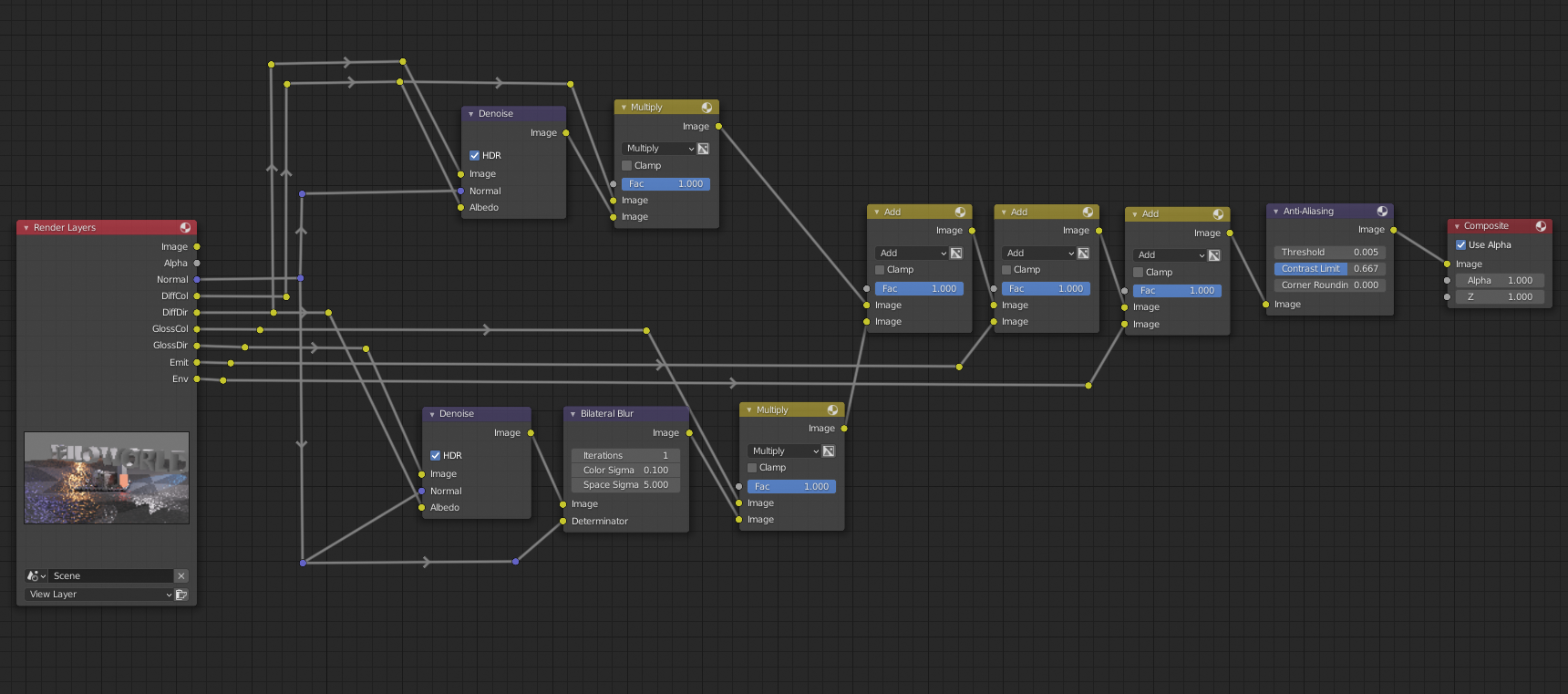
It's possible to try some of these ideas today using the compositor with Eevee, by enabling lighting passes and denoising/smart-blurring the result with a post process AA node at the end.
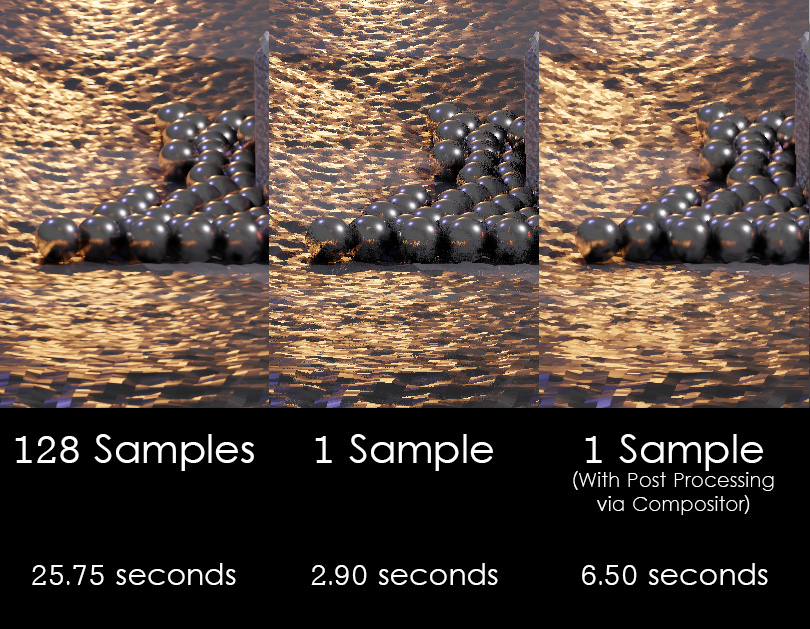
Here are sample examples of the kind of results I was able to achieve with a relatively simple node tree setup.
(Click each image to view it larger.)
Take note of the SSAO noise at the top of the image, and the aliasing around the hard edges.
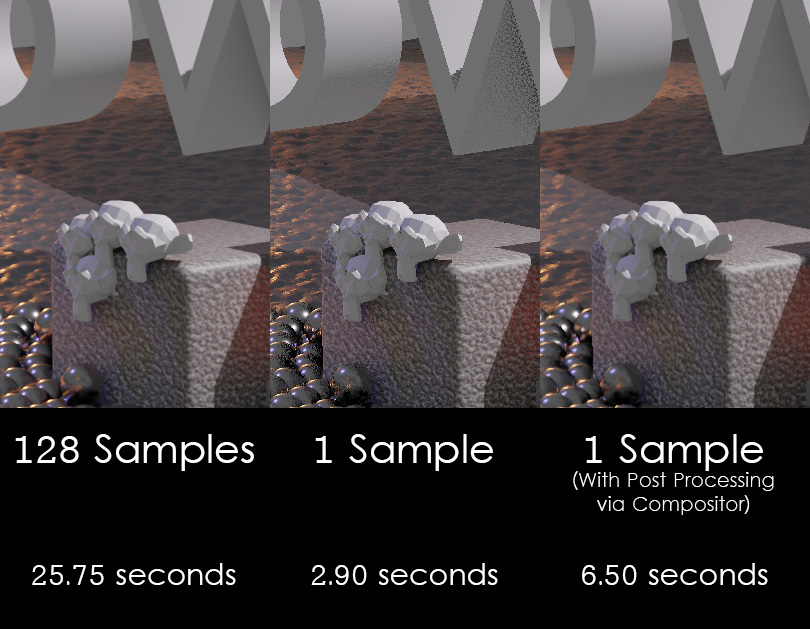
The smart-blurring of the reflections on the chrome balls worked remarkably well.
Node setup was fairly trivial:
5 Comments
The up and coming viewport compositor will make this so possible.
A branch was created fot EEVEE (EEVEE-REWRITE) For improve a lot features like Culling, clustering, refraction, Global illumination etc.... Look Here :
developer.blender.org/project/view/135/
developer.blender.org/T68474
code.blender.org/2021/06/eevees-future/
github.com/blender/blender/tree/eevee-rewrite
And a lot of more features not definied now, still in progress for 3.1
Series 3.X focus on EEVEE / Culling and performance
it's only coming on blender 3.1? :(
I agree, this is needed because even at 128 samples I render a scene in 2 minutes... and still there is noise in some areas that never go away, they need a good denoising built in or those techniques u mentioned, that screenspace tracing noises are really annoying near lamps or reflective areas, instead of compositor solution, we need real solutions for 1 sample rendering like u said. even not 1 sample but 128 sample should be enough quality with those techniques right? I always feel like 256 samples will still wont be enough cuz in animations those noises are so flickery, at least there should be a temporal denoising for those ...
in upbge fork we have a option to render the scene X times (multiple samples per frame) however - I think with MRT we could render 8 samples in 1 shot? maybe