
UI: Win32 Child Windows On Top
developer.blender.org/rB492e64c
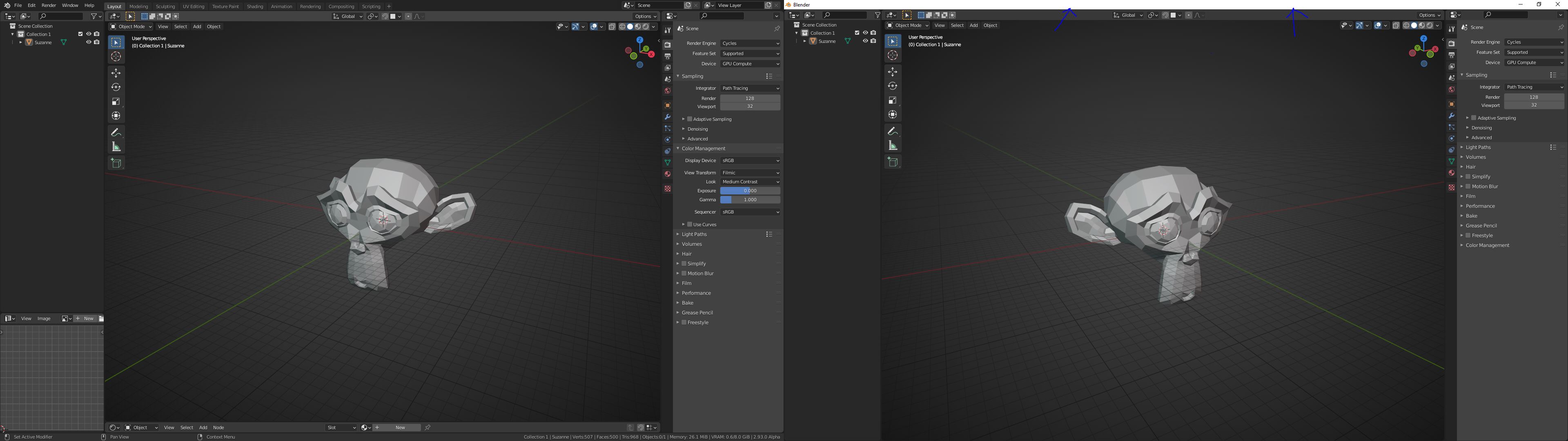
(Unfortunately, I don't know where to post this concern.) I always work with 2 monitors and now I suddenly have this ugly white window topbar. on my 2nd screen. Can you make this as a User preferences setting? Monitor 1 (left) / Monitor 2 (right)
24 Comments
RCS is for feature requests, developer.blender.org is for bug reports.
* @-L0Lock- * This is not a bug. This is a feature.
Ther's two options in Window menu: New Window and New Main Window. Only the second one respects "Toggle Window Fullscreen" setting. Also, to make that white titlebar less ugly, you could change it's color ;)
* @ErminOS * the new main window dont chance automatically the workspace (taps) if i switch between them. In my workflow^^
Don't you can just do "Toggle Windows Fullscreen" (without this Windows bar on top) for each (for each separately) window?
* @IIIFGIII * my keymap is like the 2.79 and i have the default key Alt+F11 . This Option has no funtion now with the new version 2.93alpha (imo)^^
* @glgraffixx * Have no idea what you talking about. What the Alt+F11, function, option, default...
Jut map toggle fullscreen operator to any key you want and just do this operator for each window (click in window to activate it, then press your whatever hotkey).
* @IIIFGIII * yes i know but nothing happened since "harley" changed it. In older version it works all fine ;)
Well, here is my proposal to modernize the title bar: blender.community/c/rightclickselect/7dhbbc/ Without the need to use Fullscreen, which might not be what one may need because you might still want to have access to the taskbar.
My description here is based on Windows because Blender is unusable on Mac for me and I wouldn't use it on Ubuntu GNOME also.
I'm not quite understanding the complaint. The "ugly white" window top bar is what your operating system uses to draw every program's window titlebar that does not currently have focus. Its probably blue or something when you click on it.
The left window is maximized (Window / Toggle FullScreen), while the right window is not. I'm guessing you couldn't do so because you made that window with Window / New Window, rather than Windows / New Main Window. If you do the latter you'd have a menu and can therefore make it fullscreen. When I do so I can have one blender instance with three windows, all fullscreen on each of my monitors.
* @harley * May I add, that also the titlebar of focused "current" window is white by default on Win10. Tho both colors can be changed in registry:
AccentColor/AccentColorInactive. Unfortunately, the titlebar text colors can't be specified (as in Win7/XP) and is calculated automatically, often badly.* @harley * For me it is very important that I can use (New Window (byb.obs.wm.window_new ())). This window is maximized on the right screen. Before you made this change, the command (Toggle Window Fullscreen) also works. I don't want to create a (New Main Window), because with this the workspaces on the right screen do not change automatically. When I switch workspaces to my main monitor. And before you change, never watch the white title bar of Win10. I've been working with 2 screens since Blender 2.60^^ or longer...
* @glgraffixx * It would be helpful, if you could open a bug report, or at least tell - which was the previous Blender build version, that worked as you specified.
I'm now trying this with two monitors (on Win7 tho) with different older 2.92/2.93 builds (from January), and none of them seem capable of changing workspaces automatically for me. I can observe only a little zoom changes and Properties panel flickering. Maybe on W10 this works ¯\ (ツ) /¯ Are you using any plugin for such workspace sync?
Btw, if only the titlebar would be your concern, it can be hidden using utilities like: WinExplorer from nirsoft or Autohotkey script.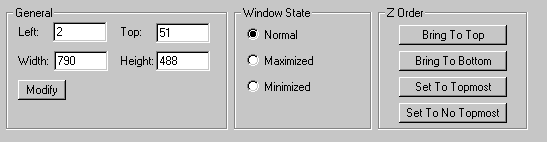
* @ErminOS * This is the last version how it works: version: 2.93.0 Alpha, branch: master, commit date: 2021-01-15 00:04, hash: 10ce2a1016ae, type: Release build date: 2021-01-15, 00:10:38 (I download weekly a new experimental branch)
I dont use a addon for the automatically chance the workspaces (this works only with child window's)^^ i have test two programms to capture my two screens but both recording simple one monitor:/
Hm yes think i made a bug report for the toggle window fullsreen. this is the main problem .... imo. It works only on (main window)
i don't want to use programs that hide the title bar.
* @glgraffixx * Hi, I think it would be better to create a bug report, because @Harley could help you as the author of those changes. Also, you can poke him on blender.chat
(deleted)
* @glgraffixx * So, I was playing with New Main Window and found a way to maximize it, without loosing T-panel and edit-mode synchronization (if that's what you need).
* @ErminOS * sry no thats not what i will.
drive.google.com/file/d/142j9P73N4q_Ylr4FTcHw4o7-9MGum-t1/view
In this video you can see the synchronization between the workspaces. I didn't have to maximize the two windows on one monitor. on the left is the main window and on the right the child window. ok i will report the bug during the day or tomorrow.
* @glgraffixx * Thanks. Now I see what you mean and I was able to recreate desktop setup similar to yours, and I reported the bug.
* @ErminOS * realy cool thx you :) Report: developer.blender.org/T85768
* @glgraffixx * Ok, the bug should be fixed. Please try a fresh daily build.
* @ErminOS * oh very big thanks. it works like before. there is a small but not bad mistake. the child window on the second screen goes black for a tenth of a second when I click the window on one of the two screens to select it as the active window. Unfortunately, I can't film it because my recording programs can only record one screen. when I share blender on a screen like in the first video. the child's window doesn't turn black for a very short time. as I said it's not really bad.
thank you for your good work. :)
Added with this commit developer.blender.org/rB492e64c
* @Zach Hixson * I think that Blender should consider redesigning the UI to remove/merge the title bar altogether as the likes of Photoshop and Chrome.
If the filename should be displayed for example it could be displayed in the lower right corner. I don't really need to see the the current blender version.