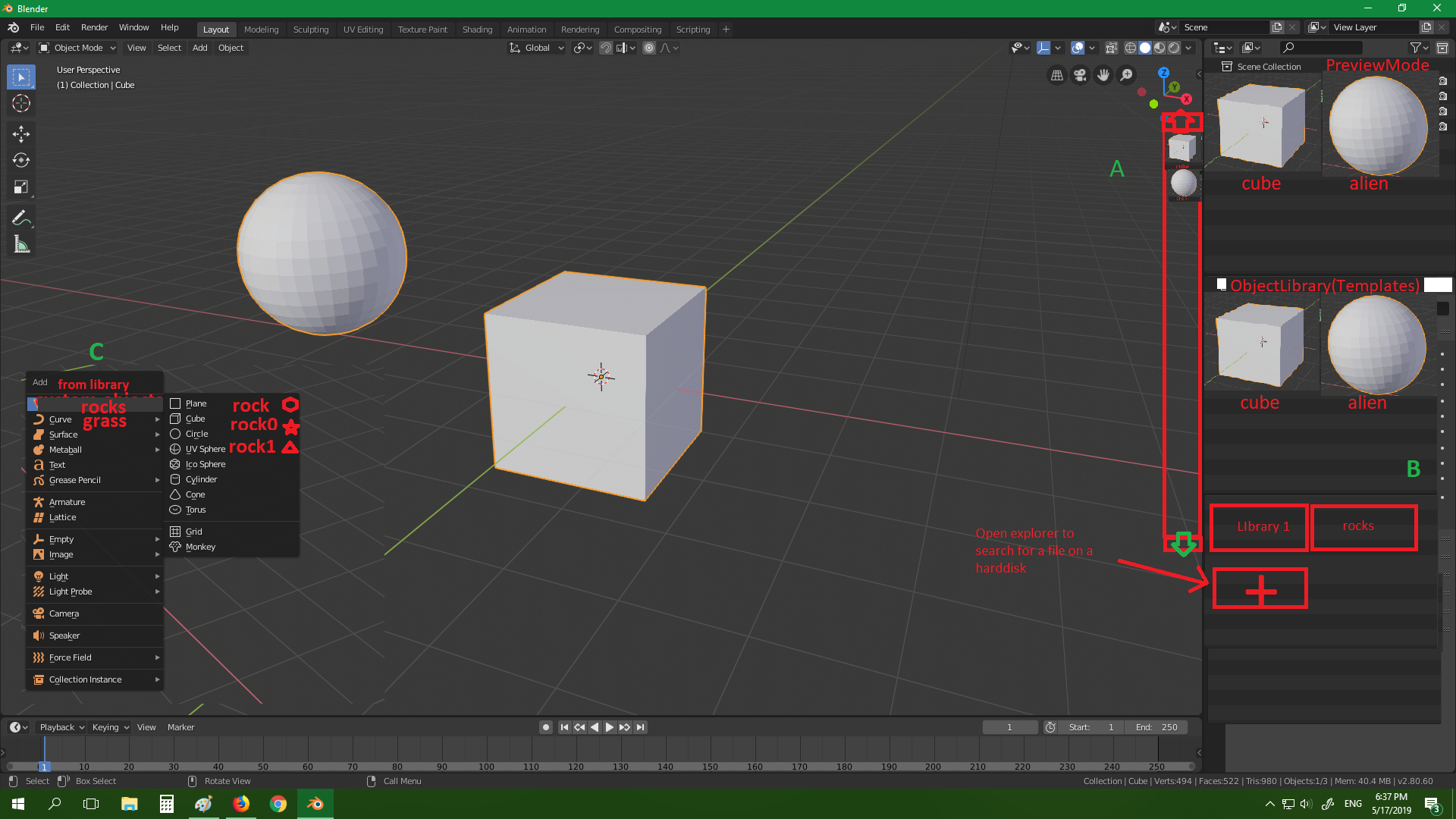
Preview of objects ,Template objects library(A,B):
66.7%
Development Status:
Incomplete
Upvote2Downvote1
s
stefankl96
18 May 2019
4 Comments
j
jason
It may be helpful to provide a bit more explanation that more clearly describes what you're looking for and why you think it would be useful.
2
t
toasto
I like it and I want it. Maybe it would be helpful if you guys to try the Sweet Home 3d (free and open source software). It has a Furniture library that might be you can implemented in Blender. It has drag and drop, snap, small thumbnail that can show more object in a row, search and category.
But in SH3D, you only can add the object to the library by importing from files (obj,dae, etc). In Blender it should be can do "Export Selected Object to the Library".
V
Vyach
Previews are good but…
I see the problem. For complex object small icon will be just a mess. So user should make optional manual preview with good viewpoint.
Colored and thin objects will dissolve into background. And grey models without materials can be very far from you are looking for with your eyes.
So there should be a system of fast preview renders as simple as screenshots or so:
select object/group, select angle of view, click hotkey, drag rectangular frame — render is ready and saved like preview.
Or just select object and press another key. Render will authomatically capture front and right side with grey material and default light.
s
stefankl96Author
|(Maybe this would be useful for everyone)
1.Preview of the object allows the user to easily(faster then looking for name) see the desired object for selection \n
2.If object is too complex then show simplified -reduced version or only low res rendered preview.
3.For e.g unity engine object preview when is imported from blender.
II(Special Idea)
1.e.g I'm making low poly grass block and want to make variations.On some blocks I want to put mushrooms then different shapes of grass,rocks...After that I am creating scene with those blocks which are also in libraries.
2.A)Right click on exsisting object in menu then option add to objectlibrary->selectlibrary or make new or drag and drop to existing library.
3.Idea is like append but is more user friendly.New way to add objects and group it.
4. adding menu (shift+a) shows submenu with objects or special key shortcut e.g shift+q to show menu with object templates
A,B,C are types of interfaces

4 Comments
It may be helpful to provide a bit more explanation that more clearly describes what you're looking for and why you think it would be useful.
I like it and I want it. Maybe it would be helpful if you guys to try the Sweet Home 3d (free and open source software). It has a Furniture library that might be you can implemented in Blender. It has drag and drop, snap, small thumbnail that can show more object in a row, search and category.
But in SH3D, you only can add the object to the library by importing from files (obj,dae, etc). In Blender it should be can do "Export Selected Object to the Library".
Previews are good but… I see the problem. For complex object small icon will be just a mess. So user should make optional manual preview with good viewpoint. Colored and thin objects will dissolve into background. And grey models without materials can be very far from you are looking for with your eyes.
So there should be a system of fast preview renders as simple as screenshots or so: select object/group, select angle of view, click hotkey, drag rectangular frame — render is ready and saved like preview.
Or just select object and press another key. Render will authomatically capture front and right side with grey material and default light.
|(Maybe this would be useful for everyone) 1.Preview of the object allows the user to easily(faster then looking for name) see the desired object for selection \n 2.If object is too complex then show simplified -reduced version or only low res rendered preview. 3.For e.g unity engine object preview when is imported from blender.
II(Special Idea) 1.e.g I'm making low poly grass block and want to make variations.On some blocks I want to put mushrooms then different shapes of grass,rocks...After that I am creating scene with those blocks which are also in libraries. 2.A)Right click on exsisting object in menu then option add to objectlibrary->selectlibrary or make new or drag and drop to existing library. 3.Idea is like append but is more user friendly.New way to add objects and group it. 4. adding menu (shift+a) shows submenu with objects or special key shortcut e.g shift+q to show menu with object templates A,B,C are types of interfaces