
Better Selection & Assigning of Vertex/ Face/ Bone/ Pose/ Material Groups
The new Face Maps/ Face Sets are very exciting stuff. Generalists who have tried to rig reusable characters, weight paint animals, human head parts, make material or color ID map for internal use or Substance, make game-ready clothing with multi material/ physics sub-parts... will find Blender's mesh sub-grouping process super frustrating.
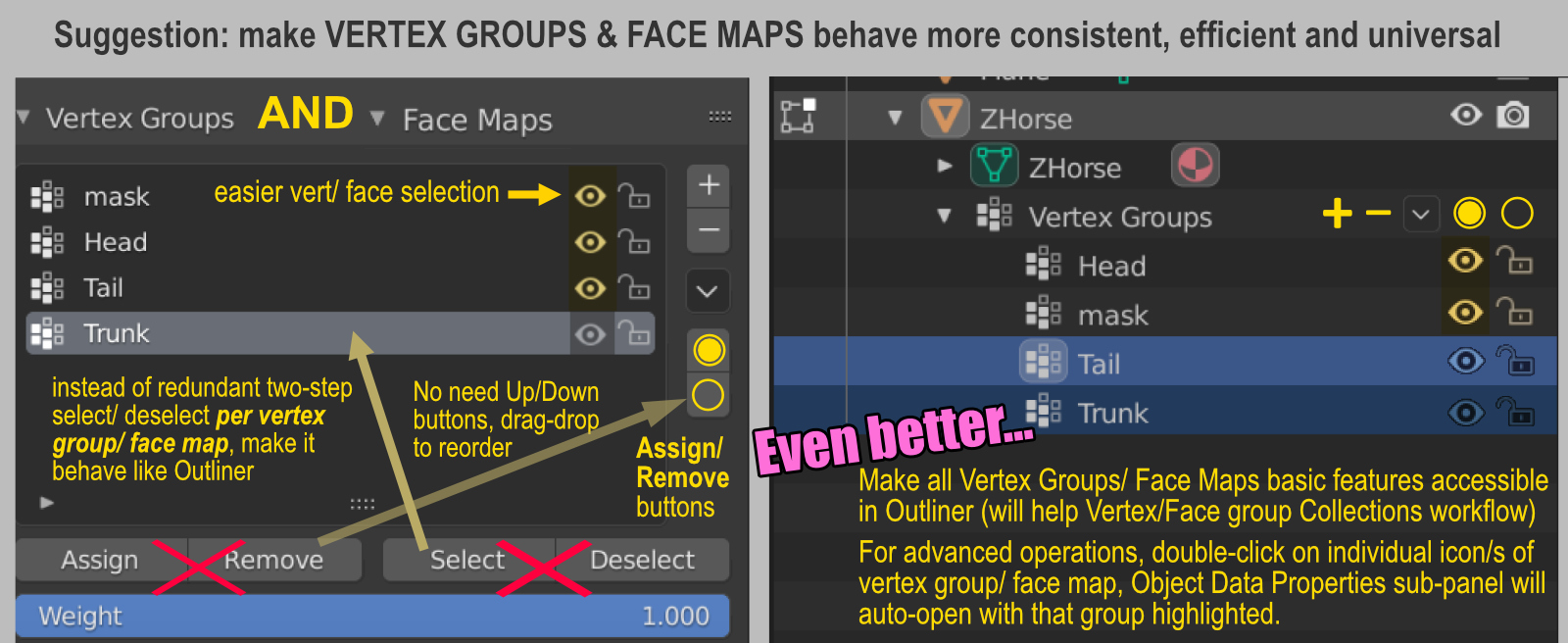
Here's my suggestion to reduce redundant clicks (and reduce confusion of new seasoned users) by 80%, in creating/ joining/ adding/ subtracting/ multi-selecting Vertex Groups or Face Maps.
Synchronizing Outliner>Mesh Object with Object Data Properties tab's Vertex Groups, Face Maps (and maybe even Vertex Color Groups) will be AWESOME. And will make a lot of sense too!
3 Comments
In case Blender devs are listening....
For the sake of 80% needless clicks reduction, and consistency: apply the same change across the board to the same dated sunken panels of Pose Library, Shape Library, Bone Groups, Materials...
It's beyond absurd that we need to select-click a pose (to find that NOTHING HAPPENS), then press Select button to re-select that already-highlighted pose, is just...hair pulling... This is before the next level madness of multi-selecting stuff inside tiny stingy little sunken panels that behave like 1994 CG tools.
I do realize Pose Library and Materials will soon be done in Asset Browser, which is GOOD NEWS THANK YOU THANK YOU, so please, retire these totally-anti-intuitive sunken panels and make them behave like Outliner.
Also addition of edge group would be nice
ctrl+click on the eye icon to add a mask modifier with selected vertex group as an inverted mask