
mouse wheel control in XYZ with Ctrl/Shift-clip/sidewheel on MX 3
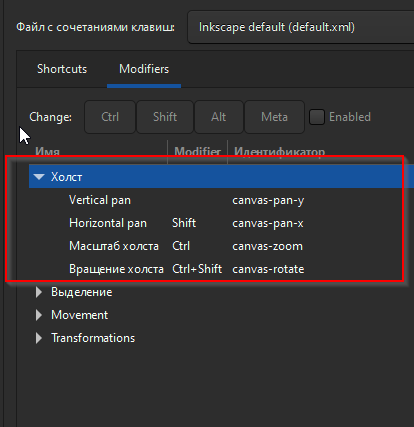 Hey! Thank you for the developed program. I would like to provide feedback and ask about adding features to the control. I use the vector program Inkscape more often. It is 2D, but there is a convenient system for moving the view camera using the scroll wheel on the mouse. In your program, you can only zoom in and out of the camera in the scene or nodes. I would like to ask you to add to the program the ability to move the camera left and right using the mouse wheel (for example, by pressing the Shift key and rotating the wheel), as well as move the camera up or down with the Ctrl clamp - move the camera up and down. (or assign a spin around the mesh's orbit) In addition, there are mice with extra wheels. For example, MX Master 3. I would like to be able to use the side wheels (set to something else, turn on reverse) for lateral camera shift. What is more convenient? move the camera in Nodes with middle-click or pane-scroll even with Ctrl/Shift-clip/sidewheel on MX 3? Thank you for your work.
You can add here "rotation" (scroll)
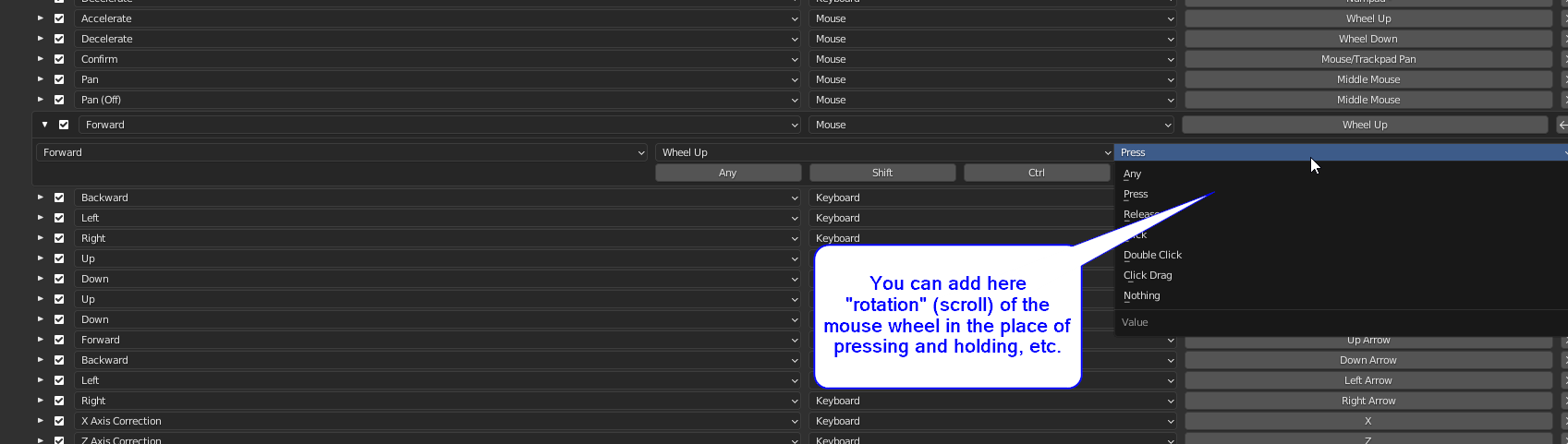 of the mouse wheel in the place of pressing and holding, etc.
7 Comments
I agree Blender should be changed so we can zoom in and out when copying stuff as well. Allowing shift to change the axis lock (push middle button now) would allow us to finally zoom in and out as well as pan when duplicating and then also set scroll wheels to different settings. It would make working with Blender heaps easier. Most of us have scroll wheels but they just get disabled now which is a bit sad.
please like this post!!!
Horizontal scroll is not working on Windows yet, you can track progress here T72123 (but be patient, its Low priority :p)
Meanwhile set scroll in LogiOptions to some keyboard shortcut and map in in blender:
You could describe in more detail your proposal for the purpose of buttons and how to use it. I tried to assign this count to the wheel and nothing works. how should it work?
По поводу горизонтальноф прокрутки, то в инскейп горизонтальная прокрутка работает и средним колесиком мышкис вариантом контрл/шифт. списки прокручиваются. хотелось бы чтоб работало не только на М Икс 3. чтоб не зажимать кнопку шифт( с перетаскиванием мышки), а зажать контрл или шифт и крутануть колёсико и сдвинуть камеру куда надо. А к примеру с зажимом кнопки альт и вращением колёсика - сделать ротейт.
Its not proposal, i also want correctly implemented horizontal scroll in Blender.
the workaround is that Logi allows you to set horizontal scroll to act like keyboard press in selected program. So You can set it to eg "[" and "]" or some other key that You dont use and create shortcuts. Thats not ideal and it does not work corretly, but at least it works somehow until there will be correct implementation.
Thank you. I missed the [ ] keys. I'll try like this Please give a like to the post. To draw attention...