
Support Multilayer EXR images in Shader and GNodes
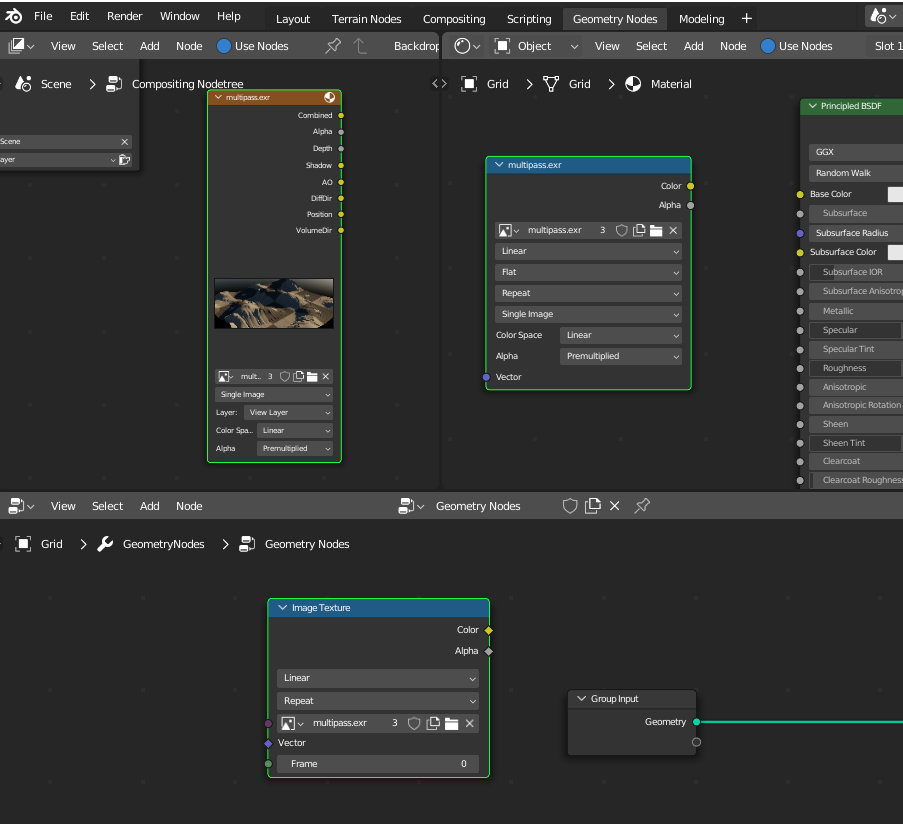
Currently multi-layer exr image node only has the standard RGB and Alpha output. Multi-layer EXR files are already supported in the compositor, this functionality just needs to be extended to the Shader and Geometry nodes editors.
4 Comments
This proposal could add some context in which cases/work flows you would have materials stored as multi layered OpenEXR. It would help the developers to understand when this is useful for developers.
Currently in Eevee there is a limitation that an Image data-block can only have a single representation of an Image on the GPU. This would already fail when using the same image sequence with different frames. To support Multi layered textures as input this part should be re-evaluated. This isn't a small change, so any useful information about potential workflows/use cases would help to put the right prioritization to such a feature.
I don't know about the OP but I would like the feature for the following workflow: I'm creating multiple simple story videos (over 100) using depth maps created in photoshop to add depth in the form of 3d extrusions to the images. I have 30 separate images per video, each in its own scene. Now if I could import one single exr file for all the images, then for each of the scenes I will just have to connect the correct nodes, or cycle through the layers instead of having to use a separate image for each depth map. For a single video this wouldn't seem like a task, but when you're doing a 100 (meaning for 3000 images) you can see how certain seemingly banal steps, like changing the depth map to the correct one, would add up in terms of the time taken to do them.
Is this still the case for EEVEE Next?
Anyway my use case for this would be for billboards. An exr file containing all the passes from ( youtube.com/watch ) here. It would reduce files from 3 pngs to 1 exr per angle but I don't know if that's worth the work.
Hello @jeroenbakker ! I'm currently having a use case for multilayer support in geometry nodes.
To give a bit of context, I'm currently working at a medium sized VFX /animation studio (~100 artists) and my task is to integrate blender as a main hub in the matte painting department. Most of the work there is done with Maya, Houdini, 3ds, painter... and it's a bit challenging to give matte painters a good 3D scene as a starting point : High poly USD are quite heavy and without materials, LowPoly/Proxy geo isn't detailed enough. So my idea is to take the multilayer EXR passes from rendering and generate a point cloud from it. Currently in order to do so I need to first extract the color and position passes with the compositor, then load those in geometry nodes. Pre-processing the EXR is not a big deal especially since everything is going to be automated with scripts, but having access to those passes right away would be much more convenient, especially for someone who just want to play with those passes right away.
If allowing to access all the passes within a single image datablock is difficult, like in the compositor, I think a good middle ground could be to allow to access a particular layer within the exr... So if I need to use color and position pass I'll use two different image datablock pointing to the same exr files... If that makes sense !