
Overscan for VFX
Overscanning is a process where extra pixels are rendered around the intended resolution (not like Eevee's overscan). That can be useful not only for lens distortion workflows, but also post camera shakes, better glows at the edges etc. With a bit of math it's pretty simple, but why not have it as a feature and be future proof? Even .exr files support some form of overscans, maybe that could be implemented as well in the future.
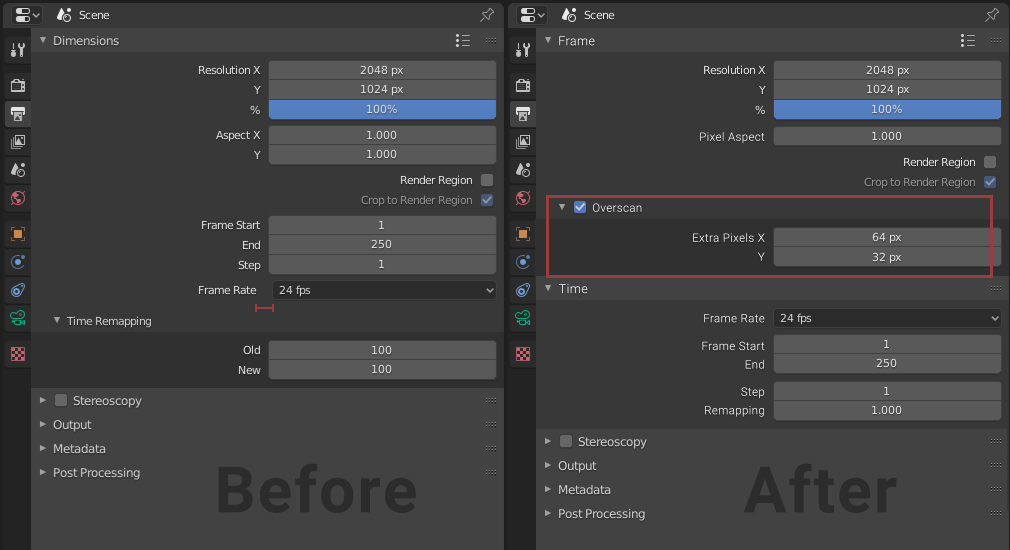
Here's a mock-up of a possible UI:

In some cases, x-axis property would be enough, Y could be calculated in proportion to the aspect ratio, since lens distortions generally transform the pixels radially from center, but some softwares use the same overscan for X and Y, also by using proportions or a simple % slider, decimal values would be introduced, which is not good - pixel perfect accuracy is needed. That's why 2 integers would be a better option.
This feature should be independent of the render engine, all it needs to do is increase the render resolution and FOV so the cropped image exactly matches the original. The new resolution would be:
resolution_x + overscan_x * 2
resolution_y + overscan_y * 2
And the easiest way to increase FOV without changing any other lens characteristic is to internally multiply Sensor Size by one of the factors below this image:

(resolution_x + overscan_x * 2) / resolution_x    // new x res. div. by old res.
(resolution_y + overscan_y * 2) / resolution_y    // same but for y
Now which one to use depends on Sensor Fit in camera settings. X values for Horizontal , Y for Vertical . The Auto sensor fit is a bit more complicated, since it should probably take the altered resolution into account. The problem rises when the aspect ratio is close to 1:1 where the overscan can change the overall orientation. But basically if the image turns out to be horizontal, then again use the X values and vice versa.
There are 2 main ways to visualise this in the viewport (camera's point of view). Either show a dashed line outside the set FOV and change the settings only for render, or already show the wider camera with the rectangle inside. Both have their advantages but I'd opt for the 2nd. Here's a comparison:

There's probably more things to consider - Render Region , Background Images (which should have an option to align to both sizes), maybe if anamorphics would work the same, how to remind people of the final/different resolution etc. but I feel like this is long enough...
While I was making the UI mock-up I also changed the Dimentions tab a bit (e.g. Pixel Aspect , Time Remapping ), it's more or less just my preference, but take a look at it, maybe some of it makes sense to more people then just me, like why do we have 2 values defining Pixel Aspect Ratio ? Also one small UI nitpick - the Frame Rate setting doesn't align properly, there's a bigger gap between the text and dropdown, which seems to be 4 px narrower. Other instances of the dropdown menu don't have this problem.
Anyway, I hope my English is OK, this is my fist proposal here, so thank you for reading!
13 Comments
let's bring this back from the dead! I searched for this feature on the web (as it would be extremely useful and I thought it's there already I just can't find it) but I only found this RCS proposal.
Someone should make this happen.
I just worked on vfx for music video. Several artist could't make a tracking with 3dequlizer and pftrack for some shots. But I made tracking camera and match moving object with blender tracker easier. They were surprised :-) Blender trakcer is very powerful! And overscanning feature realy needed for lens distortion workflow.
There is an overscan addon for Blender which used to work in 2.9, however, since 3.0 changing the overscan value is the same as just changing the render size. It doesn't alter the camera to match the original framing, so it's useless. But anyway, how hard could it be to implement this natively in Blender? It's practically a core tool for VFX.
Curious if this has got some love from developers as it's a so needed feature if you undistort images when match moving a sequence.
It's a 2 years old idea already and very much upvoted...
big up <3
Currently dealing with anamorphic footage and having this built right into Blender would be a whole lot simpler than using the plugin. That said, I think your first implementation (on the left) is better than the right one. By displaying overscan as a line inside the regular area it could easily be confused for a safe zone or similar. By displaying it as a line within the darkened area its purpose is clear — this area is clearly outside the bounds of the frame.
This thing is sorely lacking in a blender! Developer, if you see this, please add this function to our favorite software!
I think this is what camera_overscan.py does already, or at least part of it.
* @verysame * Yes, kind of. But there's a few issues with that.
For example it directly changes the res. and sensor size in properties, so you can't see the original values. You just work with a wider camera without any visual indication of the overscan amount.
But yeah, good point! For some people that's enough.
* @Vladislav Macíček *
Upvote. Can't believe there isn't already an addon that does this properly...
great proposal, have an upvote!
We really need this but sadly the devs have other priorities i guess.
still nothing? :(