
Add an "Edit Externally" icon to the texture node
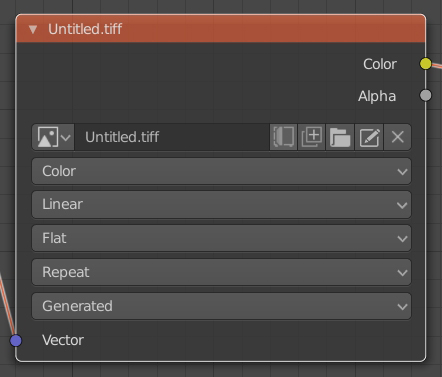
I think this is something that should be easy to add and very handy as you currently need to switch to image view, find the image you want to edit and open the image menu to find the "Edit Externally" option. It would save lots of time and it will be much more intuitive. Check the new icon added to the texture node.
4 Comments
I'd rather not have so many buttons in the node. Perhaps it would be better if this were a button that shows up in the Properties region (<kbd>N</kbd>) when the node is selected?
@Jason van Gumster: That could be another solution better than the current method to edit the file externally. I don't think is too bad having one more icon though. This is another solution for having more options as icons and much more space to actually see the texture full name without making it wider. I think is a lot of wasted space and it could be put to use. I also made another proposal regarding the color/non-color menu which IMO is totally unnecessary having a couple of sockets. That way the node could become very compact.
That would be good. By that way lot of node specific operations can be showed in properties region. (For texture node "Show in UV/Image Editor" can be helpful. Node wrangler's ctrl+t operator can be added there too.)
You can go further and make it even more compact.