
Radius for Octahedral bones
I know that a custom object can be assigned from the Bone Viewport Display, but it would be useful to quickly correct the excessive radius in long bones.
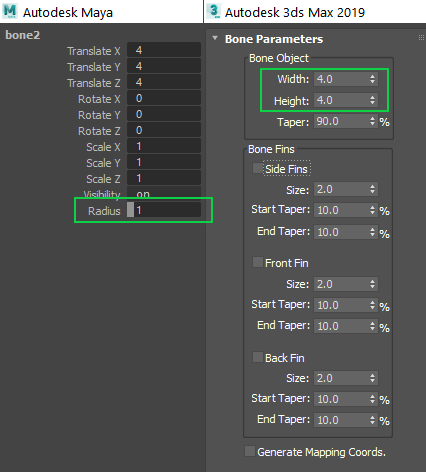
I know that a custom object can be assigned from the Bone Viewport Display, but it would be useful to quickly correct the excessive radius in long bones.
11 Comments
I would like this as an option too. I've switched to B-Bone since this is the only one that allows you to modify the dimensions of the bones. But I'd prefer octahedral if it had the ability to tweak the radius.
Yes, please
+1 ...one of the things really bothering me. Octahedral bone supposedly only visualize rotation and connection to other bones, so size shouldn't definitely be related to it's length.
*Although it could be great to have mode where you can set maximum size for a bone (thus can have automatically thinner bones for digits etc).
There is already a separate mode for bones to show their size (can't remember exactly but those boxes), so bones that only define connections should have user definable thickness... otherwise these will just clutter the view and make skeleton+rig unnecessarily hard to read.
So you're asking for the ALT + CTRL + S shortcut but for octahedral bones? That's fair. If it works for one, why wouldn't it work for the others too?
For what it's worth, the octahedral bone is just a display type. You always have the ability to adjust the radius of influence from the Properties region in the 3D Viewport, regardless of the armature display type. Of course, if you use the envelope display type, it's much easier to visualize.
* @Jason van Gumster * This proposal talks about the thickness of the bone when it is shown in the viewport. This does not talk about painting weights or envelopes. The problem is that Blender scales the bone proportionally according to its length and if the bone is very long its thickness is exaggerated, in the rest of softwares the same thickness is maintained.
* @sebastianmroy * Ah. I follow. But then again, isn't that what the other bone drawtypes are for?
* @Jason van Gumster * I think octahedral bones are very standard in other 3D softwares as the main bone type. They are very useful, why should you switch to a different less efficient drawtype to view your rig? You have to admit that currently it is both inconsistent since some drawtypes can scale and some can't, as well as confusing and inefficient.
* @MizManFryingP * I suppose efficiency varies depending on what metric you're using. It certainly would be convenient to adjust the size of octahedral bones, but I wouldn't suggest using Radius as the term, since that's already in use with respect to envelopes.
Personally, I only use octahedral bones when I start rigging. After that, I often switch to the B-Bone or Wire drawtypes (or bone shapes) for actually using the rig.
* @Jason van Gumster * Yeah I agree that the naming could be different. Maybe something simple like 'bone size' could do.
Don't you think that this is because octahedral bones just don't cut it compared to the others? This shouldn't be the case in my opinion.
* @MizManFryingP * It is because they don't cut it compared to the others... but having adjustable bone thickness isn't going to make up for that. Not for me, at least.