
Straighten Curves + Extrude function of Object ( Faster way to create planes inside an object)
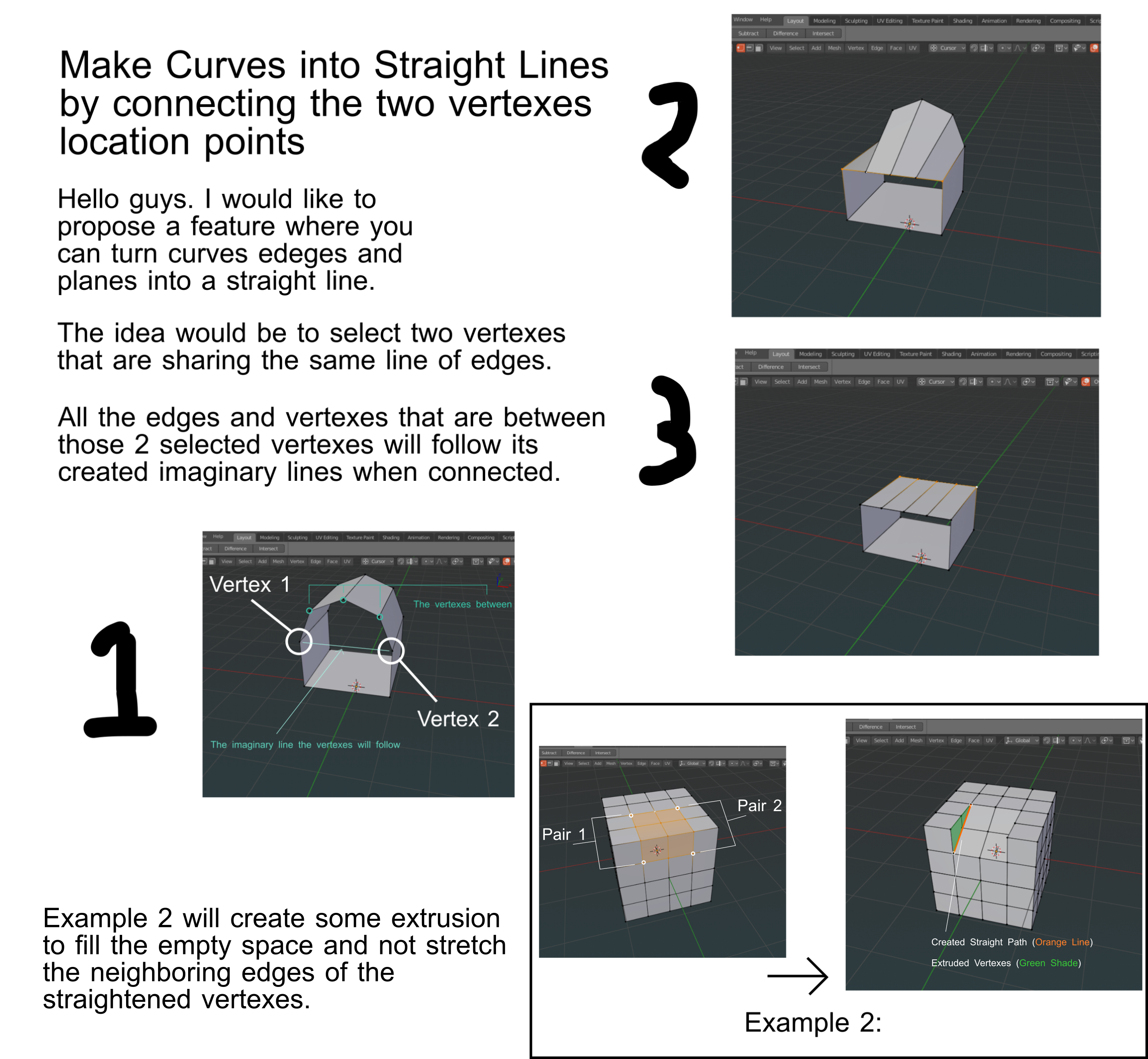
Hello guys. I would like to propose a feature where you can make curve edges into straight lines out of two vertexes.
This will help in creating straight lines within the created objects faster. The second example will display its ability to at the same time extrude the affected vertexes to avoid stretching the edges that are not included in the preferred alteration.
Thanks.
17 Comments
To just make straight line - G-Stretch. Play with it, try all the possible variations. Pay attention that it also have axis constraints. I use it for a lot.
For second part of your suggestion - it's too much unpredictable feature. It looks good on Box example but try to imagine all the possible situations and possible usages. And if you ask your self you find that in most of possible cases you have no answers what should do this feature and how it have to detect is current case possible to handle or not possible to handle... Of course - my coding experience equal 0.01 % so I can be completely wrong.
On other side to make it manually is not so big deal.
* @forestgumpovu4 * Thanks dude. I have learned something new in dealing with these stuff.
* @forestgumpovu4 * did you ever understand that after all that time Those curve tools are still an addon and not integrated into blender !
* @Orphydian * Loop Tools included to " Box " version of Blender. So it's supported and it's native part of Blender.
* @forestgumpovu4 * still not integrated and just an addon that shipped with blender. As if there werent enough mess with all external addons, even these esential modeling operations have to still be separated. Not a big deal but Blende r is bare bones and will not hurt some of the old usefull addons to be nothing more than part of it, seemlesly integrated.
* @Orphydian * The reason why some of these add-ons aren't enabled by default is because they aren't essential for everyone. Not everyone opening up Blender is a modeler. Blender gets used by a lot of other people in other parts of the pipeline who aren't modelers and don't need that additional functionality loaded into memory.
Now, things obviously change over time and it's obviously worth it to periodically address which add-ons are enabled by default, but that's not the point of this particular proposal.
* @Jason van Gumster * these and others that are not even shipped with Blender like Edge flow addon are more esential and actually useful and working more decently than other functions that shipped with blender regarding modeling.
What is considered optional in Blender regarding modeling is not exactlyvalid for like every other 3d package out there : these loop tools, the edge flow operations, some other constraint addons that are not shipped with blender are taken for granted in other apps. I think this is just an old perception which has to be updated. I make a wild guess and assume that are lot more people using blender for modeling than anyhting else. My frustration was not about only enabling this by default to load with blender but to integrate them seemlessly. This way maybe they would take so much precious memory also (not sure if the loop tools have a significant use of the memory) but that another wild guess.
* @Jason van Gumster * I recently got that point. That is why maybe if possible blender would hire one or more dedicated developer to focus in creating features that would have been helpful and useful in blender but just didn't gain some traction for demand reasons and turn it instead as an addon.
Maybe I will submit this kind of proposal soon.
* @Orphydian * Add-ons are integrated with Blender seamlessly. Cycles is an add-on.
* @Jason van Gumster * they are not, they just make additional Ui panels, have placeholder icons, some appear in the conetext menu but not in the menus above the vieport etc. Why looptools appear above the context menu title and why it appears only hear and not in the menus as well ?
* @Orphydian * That's the fault of the add-on developer. There's no reason why an add-on operator can't appear on an existing menu.
Already exist. Select one, Ctrl-select second, Loop Tools —> GStrech. Please learn Blender more than 1 year before making proposals.
* @ Vyacheslav * I appreciate the info. Can you please show me a presentation or link to make the sample above? I have not found some documentation from my reasearch. Thanks.
* @ Vyacheslav * I found what you mean already but I am not sure if that can create the second example I have posted.
To create the second example the feature may need to add some additional faces similar to extrusion. The Vertexes that were selected to create this result are the corners of the highlighted planes.
* @johnpdelacruz26 * the second is not straignten, it is dextrusion. But you can use addon too or огые rip edges, then straighten and fill. Not so hard {attachment 4311941jpg}{attachment 4324641jpg}{attachment 4330244jpg}
* @ Vyacheslav * also Blender can`t assume, what the best cutting method is in the certain case. So anyway you should cut new polys manually or make bridge manually {attachment 4351248jpg} Do please learn Blender.
* @ Vyacheslav * Thanks for the info man. This is my first time encountering this addon.