
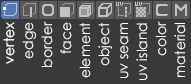
Edit mode - Selection
Simple Idea :
- Vertex - As usual.
- Egde - As usual.
- Border - The empty space in the object not filled with polygons, even with broken (triangulated) geometry. Like in 3ds Max. (Perhaps not fundamentally important \ need)
- Face - As usual.
- Element - Linked selection but as component mode. Like in 3ds Max.
- Object - Selecting any object without going to Object Mode and editing it.
- UV Seam - Displays only seams on the object. Editing associated vertices and egdes.
- UV Islands - Displays only seams on the object. Editing as a group of polygons.
- Color - Something like the analogue of polygroups in ZBrush. Editing vertices, edges, and polygons associated with them.
- Material - Select all polygons with the assigned material.
Exactly 10, from 1 to 0 on the keyboard.
(I apologize for my English - I write through a translator)
7 Comments
amazing, it's so simple that I don't even understand what you're proposing. new icons? vertical text that hurts my eyes? spend a few more seconds describing your proposal a bit if you hope to get any traction.
* @testure * The text below is an explanation of what is selected (what to work with) in edit mode when you click one or another icon.
(I apologize for my English - I write through a translator)
I think I can understand how most of the would work, but not all of them :
* @-L0Lock- * For example, I made the entire strip of selection icons in Edit Mode.
I think this will greatly reduce the entry threshold of those who have just started to study Blender. And it will also increase the speed of work on polygonal modeling by an order of magnitude.
Thanks - Updated the description.
I upvote simply because I do think that selecting polygons based on material is one thing I do miss a lot from Modo.
I think it could be a good improvement, but we need more details or mockups of what you'd like to achieve with this. Even if for you they might seem obvious features, a single image and no description is not enough.
* @David Vernaglione * Answer above. Updated description.