
Display driven values in the driver editor
We can check the driver values in the driver editor in current Blender.
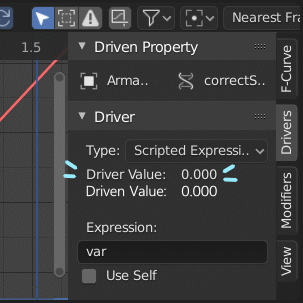
The driven value is contained in a property box marked in purple and can be found somewhere else in the editor.
This works fine, but I often feel uncomfortable when the driver values and driven values are far from the Blender UI.
The example image below illustrates this inconvenience.

So I think it's a little bit if I can check the driven value in the driver editor, but I think the ux will improve. I have attached a model image and gif of my idea below.


Thank you for watching.
1 Comment
Yes, this would be helpful indeed. The layouts you need to make drivers become very difficult and the time you need crossing realestate just to check and check again is ridiculous. This would save so much time with some gentle feedback of the driver and driven.