
FOV keyframe support and focal distance display options
(I rolled these two into one because "FOV keyframe support" would make for an incredibly small post)
Incredibly surprised that, while you can keyframe, animate and manipulate the focal length of the camera when using millimeters, the same is not true for FOV. Feels like it was forgotten about.
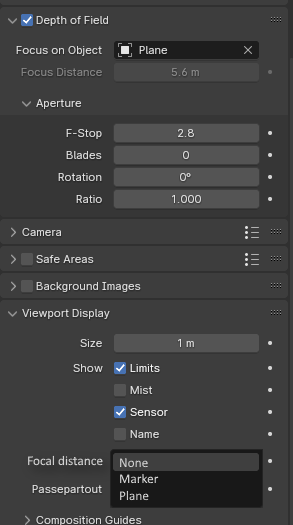
Along with this, it is possible to see the focus distance of the camera by enabling "limits" in the viewport display settings, but a simple empty-looking shape (also not anti-aliased) may get lost among tons of other lines and shapes for rigs and so-on. Perhaps a drop-down to set it as "marker" or "plane"
3 Comments
I think there is a confusion here. You mention "FOV" everywhere, but you show the DOF's focal distance.
Regardless, while the FOV is indeed not keyable, the Focal lenght (its equivalent in lens width) is keyable. So if the DOF's Focus distance when you don't set a focus object (which acts as an override of the manual focus distance):
Having more options for camera properties visualization would be welcome indeed. Semi-transparent planes with different colors for focus and clipping distances is something we sometimes see in other softwares and plugins.
Also the ability to manipulate the visualization object themselves to control those properties is quite handy. An example of this can be seen in the Real Camera addon: you can click and drag the empty object representing the focus distance in the 3D view:
those two images I made were just for what I had to say about focal distance, I didn't make one for the FOV suggestion because I didn't need a visual aid to explain ^^ And in terms of the gif, I did try to make the plane move based on focal distance via drivers, but couldn't so I went for a different method.
and in terms of something like Real Camera, thanks for letting me know! Though while addons are great, its still good to see some of their features simply added into Blender at some point. Plus, the addon's github mentions that part of it doesn't work with AgX which is a shame, given that AgX is a fairly core viewtransform option.
Using drivers you can query the distance between two objects. Although the annoying bit is that except by using an armature, there doesn't seem to be a way to easily have an object moving only in one axe local to its parent.
But anyway, using an armature, you can have a bone for the focus distance:
I made an example rig here if you want to check:
drive.google.com/file/d/13BbvaKn7_XqyVEbYsqyXZT3YgFAo4KfM/view