
Improve the Grease Pencil mask adding UI and process
The panel of the Add Mask operation is really cumbersome to use when the GP objects has a lot of layers, especially since the list is inverted compared to the layers list order. I've got a few suggestions to improve it's usability
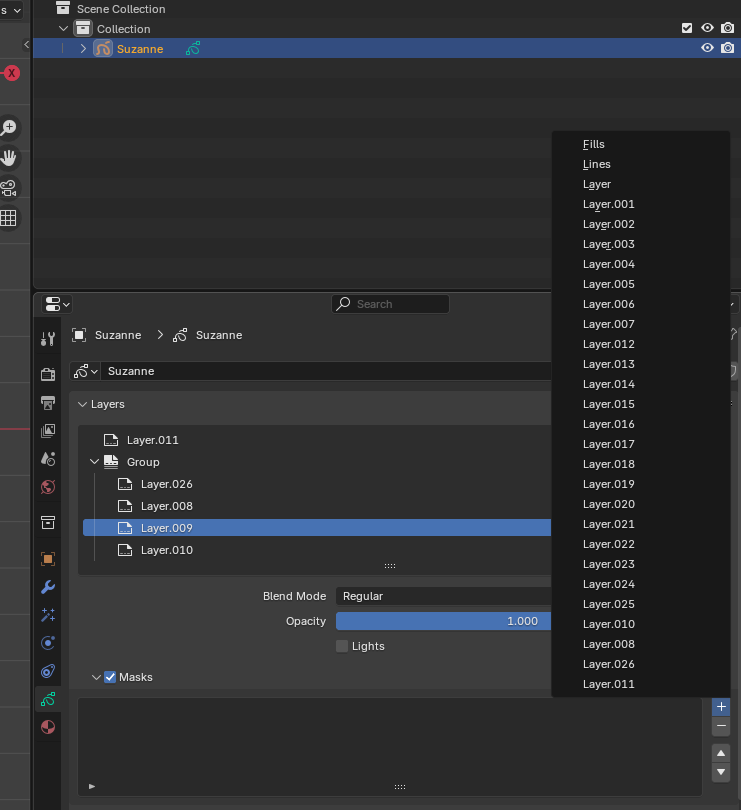
-
Collapsed layer groups
Currently layer groups aren't shown in the panel at all. Understandable since you can't mask with a group at the moment. However, they could be used do organize the Add Mask panel. The Add Mask panel could first only show the topmost (hierarchically) layers and layer groups. Selecting a layer group from the panel would display only it's children, and this process would continue until an actual layer was selected.
However, if masking with layer groups is possible in the future, the panel behaviour would need to be changed again to enable selecting layer groups.
-
Layer search
Being able to type text into the panel for filtering the layers based on their name would make finding a specific layer easier
-
Drag and Drop layers directly from Layers list
Dragging the desired layer from the Layers panel to the Masking Layers panel would be a nice option for adding masking layers. However currently the mouse down event sets a layer as the active layer, so dragging a layer into a property field of another layer is not possible. Setting the active layer would need to be done on a mouse up event.
0 Comments