
Idea to improve Outline and option for modifier link
Idea 1:
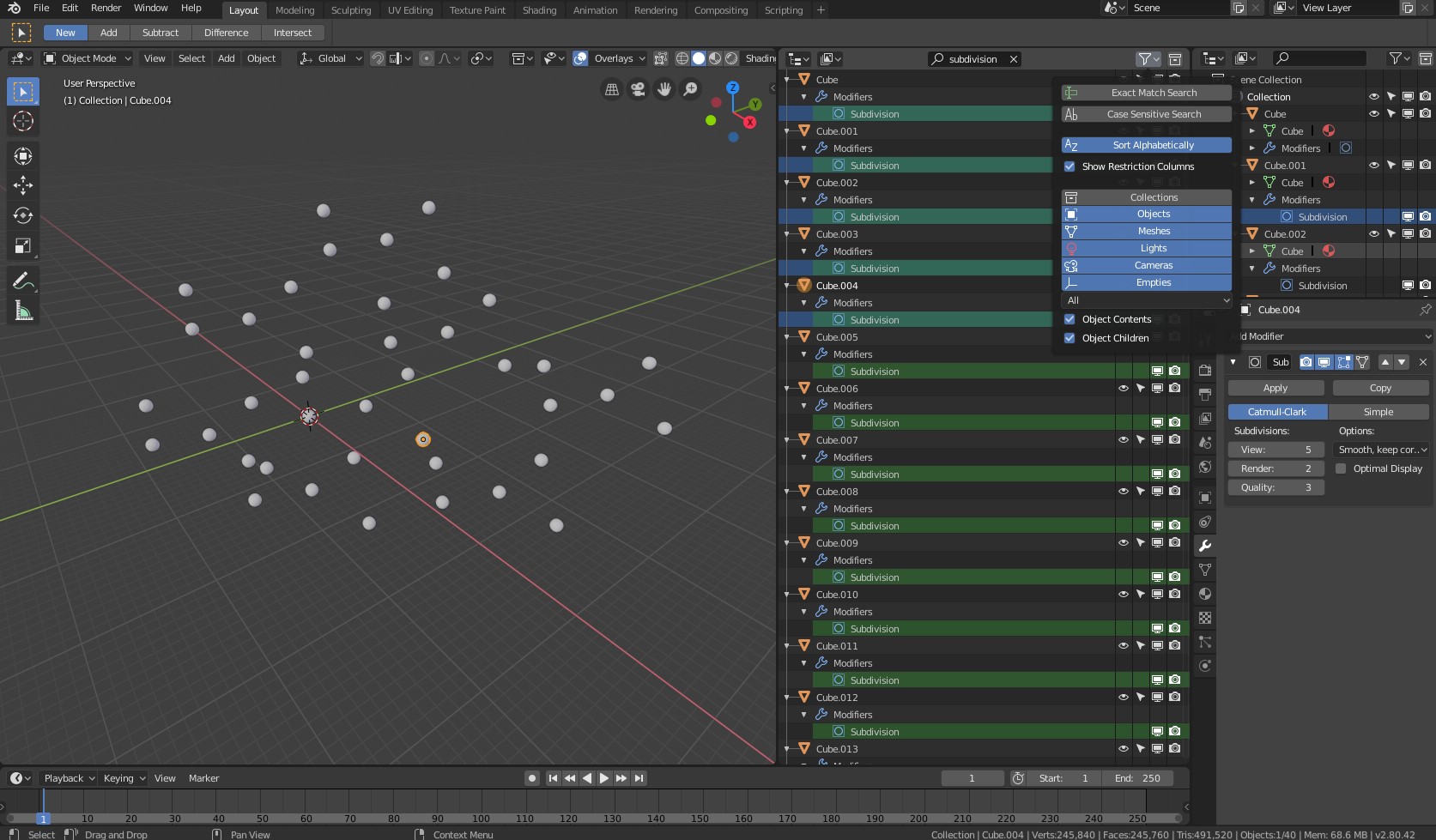
I find selecting and deleting specific modifier from many object in the scene in the outline is very time consuming, what i'd like to suggest is when we search for specific modifier in the outline search tab we should have option to show only them in the outline, at the moment they are showed nested in the object name which make them impossible to select all at once. So will be great if search result show only what we search that way will be easy to select them all and delete in outline.
Idea 2:
Also, will be great if we can have option when linking all object in the scene with the active to have additional pop up menu and select what from the active object we want to link.
Eaxmple:
Imagine many object in the scene and for some reason we want to copy one specific modifier with adjusted setting from active object to all other object in the scene. At the moment it is possible to link modifier which copy all modifiers from active one, and we should manually delete all other modifiers we don't want from all object in the scene (which is not easy at the moment check idea 1 above). That's why i find additional pop up window when linking from active object to have all modifier list so we can pick which one exactly we want to link.
1 Comment
The original concept for modifiers was to have them as proper datablocks that could more easily be linked (like meshes and textures). That might be a good first step for what your proposing. However, with the plan to make the modifier stack node-based, a lot of the current workflow may change, so I'm not sure it's necessarily worth it yet to go that route.