
select menu improvement / bug fixing
The select menu that appears when objects are obscuring other objects when we alt+click should also add to the selection instead of just replacing it, (ex: if shift is pressed while choosing the object)
The select menu has options in the F9 menu (like "Extend") but they seem to be broken.
Edit: I added a screenshot. It shows a cube inside a cube. The action: alt+clicking on the inner cube, obscured by the outer cube shows the "Select Menu". P.S: Apparently, I can get this behavior by alt+shift+clicking instead of just alt+clicking (before that the menu shows up)
Wanted behavior: While holding shift and choosing an item from the list, it keeps the outer cube selected, and select the inner cube as active
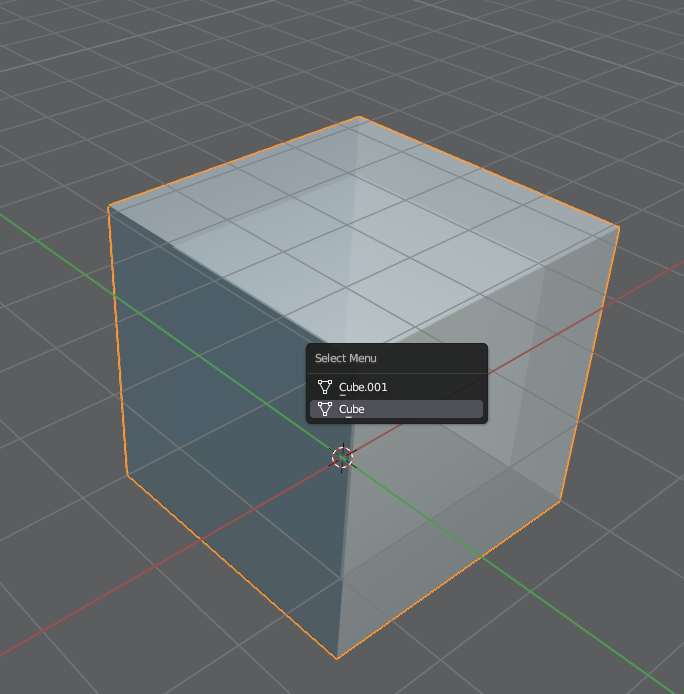
7 Comments
This menu shows a list of objects . Use shift + alt click to add an object to the selection. See Keymap editor for more.
Not sure if F9 is supposed to work for the select function. I mean, I'm sure it shouldn't be displayed at all.
Thank you. I didn't know that I can alt+shift+click to add to the selection. I think it would be more intuitive to show the menu with alt+click, then, while holding shift, the menu doesn't disappear, allowing to add to the selection.
Yes probably Shift inside the menu could work, but I don't know if it's technically easy to implement.
By the way, the icons seem to be wrong in this menu, "data", not the "object" type.
The length of the menu is limited, not all objects are displayed.
can you post a screenshot? Hard to understand.
Agreed. I don't see a menu when I select objects.
I added a screenshot with further explanations.
Ah, makes sense now. Have never used that feature.