
Add in Outliner menu point "Mark Asset" (Asset Browser obj)
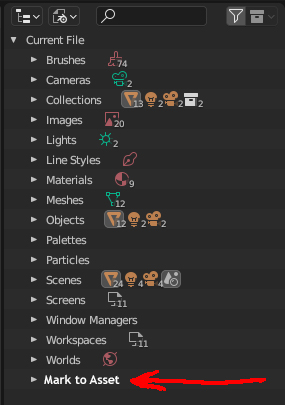
Faced with the problem of the browser asset, the problem is related to the departure of the program. I had to remove markers from all attached files, and I realized that it would not be bad to have such a menu item for convenient display of all marked objects in the file, materials, etc. At the moment, they have to be searched throughout the file, tabs of this menu.
3 Comments
Isn't that satisfied by the Current File mode of the Asset Browser ? Or am I misunderstanding you?
I guess you can't batch-clear assets from the Asset Browser, that can be a feature request, but the Blender File tab shows everything as belonging in single categories so duplicating entries there for marked assets could muddy the waters.
Yes, you misunderstood.
At the moment, there is an unknown bug in the asset browser. And because of it, you cannot always do what you propose, there will be a crash from the program.
What I suggested is filtering the internal objects in the file more than the entire asset. I.e. This function will display everything in the scene that is marked for the asset.
It is for the purposes of the "Outliner" editor that this is just right. Depending on the principle and style of the person's work, this can be done in your way, in any case, it should not be dependent on this error.
But, the "Outliner" editor itself is designed specifically for such purposes, cleaning, checking the file, etc., and in this example it is more important than ever. Because otherwise, you will either have to go through the entire structure of the file and look for marks, or separately open the Asset browser window. These are two different operations and in some cases time costs are added.
Therefore, if you want to put the file itself in order, then you go to the Outliner, and you see everything you need.
Also, there is a problem that is difficult to control, for example, if a person does not use the Asset browser, and made an "Append" object from another file, and this file is marked as "Asset object", then you can easily skip this moment and not find it , especially if you have many layers.
Simply, "Append" at the moment, along with the object, transfers "Mark Asset".
For example, if you are working in an assets folder, and mark new objects with "Mark Asset", then by "Append" from this file to a new one, "Asset Browser" will duplicate these objects. Since the label "Mark Asset" is also transferred, it will be duplicated.
And if you made "Append" not an object but a mesh, then you won't know about "Mark Asset" on this mesh.
Then the crash should be reported. Browsing assets should be in the Asset Browser.