
More configuration options for Properties Editor.
The Properties Editor can be confusing because of the amount of information there. Especially for sporadic Blender users.
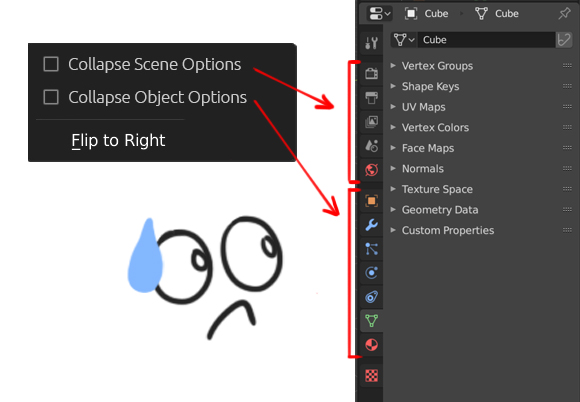
I suggest adding the "collapse" option to the Scene Options and Object Options sections. The option would be in the menu that opens when you right-click on the Navigation Bar.
This idea allows several configuration options that could make the job more comfortable, and for some users would make this Editor less confusing:

Another possible configuration:

3 Comments
Nice, but still this involves two clicks instead of one for many cases: say I have collapsed the scene tabs and want to go from object to world properties: I need a click on the scene collapsed tab, then a mouse move and a click on the world tab (assuming my last active scene tab was another one). The only use for this, in my opinion, is that last screenshot where you collapsed and hid the vertical tabs, displaying them side by side. What about the other idea? hiding panels was good, might also be hiding tabs!
* @ Lsscpp * Exactly, but sometimes two clicks are better, for example, when I work with sporadic users of Blender it is difficult to indicate a specific icon. For these cases I would always prepare Blender with all collapsed (opcion 4). It is also uncomfortable when you extend down the Outliner and you have to scroll in the navigation bar because it does not fit entirely. This idea gives freedom to adapt the Editor depending on what you are doing. As for Hiding Panels, I thought about maturing the idea to something more general like what Godot Engine (Disabling / enabling features) is doing, but I saw that other users are raising similar ideas. So I'll wait to see how they evolve to not repeat concepts. Thanks.
I dont like the idea of collapsing, seems just more fiddly to me but I really like the idea of the top tabs and side tabs, just for readability (it still doesnt make much sense to have the 2, but it reads better) The way I would love to is to always have the option to show objects or lights or cameras etc, so you would not have to select a camera or light for it to show on the property editor, and would always have that option there kind of like a camera or light lister.