
Align and Distribute
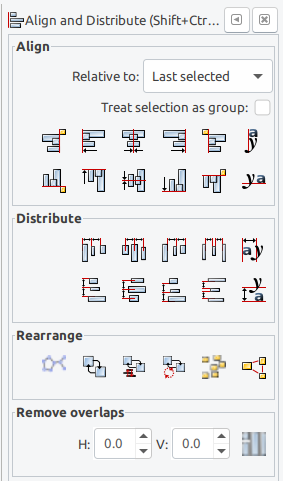
Often times I find myself needing to manually align and/or distribute objects with respect to another object, while this can be fine on small number of objects, it gets really tedious on bigger scenes.
Inkscape has a built-in function aptly named align and distribute which does the job pretty well, often wishing the same functionality could be in blender. In my opinion, it would be greatly beneficial to have those simple yet powerful functions added in.
13 Comments
I was planing to create a plugin similar to your image, the question is: Should I create one? or is there already a free script like the one in the image? what functions should I focus on?
* @iulian.flester * YES, PLEASE DO! Others have pointed out a few similar add-ons but they are either missing some functions or their method is complicated and confusing for some. What I propose here is something simple, exactly like inkscape's with just those options.
ATM there is built-in addon Align tools. And Oscuart tool, that can distribute by origins. But no tools to distribude with even spaces for example.
You can now do the alignment of objects with Align Tool addon interactively in the 3D view.
Distribute has to be a separate tool, specially with the changes in upcoming Blender 2.8.
Get Align Tool from the BlenderMarket: blendermarket.com/products/align-tool
Or get it from Gumroad: gumroad.com/l/align_tool
Cheers!
It seems like there's a pool of addons but a lot of them are kept up to date or lacking some functionality. I took a stab at it, you can get the addon here, it offers line, grid and circle distribution options, very simple interface, there's a lot of gifs and screenshots explaining it in the link: madllama.gumroad.com/l/Distribute-Objects
These are two align/ distribute addons: blendernation.com/2021/11/04/free-add-on-align-and-distribute/ github.com/Mainman002/Blender-Align-Between-Two
This addon is working for distributing objects in grids for me so far.
amanbairwal.gumroad.com/l/AlignAndDistribute
Yes yes please! evenly distribution or by size...this would be so helpfull!
Yeah please please please
* IGNORE * Oscurart Tools does what I need.
Align does exist and it's easy to use in 2.8. Distribute should be just as easy.
IMO, it should have 3 buttons: X,Y,Z.
The objects should be distributed equally from the min to max of all objects, using either median, object origin or bounding (based upon current settings) while keeping the first and last objects in place.
The direction of the distribution is a function of the button pressed.
Note: the picture shown above does not leave the first and last objects in place.
This is pretty much how Oscurart Tools does work.
* @chipp * I'll take a look at the addon. BTW, what picture? Are you referring to the Inkscape screenshot?
Is this something you want in Object Mode or Edit Mode? Also, since we're talking about data in three dimensions here, how would you propose that the user define which axis that want to align and distribute along? Should this also work on planes?
@Jason van Gumster: I would like to see this in object mode, though I don't see any issues if it was available in edit mode mode as well.
For the axis, I think a simple prompt at the bottom would suffice, kinda like how mirror does it. (Ctrl+m) or something along the lines of an interactive prompt where you see a live preview of the operation and clicking to confirm. Honestly to me the simpler the implementation the better.