
Gizmo Logic !Solved!
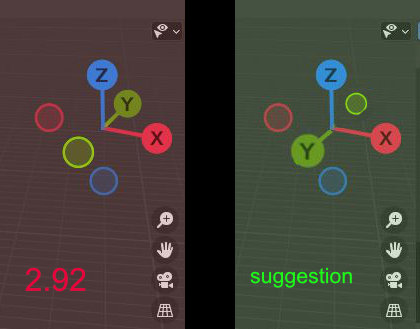
this is not logical!!! do you see it the same way ? The Gizmo-axes are highlighted with letters, the Z as well as the X axis indicate the positive axis, the Y axis points in the negative value
to restore the "logig",the Y axis should be changed to the front.
9 Comments
@IIIFGIII @Thomas Paul, Thank you for politely explaining this. Old coordinate system habbits are burned in deep. 😃(maybe there will be an addon for upgraders?! 😃)
* @wvolbers * I don't see here problem. I work with unreal and it has same X direction but opposite Y. People in Maya have Y up instead of Z and work somehow....
* @IIIFGIII * yeah this is so annoying having the up axis second, whenever I need to reset some "ground" transforms I miss Blender.
Are u sure about Y in negative direction?
Not sure what you are suggesting here. The gizmo's Y is pointing to the positive value. Blender uses the right-handed coordinate system with +Z up, -X right, -Y front
{attachment blender_2021-03-23_11h55min34sjpg}
that was the reason why i did not find it logical{attachment originalJPG}
* @wvolbers * You don't get it... This IS +Y. There are several coordinates system, and this is the one Blender uses. This is not "more logical", it's just different. And it's not something you change in a snap of a finger, every tool is based on how the coordinate system is made, changing it requires to change everything.
* @wvolbers *
* @Thomas Paul * what he's trying to articulate. Is just add a line on the minus (<: