
LFE in the VSE
Good day everyone!
This is a short proposal. Recently I have had the honor of working with Blender to attempt a true 5.1 mix for audio and was excited to know Blender can indeed handle surround sound up to 7.1! Stunning, isn't it!? (^^,)
The problem is that it does not handle the LFE at all...
LFE stands for Low Frequency Effects - also known as the sub woofer channel. In many systems, people use the Bass Management of their setup to handle this, since many a DVD or Blu-Ray's bass is either too low or not really what you're looking for (ironic...).
For Blender to really be able to do a proper surround sound mix that will work on most systems (those that use a sub), it needs to be able to handle the LFE channel in some way.
It only really needs 1 suggestion of where to implement: Under the Scene options in Properties, there is an Audio section where Stereo, 5.1, 7.1, 4 or whatever is selected. There can be a check box that says Blender should ignore or mix it's own LFE. It can be labeled "Use LFE". This only applies to the ".1" systems, meaning it shouldn't be there for 4 or Stereo for example.
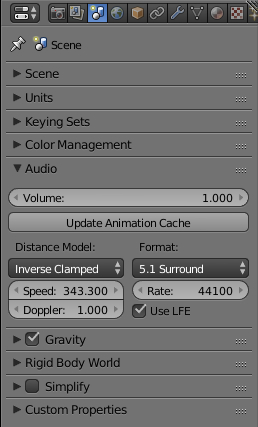
If Blender then approaches the mixing of the LFE channel, like any sound card would, that has bass management for surround sound, the LFE should be perfect in most cases.
This will mean that the workflow for a good surround mix does not have to go through Audacity or other DAW's at all. Everything can be handled in Blender as-is, because it already handles panning superbly in my limited opinion.
You may ask why Blender needs such an option in the first place. Well, most surround sound systems do not come with full range speakers, because they are too expensive. They come with small speakers and a sub, thus, 5.1 or 7.1. The ".1" being the sub.
With Blender's audio already supporting surround sound, this would simply be making the feature complete!
Thank you for reading and upvoting! Have a wonderful day! GOD bless you! (^^,)
2 Comments
I have toyed with exporting 5.1 audio from the VSE using the extreme panning but could not get any audio assigned to the rear speaker channels. TBH I just wanted to use it as a 4 track mono export rather than surround. Do you know if the VSE supports this mix type
@David McSween: It does. I made a tutorial about it - due in two weeks, but I'll give you a quick help here. In the user preferences, under system, you also need to set Blender to what you want, not just in the above area. Then, the surround speakers sit at 1.250 and -1.250. -2 and 2 are the center for the surround speakers. Of course, all this assumes your system is already correctly setup and speaker fill is turned off.