
Better Default Bezier Curve shape
When you add in a Bezier Curve it has this weird "?" type shape that is a pretty useless starting point in any case I can imagine. The handles are at different rotations, different sizes, and different rotations, which means most of the time you immediately have to start by deleting one point on the curve, and then re-arranging the other.
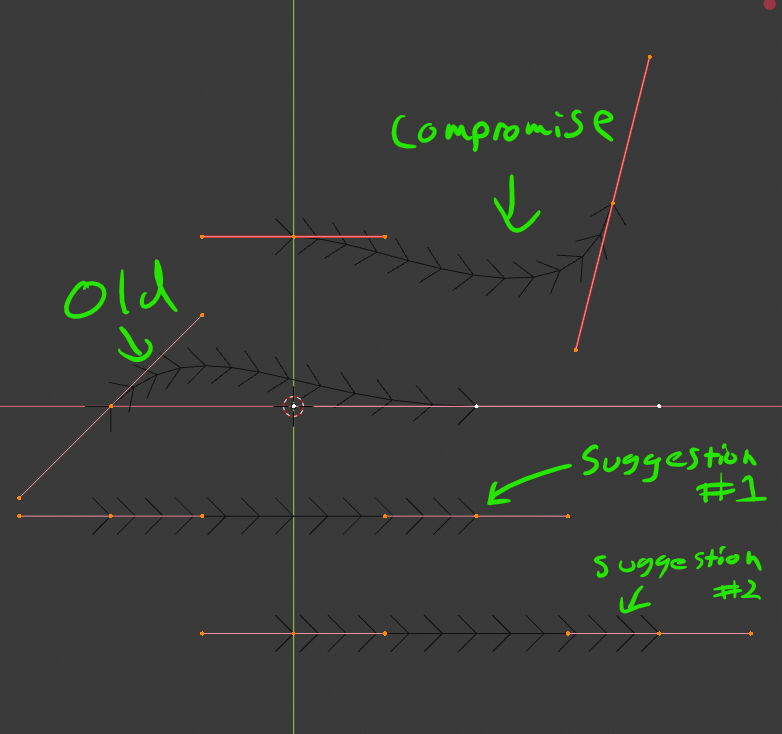
Two better starting points I can think of would be a straight line with the points at -1 and 1, or a straight line with points at 0 and 1. Even if somebody REALLY likes the curve to start out curvey, it would be beneficial to have at least one point starting off at (0,0,0) with a horizontal rotation.
I know it's small, but it's definitely a paper-cut that's drives me crazy every time I add a curve.
15 Comments
"I know it's small, but it's definitely a paper-cut that's drives me crazy every time I add a curve." Hahahah, totally agree! Suggestion 2 or "Compromise" would be a better starting point than the current curve.
Suggestion 1 would more fit the default blender style where the mass center of the object is in the middle of the abject which then is placed in the cursors location
Suggestion two however is an interesting idea since you can place the cursor where you want and start right from there. Combined with the new 3D cursor (or the cursor's orientation) this could lead to a very neat way of placing the bezier curve
i really like the suggestion #2 . Have the vertex 0 at the 3D Cursor position is really a game changer when you create a curve.
I prefer straight, I agree.
I think with this it should turn on an interactive system of drawing a curve, not give you a static curve to begin with.
* @Andres Stephens - Trinumedia * Only problem I have with this is that clicking isn't that precise. If I wanted the curve to start at a specific point, it's pretty simple to move the 3D cursor there using Shift + S, and then add the curve to that point.
Dynamic drawing would be fantastic for a lot of things, but still being able to add a curve the traditional way would be helpful.
+1 for STARTING at the Cursor, and I don't care what the "Blender convention" is, since they are chock full of bad ideas. For curves, one end or the other, NOT the middle.
There is a curve type that is straight, which is fine, but the only problem is that it's very hard to SEE when it's lined up on the axes, so I'd add that perhaps a better highlight on Selected Curves would be useful, especially when they are new.
* @jeric_synergy * That's why I suggested the compromise. One point starts off at the cursor, and one is rotated so that you can see it easier
* @Zach Hixson * , another possible compromise (in the best meaning of the word) would be to start at the 3dc and vector up in a 1/1/1 direction, rather than being flat to ANY axis. Then the line would never align with either the grid or the world axes.
* @jeric_synergy * Yeah, that would be good too. That's why I'm surprised that we have the current default. Almost anything is better
* @Zach Hixson * I know they're working hard on the code, but a lot of times they don't take that final step of "how could this be confusing to someone?".
Immersed as they are, it's hard to get back to Noobietown.
BsMax has interactive curve drawing. Check it out!
If I'm not mistaken, the long-term plan for a "default curve" is to not have one at all. If you think about it, it doesn't really make a lot of sense, it's just there because there's a default cube, etc. I mean- imagine in photoshop if you had to create a vector layer and it already came with a weird squiggly line on the layer. It's much more efficient to just click "new layer", then activate the pen tool and get to work.
And from what I remember reading- that's the long term plan for the default curve object in Blender. There would be a "curve drawing tool" that is activated when you create a new curve object, and you can immediately start clicking and dragging handles out the same way you would if you were to use the pen tool in photoshop.
* @testure * A lot of the time though I find myself wanting to add a curve from a specific point, so being able to use the 3D cursor to place the first point would still be really handy.
This is definitely more than a paper cut. I would love to have suggestion 2 implemented until the bezier tool gets a well deserved rework.
I like suggestion #2.