
Multiple Importance for Emission shaders on Meshes
Sometimes in VFX, you want to project an HDR texture on geometry so that lights captured on pictures are not always coming from infintely far away, or to have textured prerendered lights for faster renders.
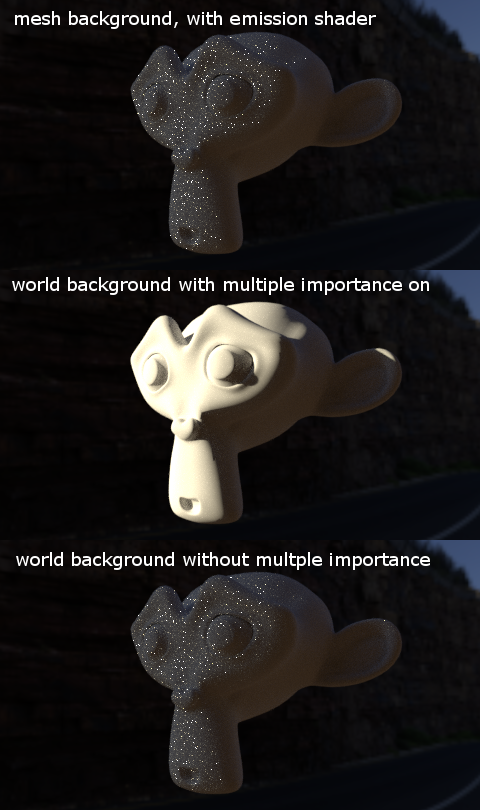
Doing this in Blender using emission materials on meshes causes a lot of noise from small and intense parts, similar to what happens to HDR world backgrounds with MIS turned off. [see attached picture]
It would be nice to have some kind of multiple importance sampling, similar to that of world backgrounds, for meshes with emission shaders. Is such thing even possible, to simply port the world background MIS for meshes? Or is having custom meshes incompatible with that kind of MIS? I recall this being possible with Luxrender.
Edit: -------------------
The checkbox that reads "multiple importance" on the material settings doesn't do what I'm describing, as you can see on the top image, where the material on the mesh background has it active, yet the result is still noisy. It does something different, sampling based on surface area (I think), but definitely not by textures (ie, a black texture with a small white dot. The white dot won't have sampling priority over the black area)
Ideally, if this was possible to implement in Cycles, this feature should appear as a separate checkbox on the material settings, below the current "multiple importance" checkbox. If it were to work like world MIS using a "map resolution" number box, that number box should also appear there alongside the checkbox, greyed out when the checkbox is off. To distinguish the previous "multiple importance" checkbox from this new one, both should be renamed to something along the lines of "multiple importance surface" and "multiple importance texture" respectively.
Having both features merged into the same checkbox would not bad either, or maybe it wouldn't be possible to have them separate, and material MIS would need to be reworked to acomodate for this feature.
6 Comments
Basically, the problem here is: Multiple Importance Sampling for World and Emission shaders means that in addition to sometimes hitting it randomly, Cycles actively picks a direction and traces a ray there. Now, for the World this selection is done based on the environment map (or whatever you put into the World Shader). For Emission shaders, however, Cycles just selects a point on the surface without considering the texture on the lamp. That usually works well since most Emission shaders have a flat color anyways.
Now, could that be changed? Well, yes - but Cycles would have to evaluate the shader for emission meshes as well, which adds a slowdown before rendering. Furthermore, setting the resolution is a lot more unpredictable since there is only one Background, but potentially many emission meshes. You don't want rendertimes to explode when you enable subdivision. Generally, this is a pretty rare use-case, and the sampling would add a lot of complexity to the code and usability while not giving any benefit for most users, so I'm not really convinced to implement something like that...
Thanks for the explanation. Now I understand that the complexity of the code might not be worth the small feature if you consider it a rare use case. I personally think it's not a rare case at all, in fact, it's pretty common to map hdr to simple planes. It would also go nicely hand in hand with this recent feature as well, considering it's sole purpose is to be used with textures developer.blender.org/rB1272ee4
If the evaluation is disabled when the user doesn't need it or want it, and if noise/time outweighs the evaluation time in scenes with simpler light geometry, I think it's pretty much worth it. Of course, I don't know the full extent of the complexity, and it's easy for me to talk without having to do the work myself. Those are just my two cents.
From what I can tell, there's already a Multiple Importance setting for meshes. In Material Properties, look at the Settings panel. There's a Multiple Importance checkbox for Surface shaders and a dropdown menu option for Volume shaders. Both have Multiple Importance sampling enabled by default.
I know those exist, but they don't do what I'm describing. Since they are turned on by default they are turned on as well on the render above
Then perhaps it would be worthwhile to explain how the feature you're proposing differs from the existing settings... and if they should be folded into them. If they shouldn't be folded in, then where would we add such an option in the interface... and how would it be named so it's clear what it does?
Thanks for the advice. I updated the post, hopefully it's more clear now.