
Sampled DoF ( EEVEE )
UPDATE:
This was implemented.
we provide a way to increase the quality by jittering the camera position for each sample
Thanks to the Blender developers!
The post-process depth of field effect which is used by EEVEE is good but it has it's limitations. Being a screen-space effect, It can't "know" what's behind an object, and artifacts will appear.
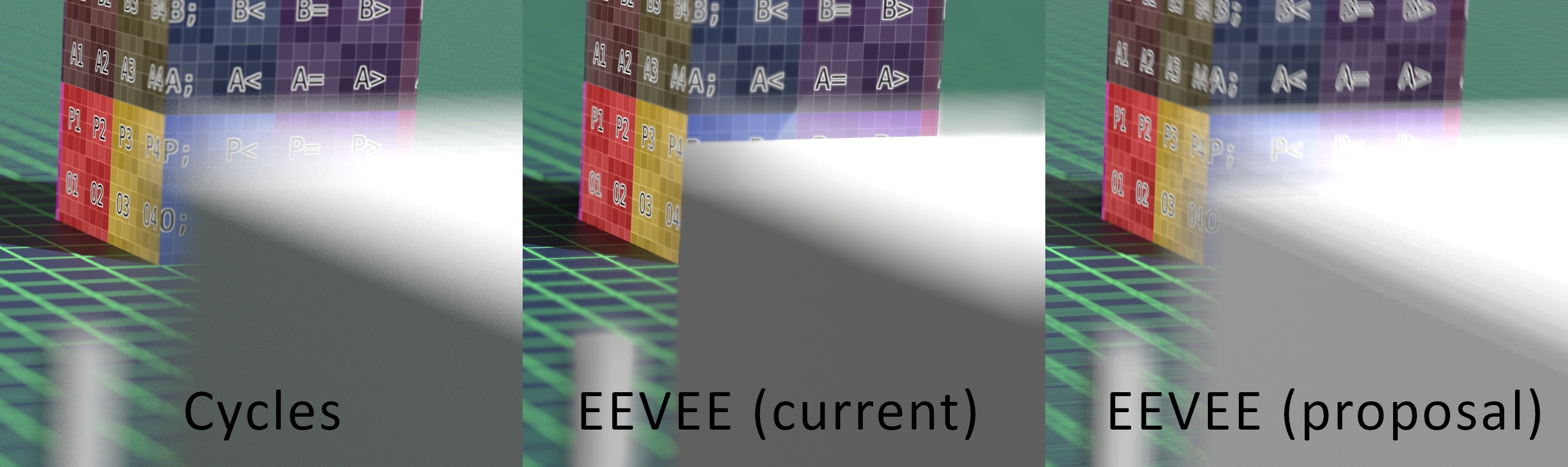
In this example imgur.com/a/OpnEo6D you can see the differences between the Cycles DoF on the left and EEVEE on the Right.
The idea is to slightly move the camera to simulate the sensor's area, just like Cycles does in the background (I presume).
I attached the camera to an empty and gave it a random rotation relative to it's original rotation over 250 frames and combined the frames together. There were some compressions artifacts and color management issues in my method, but the result is very close to what Cycles offers. Notice how the "p; p< p= p>" in the cube texture isn't visible when using prost-process DoF, but it's visible in Cycles and with sampled DoF
Sampled DoF for EEVEE (Proposal) from abdou bouam on Vimeo.
Cycles render (target) : imgur.com/a/kjhAG72
EEVEE Post-process DoF: imgur.com/a/fZioOdL
EEVEE Sampled DoF : imgur.com/a/J2dgFD0
This effect requires a large amount of samples, especially if the size is too large, but sometimes it is necessary and there are no other ways to do it without switching to Cycles.
The Post-process effect should still be available (and possibly selected by default)
11 Comments
I really like this idea. Videocopilot’s Element3d seems to have something like this and it can really raise the production value of an image. It seems like we could also use the depth pass to possibly apply heavier denoising to the out of focus regions, which might get a bit of a performance boost for renders with a larger blur / wider aperture.
* @davidmikucki * Would denoising work with the banding ? Maybe a dither pattern could make those bands into noise and it could be denoised, but it's only effective if it works without needing more samples. Honestly even the basic implementation is very useful, especially with textures and high-frequency detail that would hide the effect
* @abdoubouam * Yeah, I’m not talking about a huge boost. But I imagine tying depth into denoiser strength could help a little.
Anyway, I’m very much in favor of your proposal. Wish I could upvote twice.
I encountered the same problem so i made a node tree the helps with this, its not super accurate and a click-and-go solution but it has helped me a lot, here gum.co/ZkrjH and yes its for free
Cool, your proposal needs some darker shadows, but that's an easy fix, I think, still cool tho :D
* @djgytis231 * That's just some color grading mistake in the compositor and it's entirely my fault
I think EEVEE already supports this out-of-the-box in 2.82. No need for a post -process DoF.
* @Ivo * by "post-process" I mean as an image effect, like the screen space reflections and glare that is applied to the viewport and render. I am not talking about the defocus node in the compositor, but they're similar and share the same issues.
Sampled DoF is more accurate and gets rid of the artifacts in expense of render times, but sometimes it's necessary
interesting, but how performant is it?
* @anselmschueler * that depends on the size of the blur. The bigger it is, the more samples you need This should be just a "high quality" option without completely removing the old method
* @abdoubouam * this sounds perfect!