
Add "Snap active to selected objects surface" snapping option
Make it work like shring wrap modifier. This would be super useful for retopology work. Current snap to faces is view dependent - components snap to only visible faces. There are few problems with that when doing retopo. Here are examples.
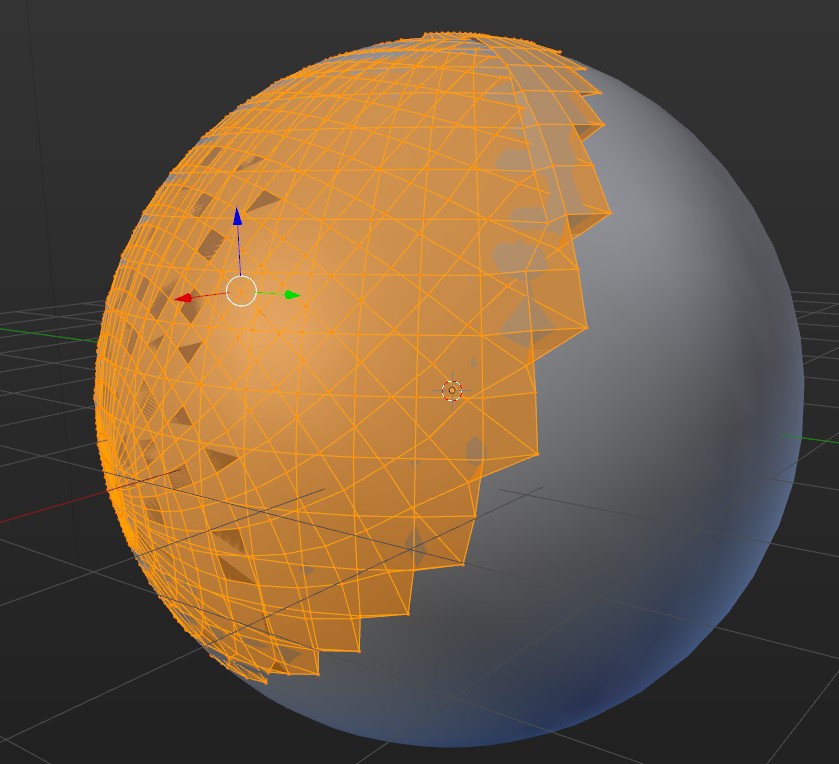
- if you need to snap many selected points to a object and some of them are behind the object - it will snap them to front of the object, not back faces - therefore destroying your mesh.
- If underlaying surface is in angle according to view - it will snap not to a closes point but point directly behind view direction and therefore create distortions on edges
You can see what I mean by:
- create a sphere
- duplicate sphere in place
- enter edit mode and activate snap to faces
- select all vertices and do slight move.
- your sphere is snapped to front part of the other sphere and is flattened and destroyed.
I know shrink wrap is a solution for this, but It would be better to have proper snapping mode that works similarly. Problem with shrink wrap is that once your need to apply and recreate shrinkwrap all the time to keep meshes aligned.
It could work like:
- Select object(s) you want to snap to
- Select mesh you want to edit
- Activate "Snap active to selected objects.."
- Selected components are snapped to closest point on target surface
Also adjustable snap offset from surface (like in shrinkwrap) would be good
0 Comments