
Viewport switch viewer
I got the merge of two issues with one solution:
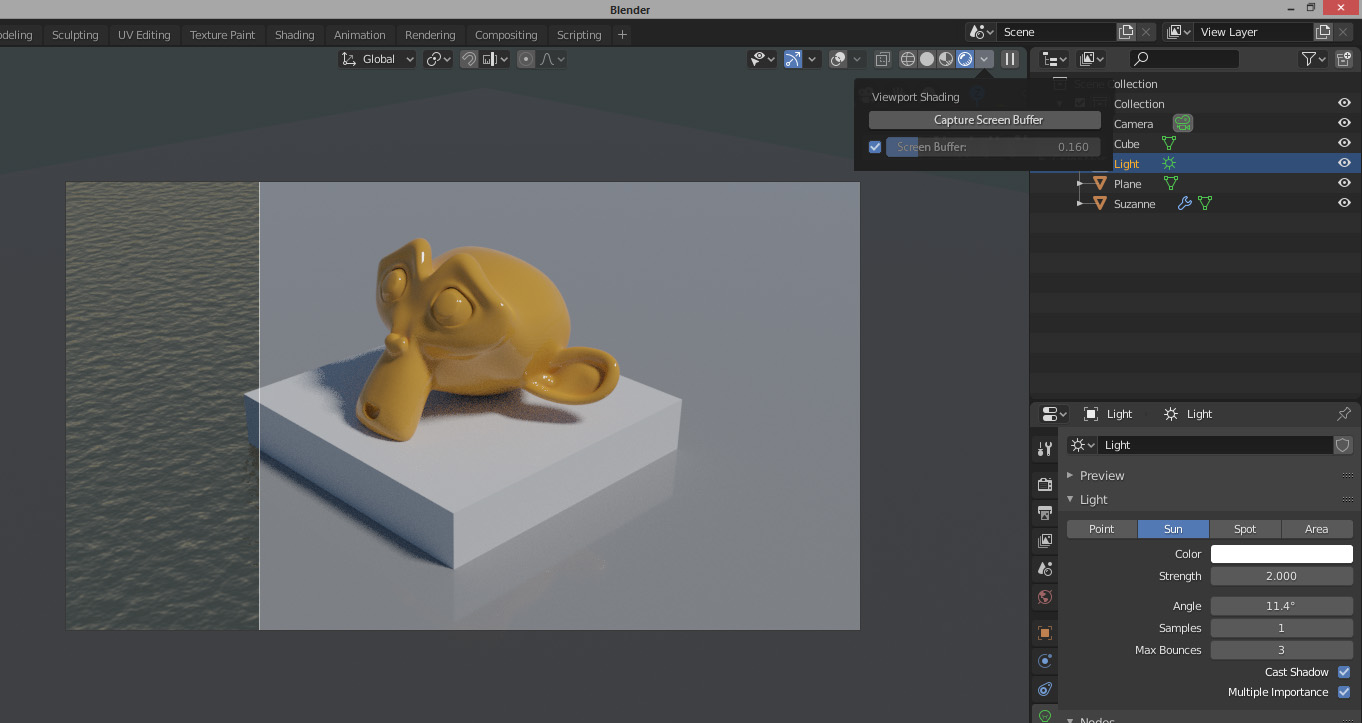
issue #1: top header, the little right-most downarrow named Shading, that is a popover that shows many shading options, is useless when in Rendered view (Cycles or Eevee). It only says Viewport shading with really no knobs to set.
issue #2: I miss a way to quickly see differences in rendered view, when I change something, like a light, or a shader. It's too hard for the eyes to judge with the annoying interference of those grainy early samples. I always find myself making two (before/after) screengrabs and pasting them into a viewer to do the evaluation there. Yes, outside Blender.
Solution: let Blender make the viewport screengrab, and let the user choose when to see it over the current preview. What you see in the mockup is a big button to save a screengrab in a dedicated buffer, a (redundant) checkmark to enable, and a slider to overlay the saved buffer to the current view.
Possible extension: multiple numbered buffers, an automatic screengrab, get rid of the checkmark (slider to 0 = off), choose from what side (up right down left) the overlay shows up.
3 Comments
Why aren't you using render slots?
* @Jason van Gumster * Working in the viewport is always faster to make changes. With render slots, F12 has to be used, that's slower because after every change you have to wait until everything is reloaded to the gpu. XSI had a good implementation of this viewport render-region. There where 4 buttons or so, to store not only the rendering, but also the state of the scene, so you could go back easily when you aren't satisfied with your changes.
* @Jason van Gumster * I also use renderslots but here I'm talking of the viewport rendering.
* @danielpaulus90 * You nailed it! Nice approach in XSI