
Delta Pose mode or Animation Layers - New Animation Mode
Case
Blender has strong animation tools, minus one very important one for Mocap and animation NLA clip blending and editing: Animation Layers and it's workflow.
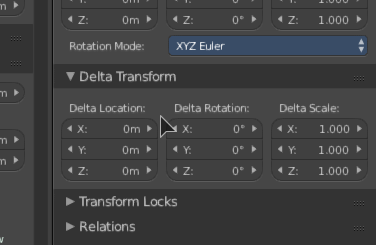
Possible solution: there is a single layer offset system called Delta Transform. And this system doesn't work on Armatures.
... Maya and Softimage both have an Animation Layer system. How does this work? Well you animate normally, bake into a clip if you want (edit, layer clips) and if you want to offset the arm waving animations, you can create an animation layer and add a new keyframe with the offset and viola, it waves in a different direction.
The NLA has the limited ability to blend clips and creat offset clips, where you can create one with an offset animation and the other with the animation - blend them with Add or Multiply.... but you hit a wall, especially in armatures. Add and Multiply don't work.
First: 1. You have to make two tracks. 2. You have to make the top track an "add" and "hold" type. 3. You have to enter the offset track to edit it's keys. 4. In armatures this doesn't even work predictabally.
When you try to edit an offset over the target animation, you will have to enter the offset clip, isolate those frames, loose perspective of what you were offsetting, exit the clip, then go back and hope your offset edit worked. You can't see both the clips keyframes at the same time unless you open multiple editors. Also, you have to prepare. You can't just click, activate the offsetting mode and go ahead and push forward and keyframe.
So, I thought Blender had a solution to this with Delta transforms - but then armatures don't use Delta transforms. Also, you can't pose in a "Delta" mode, you have to pose, then copy that keyframe to Delta, then pose again... inverse. You can't pose then pose the delta. You have to do the Delta first then the real pose. You have to offset before you even have anything to offset! Deltas are only useful for offsetting general roots of armatures or scene props - but not offsetting animation or keyframes, let alone armature bone animation.
Additionally, Armatures "Add" tracks seem to square the movement as if it were a multiply track - adding and exagerating on established keys. It doesn't offset, it exaggerates.
I key an armature at 1,1,1 and use an offset NLA track with add and a key to move the bone or object to an offset of 1,2,1 with Add mode on, the add jumps the rig to 1,3,1, double my movement that originally planned. Multiply is no better. Wtf? Why can't the offset keep the key value at 1,2,1?
Offset layers and how they work:
If you have an object at 0,1,0 and moves to 0,2,0. That is the base keyframe in a base clip. You can optionally build a clip offset layer, or NLA offset layer. It will offset at a fixed value you key in the layer.
You now key in the layer +1,3,0 and resulting keys are 1,4,0 to 1,5,0. Your single offset key changed all the animation by that value, no multiplication.. just addition and subtraction for the offset (depending on axis). This is true of armature and objects alike in the nested layers or NLA layers.
Generally, in software like Maya, Softimage and other major animation packages - you can use layered animation on top of the typical animation workflow (dopsheet/fcurve/NLA clip editor). Additionally, after that process, when you use an animation layer, the keyframes show up as a new track in the clip, and these keyframes have a new colour - and they are automatically configuered to "add" offset animation to the underlying keyframes. You can also create an offset NLA track and offset animation over a bunch of tracks and clips - an overall offset layers.
Animation can be layered. It should be able to be layered. The "additive" corrective track should be somewhat more optimized and predictable.
And more, you can merge offset data, flatten then remove the layer - and put it into one and the same (if it's nested offset layers) without any animation loss - this is impossible in Blender.
Problem
In Blender - there simply is no standarized and user friendly system to offset animation. No way to finetune Mocap without destroying keyframes in the Mocap data or creating unpredictable result with additive or multiplicative tracks (which you can't merge). There is no way to retarget animation to new rigs with an animation clip from another character. There is no way to create blending animation between clips and their linear/bilinear blending in the NLA. Without this, animatino production is clunky, slow and every change require a complete re-animation with whole new sets of keyframes. Poor animators. Expensive workflows. It just doesn't work for profesional animation turnarounds.
Tasks
Add a workflow for A+/-B = origin subtract/add offset, not A+B = origin + addition offset nor A*A origin * multiplcation offset . I don't want to +1 transform to make +2 transform. I want 1 transform, and at this point offset the transform by value on base layer (so transform of 4 would have +1 offset in the layer).
Fix or improve the NLA clip additive blend mode on Armatures and objects to be predictable. *if transform is on additive, make it offset original pose, not exagerate by the additive track values. *
Create a Delta pose mode for objects (instead of needing to copy after you do your offset after the original key)
Create Delta transforms for bones in armatures
Add ability to have multiple Delta layers
Add the ability to merge delta animation into the one and same with predictable results to inverse the workflow.
1 Comment
I agree, i'm currently trying to fix a mocap file and i0m finding a lot of trouble, i think i'm going to use motion builder.