
Keyboard shortcuts for directly accessing individual Sidebar tabs
I wish there were keyboard combinations of shortcuts to directly access individual tabs of the Blender sidebar:
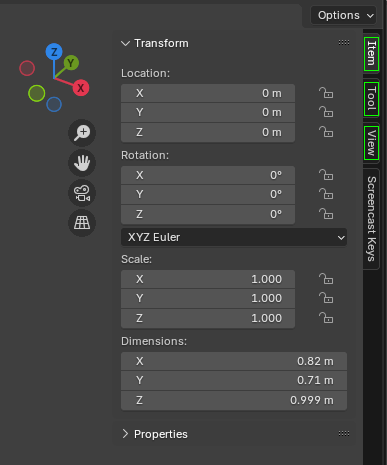
Current Blender 4.3 sidebar.
Individual tabs are located vertically on the right.
Here: ["Item", "Tool", "View", "Screencast Keys" (non-default; depends on an addon)]
For example, such combinations for the default tabs ( depicted within a green frame in the linked image ):
-
N
then
I
->
Item -
N
then
T
->
Tool -
N
then
V
->
View
Thanks!
4 Comments
use double square brackets instead of kbd html tags:
[[N]]> NFixed! Thank you for that precious hint!
I like the idea but not the solution. These shortcuts are too commonly used and would create confusion if one forgot the sidebar was opened.
Add a right click option where user can tweak tabs will be nicer, since it will be possible to change shortcuts on a fly.
Also a option to create a custom tab.
And keep a tab always visible, "kinda merging" different tabs, like display Item and Tool at same time.