
Enable "Orbit around Selection" and "Zoom to Mouse" navigation preferences by default
PLEASE help this request to get prioritized by engaging, commenting, and provide context as to why these settings should be enabled by default.
"Orbit around Selection" and "Zoom to Mouse" preferences should be default for all new users. New users to blender struggle to navigate with the zoom and camera orientation. Many giving up and return to software where "Orbit around Selection" and "zoom to mouse" are the default behavior such as cinema 4d, zbrush, 3dsmax, maya, modo, etc.
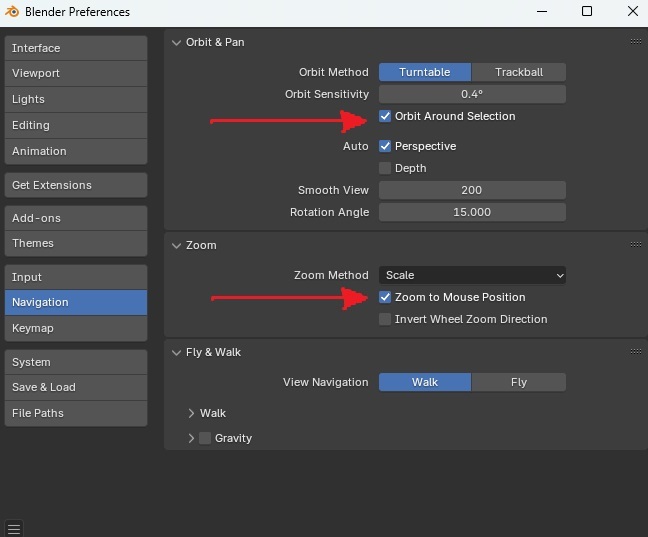
Setting these two preferences makes blender much more intuitive and easy to navigate for new users, and advanced users who are used to the legacy navigation methods can disable these options in the preferences.
There are endless complaints and confusion online for new blender users unable to navigate due to these default preference not being enabled automatically.
A quick google will return with tons of people asking how to properly navigate blender, it's such a basic thing that new users should NOT have to research. google.com/search
Most videos and discussions end up with telling the user how to go into "fly/walk" mode (SHIFT+`) or pressing the keypad "." to move the orbit around the selected object. Both of these are "work arounds" to the real problem that can be solved with these two settings "Orbit around Selection" and "Zoom to Mouse" set in the preferences by default. For example, when pressing the "." key it doesn't just change the orbit around selection, it also changes the camera orientation focusing the camera on selected object which is disruptive to the user's flow having to reorient. But the bottom line is the user should intuitively click on the object they want to orient around, it is not unitive to have the orientation around 0,0 and have to hold "shift" and drag around to move around to the various objects, and then press '.' to move the orbit orientation. That is madness.
This is 1 video as an example, and there are MANY on this topic. 5,100 views, with one user even saying "This problem made me rage quit blender a few times lol I'm going to try again after watching this. Thank you!" youtube.com/watch
Watch this video, this blender youtuber explains that new users frequently comment on this videos asking how to move around in blender. This has another 5,000+ views on this video. youtube.com/watch
This issue initially opened as a bug, and a 2 line fix was submitted to resolve this, but it was determined that this has to go through a feature enhancement request instead of pushed through the bug system.
This 2 line update got rejected because the developers said that it has to be vetted through the "feature request" instead of fixed as a bug. Please help this get the attention it needs to get put into the next release for blender asap.
projects.blender.org/blender/blender/pulls/126130
Here was the initial discussion on this topic in the blender bug channels. projects.blender.org/blender/blender/issues/126064
25 Comments
You're cherry-picking user consensus here. It's much more likely that new users are unsure with Blender's navigation because its basic controls (orbit, pan etc.) are different to the industry standard, or they've simply never used a 3D app before. It's also one of the very first things that new users seek to do in any 3D software. I strongly doubt new users are opening Blender and taking immediate issue with navigation controls that more experienced users would change, like Orbit Around Selection and Zoom to Mouse Position.
I use both of those settings myself but I probably wouldn't expose a new user to them right off the bat. It can be unwieldy if you're inexperienced and new users may swing their view out into the void unintentionally.
I am new to blender and I struggled with navigation and had to watch multiple videos and discussions leading me to find the “.” key after selecting on things to finally be able to use it at all. I was unaware of these settings until I saw this post just now, and now I finally have it working without having to press “.” all the time. If these were set from the beginning it would have saved me a lot of time and pain.
I am inclined to agree. I came to Blender from 3ds Max many years ago, and while there were plenty of quirks that rubbed me the wrong way at the time (right click select for example, lol), I don't remember the orbit/navigation behaviour being a particular pain point for me personally.
I've also introduced a handful of people to Blender over the years, and I don't recall this being a major problem for any of them either as I've mentored them (these are mostly people new to 3D software in general, for the record).
I'm sure there are many people who do find it counter-intuitive, of course. I'm just not convinced they're necessarily a majority.
back then like in 2010 when left-click would place the 3d mouse in blender, i installed tried blender (from a sketchup old user). that weird way of using the mouse and navigating was just a nope for me. i quickly decided i didnt want to use blender. so these little things could matter.
The most best thing that i got from the discord that totally describe my feeling: My brain just hates how the pivot of the camera changes if I have something selected
I agree with you, I really wanted to try this pivot point but I just couldn't get the angle and position right as the selection changes often. We can implement a button on install that allows users to choose these options, or just send them to preferences.
I personally dislike this type of navigation for any 3D application.
Tell me how you navigate in 3d applications like blender? Do you hold down shift to drag your orbit orientation? Are you constantly pressing the period key to focus on the object? Are you flying around with the Shift+` key? Because that’s not how any other program works, only blender.
Yes, i do, and i do not use other software, and i don't think core users of blender should use other software as example of anything.
@modormoder Do you have any idea of the absurd you're talking about? Blender is a copy of other software. Everything that blender does is either copied or inspired by other software. Keep that in mind.
Well... I always have in mind of Cinema4D R25 UI or something like ZBrush Dynamic cloth brush, they should had introduced it before Blender since they are the big guys, standard. Introduce some features, alike is copying or inspired, but when the devs take idea to other direction in user feedback you have to do like similiar X software.
Blender doesn't exist in a vacuum. New users carry over habits and expectations from all types of software they've used in the past. Abrasion towards new features/methods borrowed from other software or industry standards is not constructive. Lest we forget why Blender now has Left Click Select as default.
Completely agree with this. The defaults are bizarre, if you've ever used any other software and not even great for a new user. I spent the first day or two wondering how the heck it worked.
I constantly use Alt+Middle Mouse Button to center my view pivot. Doing so is super fast, works on tablet and feels more intuitive to me because the program doesn't take control away from me. Personally i dislike zoom to mouse and orbit around selection in every software
I do agree that people shouldn't need to search the internet for this type of issue. Even if the question "Have you checked the preferences/settings of the program if [insert interface issue here] can be adjusted?" should be a knee jerk reaction to any computer user regardless of the program.
A far better thing instead of discussing what the default should be would be to make the program better at informing the user at startup what navigation settings exist and where to edit them.
Whenever I introduce new people to blender I tend to inform them about these settings and that it is useful to explore them a bit, see what one likes and not.
Ie, in my own preference, the default could be anything, even randomly picked on a new installation, and I wouldn't care. I experiment around with the settings and pick something that fits my way of working.
We can pick away at each other for decades, default behavior is generally a needless debate only fueled by opinionated changes in the default.
No.
Zoom to mouse — yes, it is most intuitive thing.
This should be enabled from version 1 👍
The people who disagree probably don't want blender to become more popular
People who disagree have their own opinions. Blender is already popular, changing these 2 settings won't make Maya and 3DS Max users delete their programs.
I first learnt Blender 2.78 2.79 then I learnt Cinema4D and Maya then same for Unity, Houdini experiencing all have different kind of navigations. And looking through you mentioned Shift Tilda game engine style walk navigation "only Blender"?? I see no issue, I don't even bother to change the preferences like you do here. Glad they even have it as an option, user preferences.
came to give my upvote even though it wont make any difference ✌
and look who already downvoted. its damn sad
Like obviously quite some others I dissagree with this. I always have left these off and never missed it. It's easy enough to use the num-dot key to center on a selection if I want that and I like that workflow way better because it can do way more. So I am perfectly fine with that workflow, thinks that's a better default and think it's easy enough to just turn these checkboxes on for people who still want it.
I would also argue that having these switches on would make it easier or more intuitive for beginners. And the fact that Blender makes things like these even user configurable is superb. IMO There are way more important things to request for.
I have no strong feelings toward one or the other. I've been using Blender long enough so that the default setting feels familiar and good to me. I also use it most of the time. But I also do switch it occasionally as needed.
Bottom line though: this is an individual preference and as much as I want any software to be approachable and good by default - this adds nothing really. Navigation styles are very much a personal preference as long as they are available in the program settings. Learning where to find basic navigation settings is something I would absoutely demand from a user. Any user should be able to at least understand how to configure their program before discarding it as unusable.
You change the default to these settings and you will most likely alienate all the users who do not like it. The only way to know for sure which one is most used would be if Blender submitted telemetry of these settings. Otherwise it's pure assumption on everybody's behalf here.
Anybody down voting please explain why. It seems like people down voting are admitting that they even use these settings so that means they actually support using these settings.
The people downvoting this are probably kids with no experience with other software. Remember, they used to defend the right click select insanity. So this is nothing
People down voting aren’t giving any reasons or no solid reason why not to do it.