
Multiple Output Nodes in a Group
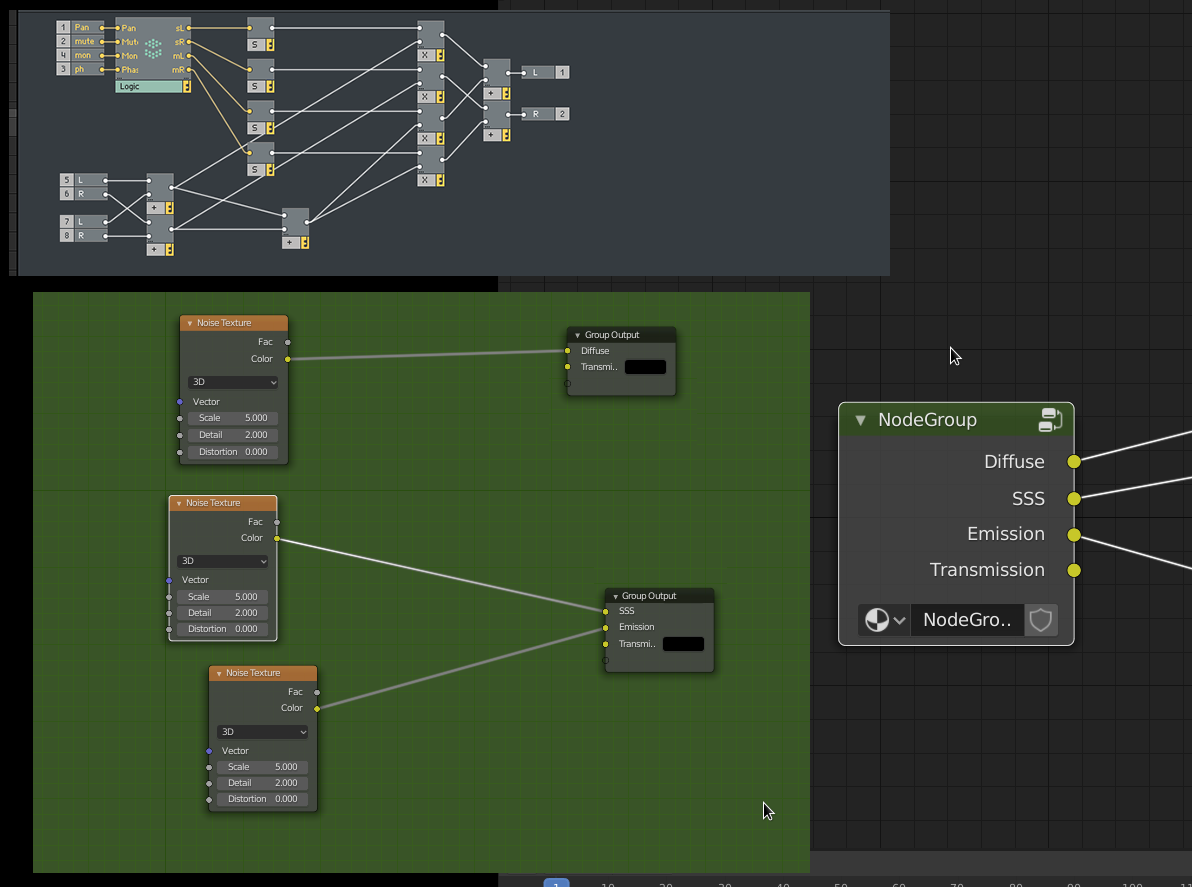
Again inspired by Native Instruments Reaktor. Reaktor implements each output socket in a "group" as it's own node. This isn't really the best idea in the world but it hints at potential. It allows you to output from multiple separate places in a complex group and reduce the amount of lines converging on one output node. This is extremely helpful.
Blender actually already has multiple group output nodes, however they are bugged (produce invalid numbers in compositor, react oddly to selection in shaders)
I reported this bug on the developer site, they told me it's an "issue" not a "bug". EDIT: they have retracted this statement and are pursuing it as a bug. maybe someone just didn't have enough coffee that day <3
In any case, it doesn't have the functionality I am requesting, so hopefully if this gets treated as a feature request it will all come out in the wash either way.
My proposal is this: If a second (or more) group output node is added, hide all the sockets that are already connected in the first (or others). Continue to show only sockets that are not being fed by any of the other output nodes, hiding sockets should they become connected on another node, and unhiding them on all output nodes if they are disconnected. In this way, output nodes can be used as one single node as they are now, or split into different places to taste, all the way up to a separate node per socket like in Reaktor.
5 Comments
From a node networking debugging perspective, I'm not a huge fan of this concept. Were this to be implemented, I see future versions of myself hunting across multiple group output nodes to figure out the socket I'm looking for.
* @Jason van Gumster * what if you could right-click on an output node and get a dropdown list of all sockets, to jump to whichever node contains the socket you want?
* @cerebral * I think something like that would be required for this to work well. Thing is... how many little additions like that are going to be necessary? And then the question is whether any benefits of this feature is worth the work for all those kinds of additions?
You have 2 transmission outputs inside the group and only one outside.. looks strange. Perhaps this is a better idea
I usually solve this problem by having nested node groups. If I have a node-feature I tend to reuse, even if it's small, I group it. I make groups of groups that are often used together. Then the uber-shaders and procedural-textures and etc. only stitch together and control the groups I already have. I can make new groups quickly this way.
The only problem it causes is in cleaning up the file- Blender counts the existence of the node group (even if none of them are in a shader) as a user for the node-groups within, so if you want to remove them from your .blend file it takes a few rounds of save/revert.