
Create new directory
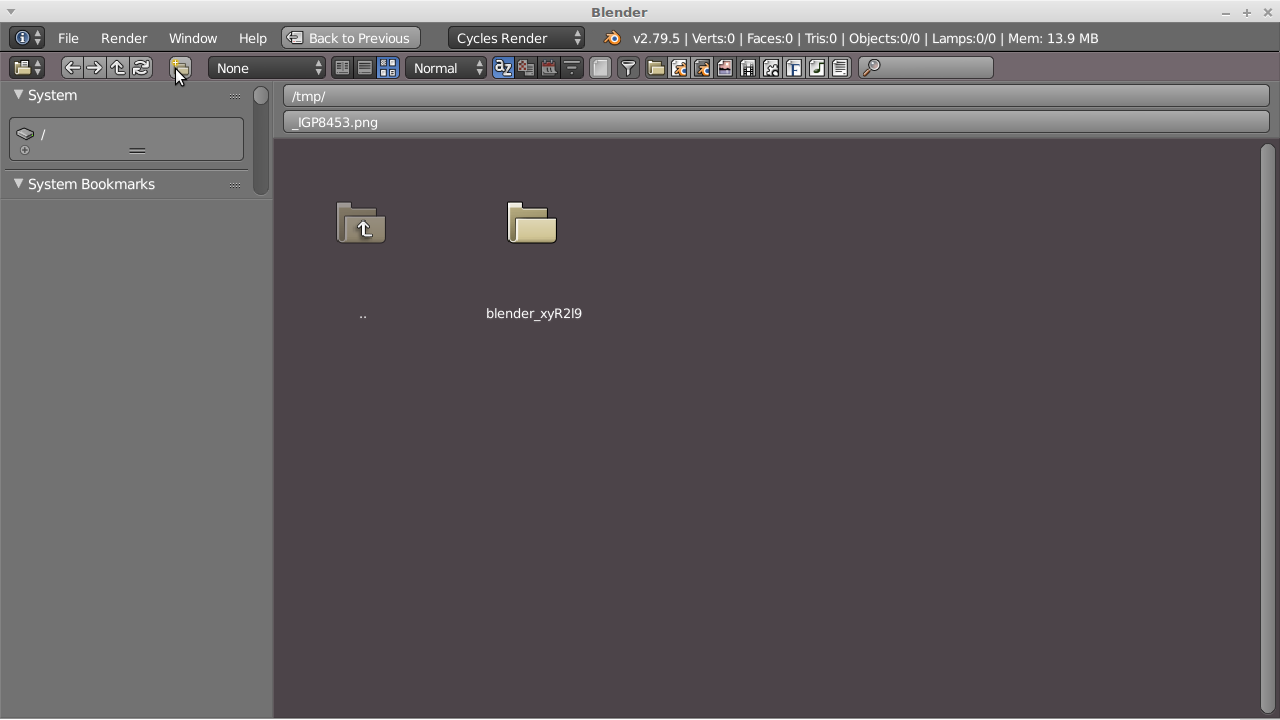
After creating a new directory in the file browser via the dedicated knob "Create new directory", the user has to select that folder manually in order to proceed. The issue: The parent folder of the newly created one could be huge, so chances are you first have to scroll horizontally for a while before finding the new folder. Artturi Mäntysaari mentioned this issue in his post . But rather than snapping the view in the parent directory, i'd prefer to have blender opening that new folder for me automatically, since this is the most likely next logical step i would do, right? And blender should propose the name for the new folder to be the same as the name of the blend file, if it already was saved under a working title.
This behavior of instantly jumping into the new folder can be achieved by typing the destination of the new folder into the adress bar, but since there is that knob, it should behave the same.
The workflow for a named blendfile should be: Open file browser, hit "new folder", hit enter twice, done.
Edit: One smart user felt sufficiently provoced by my unsorted mumble to eventually tell us his thoughts about it, and so please listen to this:
"And this is the very core of all the troubles. The newly created folder should be selected, so you can press enter to enter in, or double tap enter to validate the name and enter at the same time. This added to a centered view on the new folder would solve the issue." Thanks for that, lolc.
2 Comments
Wrong. The next logical thing to do after creating a folder is to name your folder and then enter in, maybe.
Otherwise, you will just have a blank default folder name everywhere, you will be forced to open your own file explorer software, navigate and manually rename everything so that you file managing makes sense.
And as you changed your folder name, you will also have to relocate the concerned files because their data path is outdated.
Giving a default folder name based on blendfile name doesn't seem clever to me: it doesn't solve the issue and it requires time to code this for a very little impact, if not useless among most users.
Besides that, I'm not sure to understand this :
Yes, you can, except that you must write a folder name first. What knob are you talking about in that case?
And this is the very core of all the troubles. The newly created folder should be selected, so you can press <kbd>enter</kbd> to enter in, or double tap <kbd>enter</kbd> to validate the name and enter at the same time. This added to a centered view on the new folder would solve the issue.
Love blender, Hate blender IO UI's