
Edit UV's from Modifiers
Modifiers are great for non-distructive workflow. However, when you get to the texturing stage you almost always need to apply the modifiers to UV the entire model correctly.
My proposal:
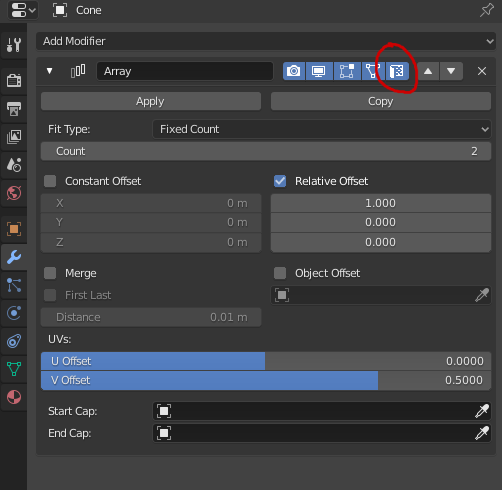
A button that toggles the visibility of the UV's generated by the modifier, and allowing the user to manipulate those UV's.
There is already a way to see the UV's generated by the modifiers, it is found in UV Editor - overlays - modified. Though this toggles the UV's for all modifiers. My proposal allows to toggle the UV's per individual modifier.
The UV's can then be selected, moved, scaled and rotated, to lay them out nicely.
For my proposal, the UV's generated by the modifiers can NOT be unwrapped themselves, they can only be manipulated. Being able to unwrap them would be a much bigger proposal and would bring alot more complexity to it.
1 Comment
By "be manipulated", do you mean actually changing what the UV map looks like specifically after a modifier is enabled, instead of changing the base UV?
Or do you just mean manipulating the base UV map, while being able to see what it will look like after modifiers take effect (kind of like mesh editing with subdiv enabled and visible) on a per-modifier basis?