
Add a floating shading workspace like Maya's Hypershade
Sometimes when working on lighting on "layout workspace" it's very inefficient to chage to shading workspace because render must update and in heavy and complex scenes it can be very time consuming and frustrating to change between workspaces in order to change shading parameters (due to re-renders and constantly windows layout changes).
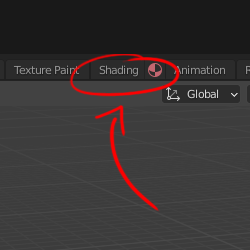
I propose to add an icon next to "shading workspace" tab that open a floating window with a layout kinda lika Maya's Hypershade. The idea is that you can just open it with one click, change whatever you want and minimize it in order to be an intereactive way to work with a shading workspace in one monitor.
I think it will add a lot of efficiency when working on lighting and changing material parameters without having to re-render or waste time on multiples clicks until you open a node editor.
It can be applied to other workspaces as well.


Thank you!
5 Comments
I like this proposal, but I'd prefer it being implemented in the workspace tab's right-click menu rather than as an additional icon. The header is pretty crammed as it is on smaller displays.
And just in case you're not aware: You already can open workspaces in new windows that behave similar to what you're proposing. Go to Window > New Window and it will duplicate the current workspace in a new window. ( Window > New Main Window will also include the Main Header in the new window). So ideally this proposal would be just implementing this behaviour in a new button/context menu.
* @lone_noel * Or a shift click, faster stronger.
But no icons. I think we have already lots of icons everywhere, if we start adding icons in workspaces' tabs, then we'll also want icons for every tab, even custom ones, then even more, ... Al that for essentially just being able to open a workspace in a new window.
* @-L0Lock- * I like this as a right-click option on the tab (menu shows up with open workspace as new window as an option) - keeps everything clean looking and enables that workflow.
* @Bassam Kurdali * or both \o/
Great! I do agree with all of you. I think the right-click option is fine. As I said, the idea is just to implement this workflow in a more interactive way than having to open windows and set "manually".
Another idea is to have a list of every editor under the "Windows" menu and be able to open each one in a new window. It would take only 2 clicks and would be applied to every editor (like almost every software).