
(EEVEE FPS settings) user interface that always has the priority of using resources
On eevee when the scene starts to get heavy, when the performance going down it's hard to change shader parameters. it would be useful to have a function control that gives the user interface always priority, an "algorithm-semaphore" that stops-slow down the occupation of rendering resources in favor of interaction with the user interface.
For example if setting a property of a material stops being interactive because the scene uses too many resources, the interactivity is interrupted for a few moments to allow the setting of the parameter, and to release the assigned function it resumes the rendering of the scene.
Another possible way to optimize the use of resources is to use scalability on objects that have priority to be rendered. For example, the objects highlighted in the 3D view, which are usually those being processed by the user, will have priority in the use of resources, and the objects in the background will have less priority and so on.
Probably an algorithm that scales the use of resources will avoid bottlenecks in general
Read comments there are userfull info * (edited)
8 Comments
I forgot about " Realtime " viewport mode. It render any realtime changes/features/fps only when viewport is active ( view was changed, some manipulations with objects etc. ).
Here is small
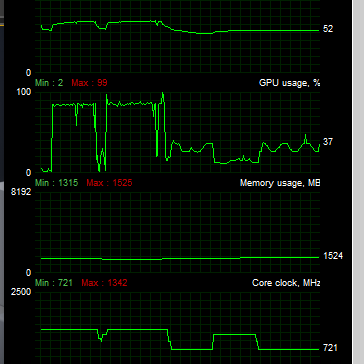
VIDEOshowing how it work for those who have no experience of using UE. Look at the GPU & CPU stats.So i think FPS clamping + this one " Realtime only if active " mode for EEVEE is something what wasn't hard to implement instead of some " user interface priority " feature and it can help.
You can edit name of suggestion to something like " EEVEE FPS settings "... maybe it still can help to get more votes. For heavy scenes it is really need to have some performance settings.
@forestgumpovu4: I hope that some develper will read this and take some inspiration from it
I think that even adding just simple settings for frame rate clamping in EEVEE mode in your case would be enough for first time.
Unreal Editor default scene without any extra content.
Without viewport frame rate clamping
With viewport frame rate clamped to 15
what does that mean get complicated and giving priority? is the performance going down so its hard to change shader parameters? or what makes it complicated?
@grauer.d: exactly when the performance going down it's hard to change shader parameters
@amonpaike: i see i only experienced this with cycles and my solution was to add a 2nd gpu which does the rendering but that is quite a overkill option^^ and not sure if possible with eevee
@grauer.d: hehehe ... my proposal is to understand if they can implement something at the software level, an algorithm-semaphore that stops the occupation of rendering resources in favor of interaction with the user interface, something that always works, even on low-end machines
@amonpaike: yeah im curious if this has become possible because i was looking into this some years ago and was told by a graphics programmer that its not possible. so curious to see what the experts think about this. then not to forget 2.8 is in alpha state and there is most likely a lot of room for optimizations.