
Random Object and Material color passes
In other software it's super easy to make a random color pass either for per object or per material to ease the area selection and masking process in compositing software like Photoshop or Krita.
So, you have the beauty version of the image:

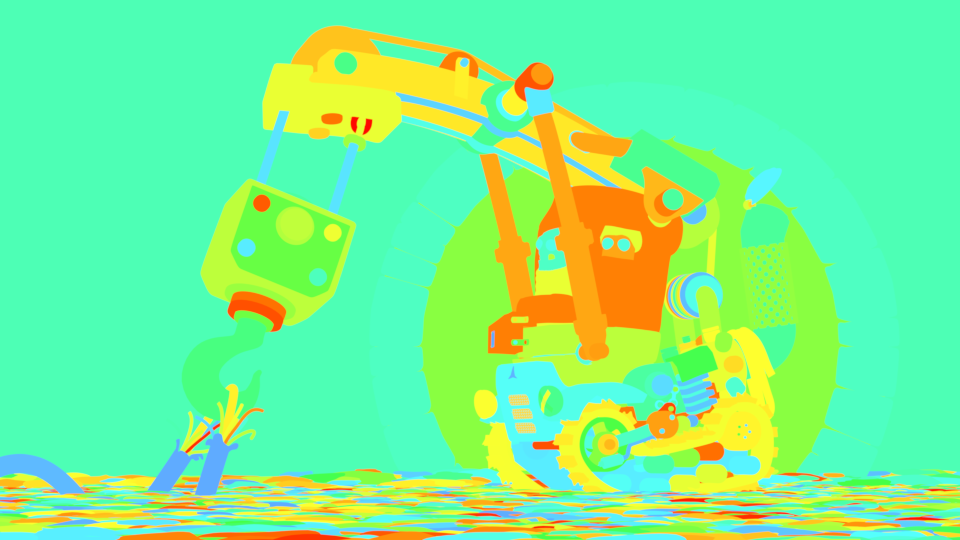
And this is what would be needed (the image below). The following image is painstakingly achieved by putting a single emission node for each material.
I'm sure this could be automatized easily
. Other way is to assign material IDs to each material and in compositing editor collect them all into one image - but that too takes way too much manual work, as well.

You can achieve relatively functional random colors for every object by assigning an override material for the render layer. A material that has the following nodes. But you would need
this seed suggestion
in order to add also color values (black, grays, white) into the final colors mix (which helps the selection in Photoshop)

And the result. Not very good, in fact because all the objects use same color value, only hue is different, which causes too many objects to have almost the same color.

So.
Can we have a simple way to render out a proper Random Object color pass and a Random Material color pass? Pleeease? :)
6 Comments
This is actually so essential. I couldn't count the number of hours I've spent assigning different Material/Object IDs and then remap them to the File Output node just so I could have more control in post.
@niranjanraghu96: I know the pain. Later on Nuke or compositors, if you played the same hue level, in for a treat on masking... pain...pain
Absolutely needed. You might wanna take a look at Cryptomatte, being developed for Blender :) youtu.be/_2Ia4h8q3xs
+1
Although it can be achieved with a material override it would be a really useful and handy feature to have. And if Blender ships with a few default preset shaders, like a random material shader, it would be even easier to setup for most users.
By far(!) the best solution to this problem is cryptomatte! Blender support is underway afaik. I'm not aware of any plugins for Photoshop or Krita tough ... but this is just a question of time.
Yep, I think that's cryptomatte
Nice Artwork btw :)