
Normal Input for Texture Coordinate Node's Reflection Output
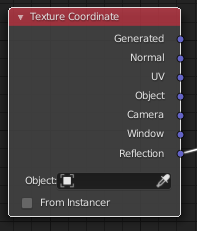
When using custom environment map for a material effect you may want to add normals, like in the situation I currently find myself in. The environment texture node must use the reflection output of the Texture Coordinate node to accurately behave like a environment map would. However, there is no normal map input which prevents you from using a normal map to distort the reflection like it would with an actual glossy node. I suggest adding the ability to input a normal map to the texture coordinate node for the reflection output.
2 Comments
I think you can just add an "Converter - Vector Math" setted to "Add" between Reflection and Normal Input of the Material. Then plug the Normalmap in the second input of the Vector Add. Maybe you have to a add Vectormath node with setting to normalize after the add node so that it stays between 0 and 1.
This is probably doable with vector math- it's not actually all that hard to calculate the reflection vector (formula is on en.wikipedia.org/wiki/Specular_reflection ). I've done it before, but I didn't try using a normal map.