
Option to render via Command Prompt
Am trying this suggestion again, as I had poorly explained it last time (don't worry, I removed my first post about it) .
As shown in the video and through Blender documentation, its possible to render via the Windows' Command Prompt rather than through the Blender application's UI. Rendering with the Command Prompt is often faster and more stable than rendering with the UI, and I've found it incredibly useful.
But while rendering via Blender's UI requires simply clicking the render image or render animation button in the Render tab, using the Command Prompt requires opening the Command Prompt and typing out a list of commands and as such, many people don't know its a thing.
I'd like to suggest adding a button into the Render tab to render via the Command Prompt, similar to what the FLIP Fluids addon does - where it'll open the Command Prompt, write the necessary commands and start the render automatically.
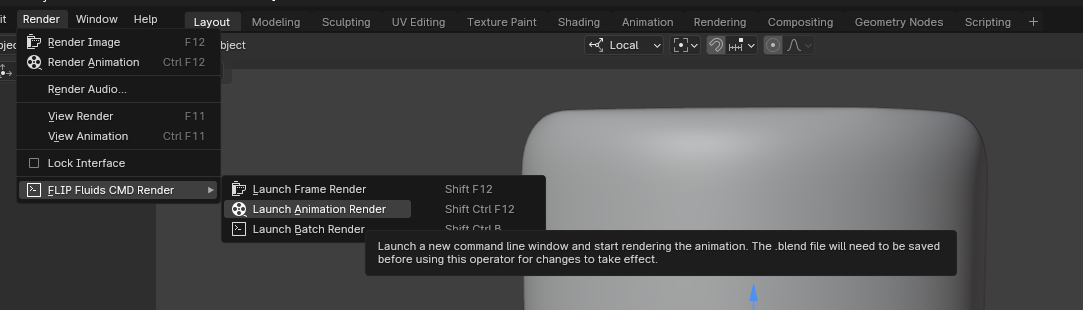
3 Comments
Meanwhile, there is Loom addon offering this and more github.com/p2or/blender-loom
This would be great. Some things to consider:
Take a look at the B-Renderon tool (see blendermarket) It's doing exactly this and solves way more rendering problems too. Like being able to render all camera's from a .blend file, choosing the output path/file name from there, choosing another blender version or renderer to render with, have a queue to render etc. I have good experiences with this and now use it on all my renders. Like you I used this a lot when doing FLIP fluids renders for the same reasons you mentioned (blender UI not being stable enough when rendering). Also you can have it automatically shut down the computer when rendering the queue is done, which is super useful. And you can still have a blender instance open to work on another project while this tool is rendering another project/projects.