
rotation object origin with snap
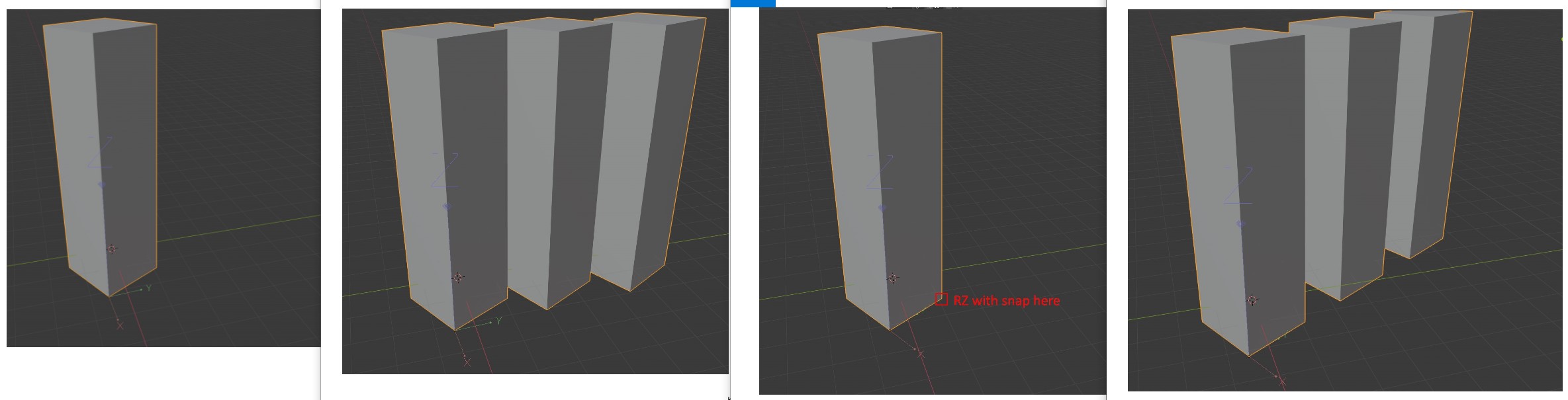
It would be great to be able to align object origins to some reference points using snaps. Especially in the case of archiwiz. For example, if you want to make arrays of objects rotated in a way that is not coherent with the default x, y, z axes
15 Comments
Try enabling the Copy Attributes add-on. You'll find it has exactly what you're looking for in <kbd>Ctrl</kbd>+<kbd>C</kbd>.
* @Jason van Gumster * sorry, I know the addon but I don't know how to do what I want. Can you explain better?
* @stecionco * Use these steps:
* @stecionco * Of course, re-reading your post, it sounds more like you're looking for a distribution mechanism more than an alignment one.
* @Jason van Gumster * I did as you say but unfortunately I don't get the result I want. what I try to get is that the rotation of the object origin can be done by aligning with snap to a point of the object. excuse my English
I would like to add one thing: I know that if you rotate an object its origin rotates simultaneously. But this only happens if the object is born in blender. If a 3d model is made instead of tracing a drawing (for example a 2d floor plan in dxf), everything is different. I often need to make arrays of architectural elements that derive from dxf floor plans I don't have the tool to be able to change the rotation of the object origin in a precise way
* @stecionco * The trouble is that the object's origin is only a location- what you're proposing is really rotating the object's data to stay in place while rotating the object itself. It's not that much harder to do on the math side, but it is an important distinction.
I think this is called "bake pivot" in other apps, and I don't think it would be that hard to do with Python- there's probably already an addon for this somewhere.
* @stecionco * Look at this proposal (I think this may be what you want, if so, this is a duplicate).
* @Josephbburg * I think this proposal talks about the possibility of rotating / aligning the pivot, which is already possible in other ways. What interests me is the rotation of the object origin, which is another thing, I think .. maybe the best way would be to eliminate the existing distinction between the origin object and the pivot
* @Josephbburg * for those who in the past had the misfortune of using autocad (like me), the tool is called UCS
* @stecionco * There is no distinction between the origin and the pivot. This proposal suggests being able to bake the rotation of the 3D cursor into the origin of the object (through the method I mentioned above-- by rotating the data and counter-rotating the object).
To reiterate- in Blender, an object's origin CANNOT be rotated. Origin is a point, therefore rotation doesn't exist. The closest thing is delta-rotation, but that's actually just a second rotation channel that is applied to the object before the standard rotation.
* @Josephbburg * I don't understand. blender 2.81 allows you to move and rotate the origin using ctrl+. ( wiki.blender.org/wiki/Reference/Release_Notes/2.81/Transform ). If I try to make an array of an object that has a rotated origin, the array follows the axes of that new origin. It is also possible to have an object with a pivot in one way and an origin in another at the same time: i.postimg.cc/W31MD42G/Screenshot-2.jpg
* @stecionco * When you edit the origin in that way, rotation is applied in the way I described in the first post above-- it rotates the object and counter-rotates the objects' data. The origin itself cannot be rotated. The screenshot you're showing has its transform widget set to Global orientation, not local. If you set it to local, it will follow the objects' rotation.
perhaps my idea is not correctly expressed, but the concept is the same: I would like to rotate the object data with a snap in a precise way. I show you again with a screenshot i.postimg.cc/zBqG9NTP/rotation.jpg
now I'm looking for an addon to do this txs
* @stecionco * I don't think an addon can rotate the object while snapping, but it's probably not that hard to make an addon that sets the object's rotation based on the 3D cursor. You'd have to snap the 3D cursor's rotation with the 3D cursor tool set to 'geometry'. At any rate, after this thread, I'm convinced that the array modifier should be able to use a custom object's local coordinate system.