
Sequencer Multicam option to Set Channels
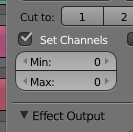
Some time ago I put together some ideas to improve the VSE, looking at each type of strip and the overall Sequencer workflow. I did an interactive page to present them. Please, check this link: Dropbox: VSE Improvements. Below is an idea about meta strips:<h2>The problem(s)</h2>A common problem I face using Multicam strips is that they count all the strips below them. When your're editing synced video and audio strips, is nice keep them together in the timeline, say tracks 1 for audio and 2 for video. Adding more one video track and a multicam effect, it'll end up with 3 buttons, when just 2 are useful. It not only clutters the interface, as also prejudices the keyboard shortcuts witch are essential to a efficient multicam editing.  This is a controlled instance, but note the problem scales quick in larger projects. Grouping tracks in a meta below the multicam helps a bit, but can't solve it.Another problem is: It happens you already did an multicam edit, but need to change the channel of source strips. Since the multicam channel value is absolute, you'll lose all your job.<h2>Relative Multicam Channels</h2>So the a practical and flexible solution is to set min and max channels, so the multicam number becomes relative:
 Another changes in this image, like tabs, skip buttons, and Set time options are discussed in my initial proposal, so check it all if you think so. Thank you for reading it, please like it if you like any of these ideas, and be free to discuss them.
0 Comments