
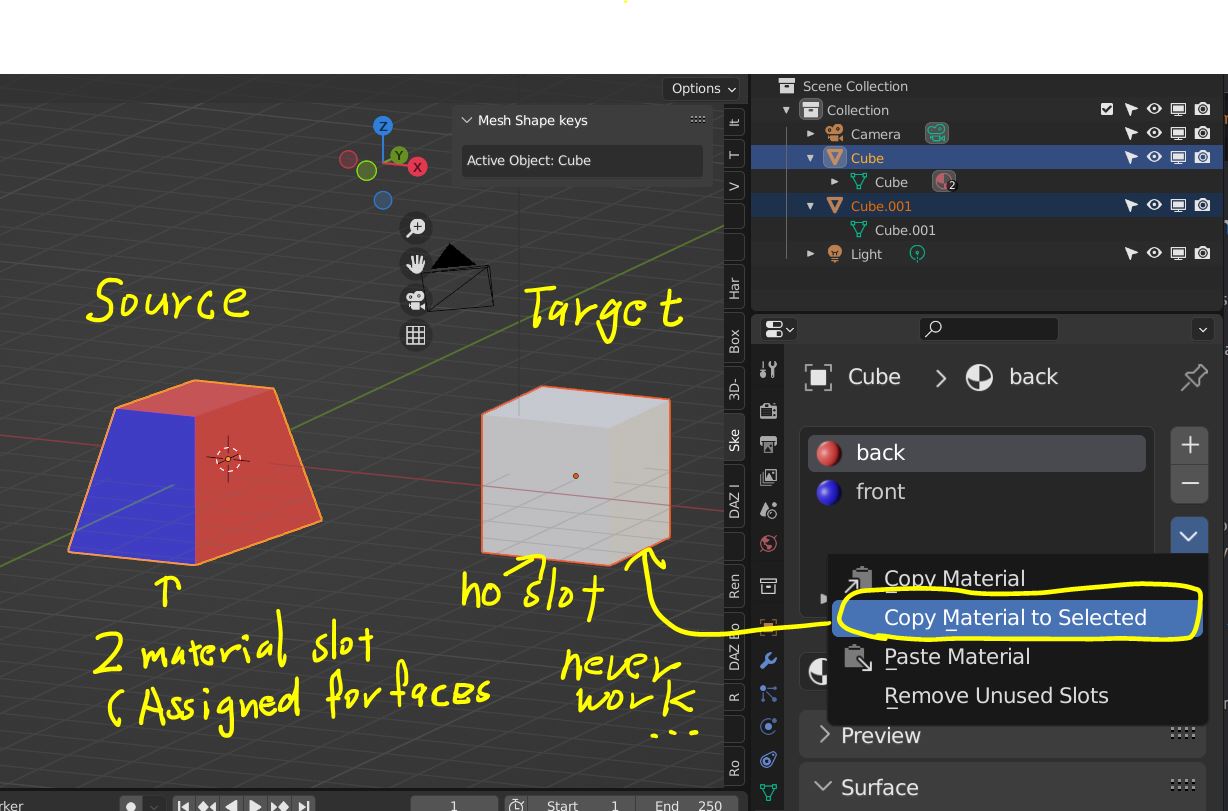
"Copy Material to selected" should generate material assign.
I often use "Copy material to selected" with complex multi material slot meshes. Like figures.
The main usage was, after set material for each slot and assign surfaces, then save one material sets of the figure as Data/Object
Eg I have 3 material sets for same figure, then save them as object.
A natural skin sets, B wet skin sets, C, tatoo skin sets.
Now I set animation, shape keys, or sometimes need to remove material slot to more simple one (eg arrange as UDIM ) After I finish current scene work, I may hope to use "Copy material to selected"
Current Blender "Copy material to selected" not re-assgin material slots for the target mesh as same as Source.
So if you do not have same material-slot and each slot have not been assigned for mesh (surfaces) as same as Source, "Copy material" can not transfer materials correctly.
How it will copy and paste material will change with current target material assignment for faces, and material slots.
If you work complex character, you may save often and with keep mesh structure (vertex order, and count) but add modiier or change material assginment >>> you may hope to transfer material from saved objects. So I hope, (copy material to selected) should generate material-slot as same as source , and auto assign for current target faces >>> copy material for each material slot.
3 Comments
If 2 meshes have matching face count / face id / face index or totally matching everything about their topology, then it should be possible to copy all material slots all at once from one mesh to another and have the correct faces auto-assigned to the correct materials in the correct slots? Is that what you are saying?
Yes. Though I do not know if blender already offer way which can do same thing, but I can not find it. I only hope to transfer all materrials and assign for each faces from source. so it should not change current mesh data.. only materials correctly transfer and show same mat when render as source.
The above pic show simple case. 1I set 3 material slot for 6 faces of cube.. (assign material slot for each faces) = 3 color material set . Then I save the scene.
Another scene, I have same cube. it now only have one material = all white material set for cube. Then I hope to apply 3 color materials for the white cube. . by one click . (it is what I requested about "Copy material to selected" )
you may chage cube as figure which will have more than 10 materia slot,, you carefully set shader/ texture then save it.
Then another scene, you change material assignment which only use 4 materials. with same figure (same mesh) , make pose, add shapekeys set driver for rig etc etc,,, after that you hope to return material as saved one... But to copy materials , you need to re-assign all 10 material slot as same as before.. it is tedious work...
After all I make sccript and merge it for my another custom add on which can easy change material type (Object / data) without duplicate . so now I may need not to ask it here, but I think it is good option, if blender officially offer.. so we can easy edit material slots, then save and transfer as we need. for same polygon meshes.