
Apply modifiers on meshes with shape keys (without deleting the drivers)
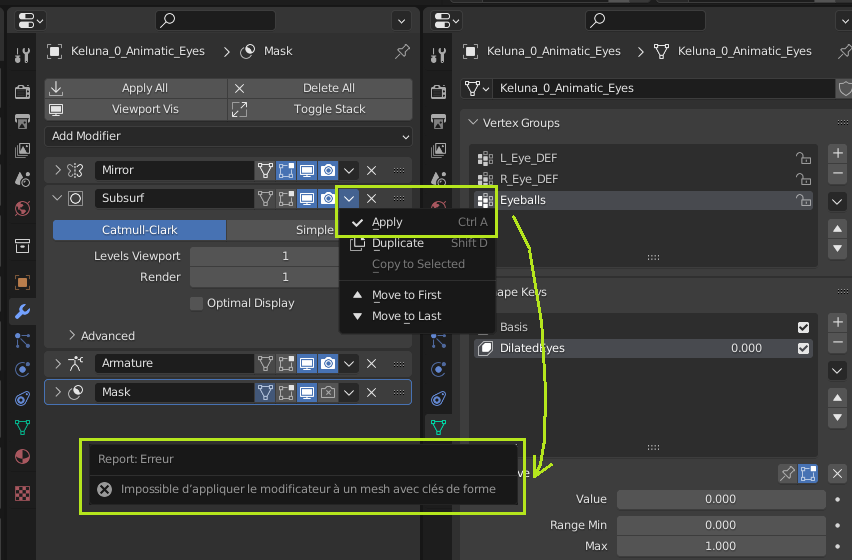
My request is simple and have already been asked, but the subject is now quite old, with a dead picture, but as the title says, it is EXTREMELY important for me, for other riggers / animators, that we can apply the modifier on a mesh with shape keys.
I noticed 2 addons which allow to do that, which means that it shouldn't be too hard to get that feature done.
So why don't I use this addon simply, you would ask?
Well, 1st of all: that functionality is too important to be an addon. It should be implemented by default. Most riggers / animators should agree with me, I guess.
And 2nd: the 2 addons I found are good, but have a strong issue that I'd like to see fixed as well: if you apply a modifier, all the drivers made on the Shape Keys will be deleted!
And that last point, if it's not a big deal, is still a SERIOUS lack of time if you have your mesh with a serious number of Shape Keys with drivers.
That's why I was keen on posting that request.
3 Comments
(If anyone is wondering which Addon I'm using, even if it deletes the drivers on the shape keys, it's this one: github.com/przemir/ApplyModifierForObjectWithShapeKeys
If there is one fundamental principle that I have heard thousands of time from riggers, it is precisely not to rig on an unfinished model. Partially because of how weights and shape keys and other stuff can break pretty bad after degenerating the mesh. And that's not an issue met only in rigging, that's also for UV unrwapping to some extent, physics, pretty much everything that heavily relies on the mesh and can't easily keep up with changes in the mesh while keeping the results consistent.
However, it possibly leading to issues is certainly not an argument against it, it sounds reasonable to just give the tools to do whatever and let the user deal with whatever the result is.
As someone who had to rig some models and to learn a lot about it for the previous year, I fully agree with you.
However, there is a counterexample I can give you: it is extremely frequent to meet the need to export or update a finished model with a higher level of "Subdivision Surface". Which is, in Blender, a modifier.
Especially that it is very usual, to avoid to have to remodel each shape key for the model "level 0 subdivision" then the model "level 1 subdivision", etc..., to make the blend shapes for the "level 0 subdivision", then to generate the level 1 subdivision, apply the subdivision, eventually fix some blend shapes, then do the same for "level 2 subdivision" if you need it, etc...
There are also some other modifiers which can be really useful to generate on a simplistic model (like a low poly or an animatic model), like the mirror. Very useful once you just have to make symmetrical blend shapes, but you need to apply it once you want to make asymmetrical blend shapes.
But really, if there is ONE modifier that needs to be able to be applied on a mesh with Blend Shapes, it is the Subdivision Surface modifier. (And the mirror modifier would be an extremely great bonus as well).