
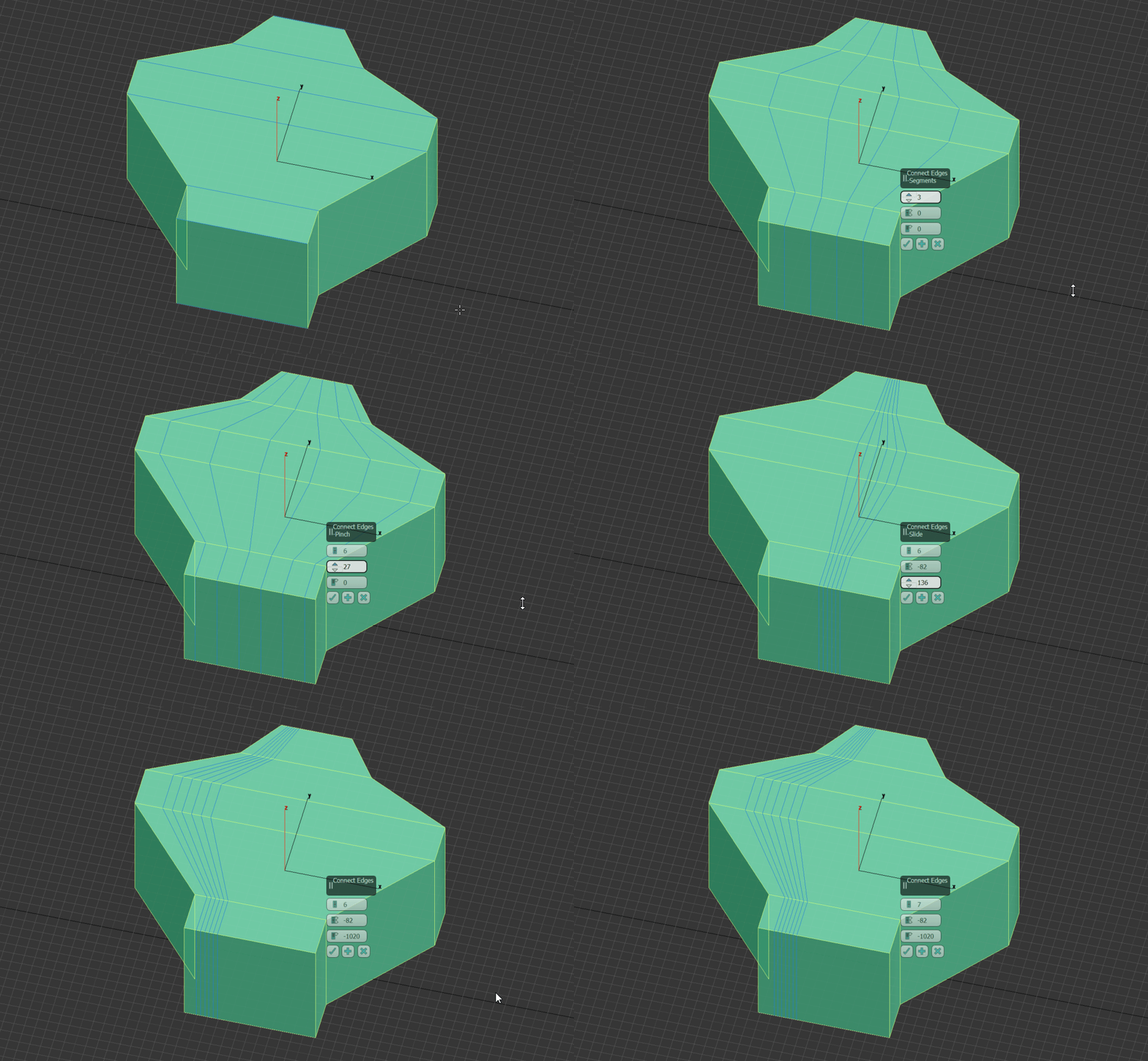
Pinch Slide Factor option between two loop cuts for Loop cut and Subdivide edge ring operators
This function should be present in the options for these tools without the need to do post factum workarounds with the pivot point and transform orientation and scale tool in order to not deform your mesh when the geometry is more complex.
In 3ds max with the Connect tool using the pinch option spinners, the artist has the ability to "slide" two edges loops away from each other, OR closer together.

In Modo it seems there is smth like a symmetry option , where even loops are dragged symmetrical to both sides of the cut

12 Comments
+1. Still waiting on this feature. Really missing from Blender. Any news on that ?
Still no update on this one ?
|GG| should be able to slide several edges another way too. if you do a Ctrl R at the center, with several edges, and then if you select them and do GG, only one is moving well. others are not following as expected and of course following the external edge of you shape
This is a really good suggestion. I have a question though, I understand the option to get two cuts away from each other, but what happens when there are more than 2? On three I'd assume the one stays in the middle, but then what about 4, 5, 6, etc? Also, what if the mesh is asymmetric? Does the behavior change or is a potential overlap considered and handled a certain way (or at all)?
This could really help us understand the behavior a bit better.
* @MizManFryingP *
* @MizManFryingP * Something similar can be done in Blender as two step action - first add loop then bevel it. But because it is two step action if on first step loop was not exactly what you need and you see it only on bevel step you have to cancel bevel and slide loop for a bit and then try bevel again to check what you get because you can't slide already beveled loops as it needed....
And this small difference change workflow comfort radically. And this thing work in this way in 3D Max from times before I even heard about 3D Max...
* @forestgumpovu4 * This seems pretty actionable! I can definitely see Blender massively benefiting from a feature like this.
Which program is this by the way?
* @forestgumpovu4 * I 100% agree with you.
* @forestgumpovu4 * but if you insert the edge lopp in the center then bevel it the 2 generated loops will not follow the geometry (they will stay straight) when they slide away from eachother and coming close to the neigbouring edges so this is not even a 2 step solution isn it ?
Nice, it's like a smooth or push with a lateral X and Z limit.
* @Andres Stephens - Trinumedia * can you be more precise about these operators. Ive look after many work arounds for this and want to see if these two can do the job.
+1 Up